CompTIA DS0-001 Practice Test 2026
Updated On : 19-Feb-2026Prepare smarter and boost your chances of success with our CompTIA DS0-001 practice test 2026. These CompTIA DataSys+ Certification test questions helps you assess your knowledge, pinpoint strengths, and target areas for improvement. Surveys and user data from multiple platforms show that individuals who use DS0-001 practice exam are 40–50% more likely to pass on their first attempt.
Start practicing today and take the fast track to becoming CompTIA DS0-001 certified.
1800 already prepared
80 Questions
CompTIA DataSys+ Certification
4.8/5.0
A server administrator wants to analyze a database server's disk throughput. Which of the following should the administrator measure?
A. RPfvl
B. Latency
C. IOPS
D. Reads
Explanation:
In database administration and systems architecture, throughput refers to the amount of data transferred to and from storage within a specific timeframe. To effectively analyze a database server's disk performance, IOPS (Input/Output Operations Per Second) is the most standard and comprehensive metric.
Why IOPS is Correct
Database workloads—particularly OLTP (Online Transactional Processing)—consist of thousands of small, random read and write operations. IOPS measures the frequency of these operations. While Transfer Rate (MB/s) measures the volume of data, IOPS measures the "effort" the disk is performing. High IOPS capacity ensures the storage subsystem can handle the high-frequency requests typical of a busy SQL or NoSQL environment without bottlenecking.
Why Other Options are Incorrect
B. Latency:
This measures the time delay (usually in milliseconds) for a single request to be processed. While high latency indicates a performance issue, it is a measurement of speed/delay, not throughput.
D. Reads:
This is only one half of the equation. A server administrator must account for both Reads and Writes to understand total throughput. Measuring only reads provides an incomplete picture of the disk's total workload.
A. RPfvl:
This is a non-standard acronym and does not correspond to any recognized performance metric in the CompTIA DataSys+ curriculum or general systems administration.
References
CompTIA DataSys+ (DS0-001) Objective 2.2: "Given a scenario, configure and maintain database storage." This includes understanding performance metrics like IOPS and latency for storage optimization.
A DBA is reviewing the following logs to determine the current data backup plan for a
primary data server:
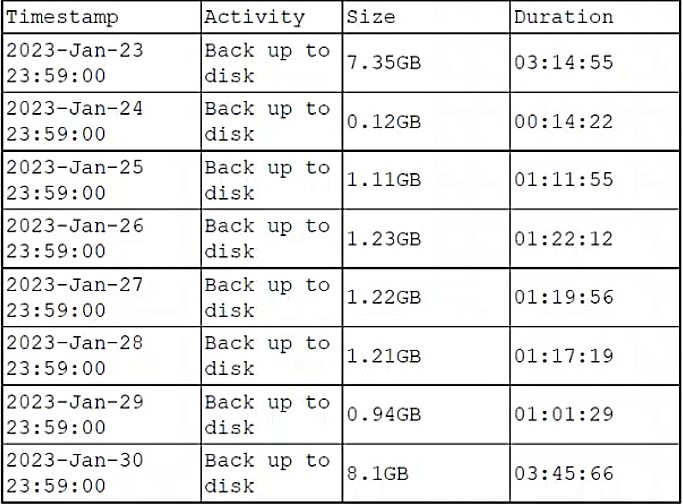
Which of the followingbestdescribes this backup plan?
A. Monthly full, daily differential
B. Daily differential
C. Daily full
D. Weekly full, daily incremental
Explanation:
The backup logs show a clear pattern: large backups on January 23rd (7.35GB) and January 30th (8.1GB), occurring exactly one week apart. Between these dates, the daily backups are significantly smaller, ranging from 0.12GB to 1.23GB. This pattern is characteristic of a weekly full backup with daily incremental backups.
A full backup captures the entire database, which explains the large file sizes on the 23rd and 30th. Incremental backups only capture data changes since the most recent backup (whether full or incremental), resulting in much smaller backup sizes and faster backup times. The small, varying sizes reflect the daily volume of changes in the database.
Why other options are incorrect:
A. Monthly full, daily differential:
Incorrect. A monthly full backup would show large backups approximately 30 days apart, not weekly. Additionally, differential backups capture all changes since the last full backup, so they would grow progressively larger each day until the next full backup—a pattern not seen here, where sizes remain relatively small and consistent.
B. Daily differential:
Incorrect. This would mean no full backups at all, which is impractical for recovery. Also, differential backups require a baseline full backup to function.
C. Daily full:
Incorrect. Daily full backups would show consistently large file sizes (like 7GB+) every day, not the pattern of one large backup followed by six small ones.
Reference:
CompTIA DataSys+ DS0-001 Objective 5.2: "Given a scenario, implement and test backup and restoration procedures." This includes understanding backup types (full, incremental, differential) and identifying backup strategies from logs.
A company is launching a proof-of-concept, cloud-based application. One of the requirements is to select a database engine that will allow administrators to perform quick and simple queries on unstructured data.Which of the following would bebestsuited for this task?
A. MonogoDB
B. MS SQL
C. Oracle
D. Graph database
Explanation:
In the context of the CompTIA DataSys+ exam, selecting the right database engine depends on the nature of the data (structured vs. unstructured) and the agility required for the project (like a proof-of-concept).
Why Other Options are Incorrect
B. MS SQL & C. Oracle:
These are Relational Database Management Systems (RDBMS). They require a rigid, predefined schema (tables, columns, and data types). While they have added support for JSON, they are primarily built for structured data. Using them for a proof-of-concept with unstructured data would require significant upfront design and "schema-on-write," slowing down the development process.
D. Graph Database:
While a Graph database (like Neo4j) is a type of NoSQL engine, it is specialized for analyzing complex relationships (e.g., "friend of a friend" in social networks or fraud detection). It is not the "best suited" general-purpose tool for simple queries on unstructured data when a document store like MongoDB is an option.
References
CompTIA DataSys+ (DS0-001) Objective 1.1: "Compare and contrast different database types and structures." This includes understanding when to use Relational (SQL) vs. Non-relational (NoSQL/Document) systems.
A company needs information about the performance of users in the sales department. Which of the following commands should a database administrator use for this task?
A. DROP
B. InPDATE
C. [delete
D. ISELECT
Explanation:
In database management, the SELECT statement is the primary tool used for Data Query Language (DQL). It allows a Database Administrator (DBA) or analyst to retrieve specific data from one or more tables based on defined criteria.
Why SELECT is Correct
To provide information about "performance of users," an administrator must retrieve existing records from the database. The SELECT command, often combined with WHERE clauses (to filter for the "sales department") and JOIN clauses (to link user names to sales figures), is the only command designed to read and display data without modifying it.
Why Other Options are Incorrect
A. DROP:
This is a Data Definition Language (DDL) command used to permanently remove an entire table or database structure. Using this would destroy the performance data rather than reporting on it.
B. InPDATE (UPDATE):
This is a Data Manipulation Language (DML) command used to modify existing records. You would use this to change a user's sales total, not to view or analyze it.
C. [delete (DELETE):
This is a DML command used to remove specific rows from a table. Like DROP, this would result in data loss.
References
CompTIA DataSys+ (DS0-001) Objective 1.3: "Explain the use of common SQL statements." This objective requires candidates to distinguish between DDL (Data Definition), DML (Data Manipulation), and DQL (Data Query) commands.
A database administrator is creating a table, which will contain customer data, for an online
business. Which of the following SQL syntaxes should the administrator use to create an
object?
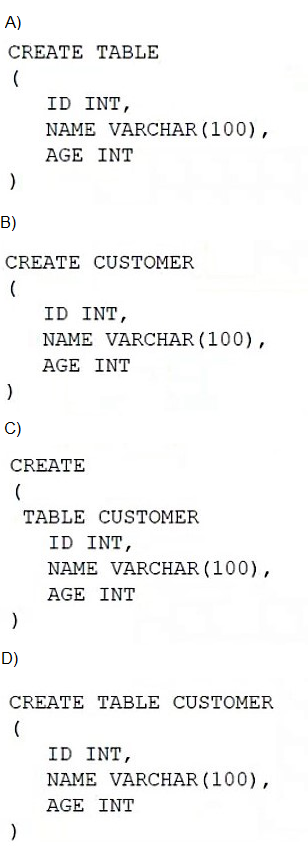
A. Option A
B. Option B
C. Option C
D. Option D
Explanation:
Option D shows the correct SQL syntax for creating a table. The proper CREATE TABLE statement requires:
The keywords CREATE TABLE
The table name (CUSTOMER)
Column definitions enclosed in parentheses with proper data types
Each column definition separated by commas
Option D follows this syntax exactly: CREATE TABLE CUSTOMER (ID INT, NAME VARCHAR(100), AGE INT)
Why other options are incorrect:
A. Option A:
Missing the table name after CREATE TABLE. Every table must have a name.
B. Option B:Uses CREATE CUSTOMER instead of CREATE TABLE. The keyword TABLE is required.
C. Option C:
Incorrect syntax with parentheses placed incorrectly and missing commas between column definitions.
Reference:
CompTIA DataSys+ DS0-001 Objective 3.1: "Given a scenario, create and modify database objects using scripts and SQL." This includes understanding proper CREATE TABLE syntax with column definitions and data types.
Which of the following types of RAID, if configured with the same number and type of disks, would provide thebestwrite performance?
A. RAID 3
B. RAID 5
C. RAID 6
D. RAID 10
Explanation:
When evaluating write performance across different RAID levels, the primary factor is the write penalty—the additional I/O operations required to calculate and store parity or mirror data.
Why RAID 10 is Correct
RAID 10 (a stripe of mirrors) provides the best write performance among the options because it lacks the computational overhead of parity.
No Parity Calculation: Unlike RAID 3, 5, or 6, RAID 10 does not need to calculate parity bits for every write. It simply "mirrors" the data to a second disk.
Minimal Write Penalty: RAID 10 has a write penalty of 2 (one write for the data, one for the mirror). This is significantly lower than parity-based systems, allowing for much higher throughput in write-intensive database environments.
Why Other Options are Incorrect
B. RAID 5:
This level uses distributed parity. Every write requires the system to read the old data, read the old parity, calculate the new parity, and then write the new data and new parity. This results in a write penalty of 4, making it slower than RAID 10 for writes.
+1
C. RAID 6:
This level uses dual parity to allow for two simultaneous disk failures. This increases the write penalty to 6, as it must calculate and write two different parity blocks for every data write. This is generally the slowest option for write-heavy workloads.
+1
A. RAID 3:
This level uses a dedicated parity disk and byte-level striping. Because all parity is written to a single disk, that disk becomes a major bottleneck for write operations. It is rarely used in modern database environments.
+1
References
CompTIA DataSys+ (DS0-001) Objective 2.2: "Given a scenario, configure and maintain database storage." This objective requires understanding the performance trade-offs (IOPS, throughput, and redundancy) of different RAID levels.
A database administrator needs to aggregate data from multiple tables in a way that does not impact the original tables, and then provide this information to a department. Which of the following is thebestway for the administrator to accomplish this task?
A. Create a materialized view.
B. Create indexes on those tables
C. Create a new database.
D. Create a function.
Explanation:
To "aggregate data from multiple tables" without affecting the source data, a view is the standard approach. However, the choice of a materialized view is specifically "best" when performance and providing information to a department are prioritized.
Why A Materialized View is Correct
Aggregation Power: Materialized views physically store the result of a query (which can include complex joins and SUM, AVG, or COUNT aggregations) from multiple tables.
Zero Impact on Original Tables: Because the data is stored separately, the department can query the materialized view repeatedly without putting a continuous processing load on the live production tables.
Data Provisioning: It acts as a "snapshot," allowing the department to see the necessary info without granting them direct access to the underlying raw tables.
Why Other Options are Incorrect
B. Create indexes:
Indexes improve the speed of data retrieval but do not "aggregate" data from multiple tables into a new format. They are structural optimizations for existing tables, not a method for reporting or data delivery.
C. Create a new database:
While possible, this is extremely inefficient ("overkill"). It involves massive overhead in terms of storage, maintenance, and ETL (Extract, Transform, Load) processes just to provide an aggregated report to one department.
D. Create a function:
A function is a set of SQL statements that performs a calculation. While it can return data, it does not store aggregated data. Every time the department calls the function, the database would have to re-run the logic against the original tables, potentially impacting performance.
References
CompTIA DataSys+ (DS0-001) Objective 1.2: "Explain the use of common database objects." This includes understanding the difference between Tables, Views, and Materialized Views.
A business analyst is using a client table and an invoice table to create a database view that shows clients who have not made purchases yet. Which of the following joins ismostappropriate for the analyst to use to create this database view?
A. INNER JOIN ON Client.Key = Invoice.Key
B. RIGHT JOIN ON Client.Key = Invoice.Key WHERE BY Client.Key ISNOLL
C. LEFT JOIN ON Client.Key = Invoice.Key
D. LEFT JOIN ON Client.Key = Invoice.Key WHEREBY Invoice.Key ISNOLL
Explanation:
To identify records in one table that have no corresponding entry in another, a database administrator must use a Left Anti-Join pattern.
Why Option D is Correct
This specific syntax isolates clients without purchases by leveraging the nature of a LEFT JOIN:
The Join: A LEFT JOIN retrieves every row from the Client table and attempts to match it with rows in the Invoice table.
The Null Result: For any client who has never made a purchase, the columns from the Invoice table will return as NULL because no match exists.
The Filter: The WHERE Invoice.Key IS NULL clause effectively filters out all clients who do have purchases, leaving only those who have not yet bought anything.
Why Other Options are Incorrect
A. INNER JOIN:
This only returns rows where a match exists in both tables. It would only show clients who have made purchases, which is the opposite of the requirement.
B. RIGHT JOIN...
WHERE Client.Key IS NULL: A RIGHT JOIN focuses on the Invoice table. Filtering for a missing Client.Key would only find "orphaned" invoices that don't belong to a valid client, rather than finding new clients.
C. LEFT JOIN (No Filter):
While this includes clients without purchases, it also includes those with purchases. It fails to provide the specific list requested by the business analyst.
References
CompTIA DataSys+ (DS0-001) Objective 1.3: "Explain the use of common SQL statements." This covers the application of different join types and filtering logic to meet business requirements.
A new retail store employee needs to be able to authenticate to a database. Which of the following commands should a database administrator use for this task?
A. INSERT USER
B. ALLOW USER
C. CREATE USER
D. ALTER USER
Explanation:
In database security and administration, establishing access for a new individual requires the creation of a unique identity within the database management system.
Why CREATE USER is Correct
The CREATE USER command is a Data Control Language (DCL) or Data Definition Language (DDL) statement (depending on the specific SQL flavor) used to generate a new account.
Authentication: This command defines the username and often the initial password or authentication method, allowing the employee to log in to the database server.
Foundation for Permissions: Once the user is created, the administrator can then use the GRANT command to give them specific permissions to see or modify data.
Why Other Options are Incorrect
A. INSERT USER:
INSERT is a Data Manipulation Language (DML) command used to add rows of data into a table. While some systems store user information in internal tables, CREATE USER is the standard administrative command for account management.
B. ALLOW USER:
This is not a standard SQL command. To permit a user to perform actions, the GRANT command is used, but the user must already exist first.
D. ALTER USER:
This command is used to modify an existing user account (e.g., changing a password or locking an account) rather than creating a new one for a new employee.
References
CompTIA DataSys+ (DS0-001) Objective 1.3: "Explain the use of common SQL statements." This includes the distinction between creating objects/users and manipulating data.
An on-premises application server connects to a database in the cloud. Which of the following must be considered to ensure data integrity during transmission?
A. Bandwidth
B. Encryption
C. Redundancy
D. Masking
Explanation:
Ensuring data integrity during transmission involves protecting data from being intercepted or altered while it travels over the network from an on-premises server to the cloud.
Why Encryption is Correct
Encryption is the primary method used to maintain both confidentiality and integrity for data-in-transit.
Prevention of Tampering: Protocols like TLS (Transport Layer Security) or SSL use cryptographic hashes (like HMAC) to ensure that if a single bit of data is modified during transmission, the receiving end will detect it and reject the packet.
Secure Tunnels: In hybrid environments (on-premises to cloud), administrators often use VPNs or HTTPS connections to wrap database traffic in an encrypted "tunnel," ensuring the data remains exactly as it was sent.
Why Other Options are Incorrect
A. Bandwidth:
This refers to the capacity or speed of the network connection. While low bandwidth can cause performance issues or timeouts, it does not inherently protect the data from being altered or corrupted by an attacker.
C. Redundancy:
This is a high-availability concept (e.g., having secondary power supplies or backup network lines). Redundancy ensures the connection stays "up," but it does not validate that the data being sent over those lines is secure or accurate.
D. Masking:
Data masking is a security technique used to hide sensitive information (like replacing digits in a credit card number with 'X') within the database or UI. While it protects privacy, it is a "data-at-rest" or "data-in-use" control, not a mechanism for ensuring transmission integrity between servers.
References
CompTIA DataSys+ (DS0-001) Objective 4.1: "Summarize standard methods to secure data." This objective specifically highlights the importance of securing data-in-transit via encryption protocols.
| Page 1 out of 8 Pages |