CompTIA CV0-004 Practice Test 2026

Updated On : 25-May-2026

Prepare smarter and boost your chances of success with our CompTIA CV0-004 practice test 2026. These CompTIA Cloud+ (2025) test questions helps you assess your knowledge, pinpoint strengths, and target areas for improvement. Surveys and user data from multiple platforms show that individuals who use CV0-004 practice exam are 40–50% more likely to pass on their first attempt.

Start practicing today and take the fast track to becoming CompTIA CV0-004 certified.

12560 already prepared

256 Questions
CompTIA Cloud+ (2025)
4.8/5.0

Page 1 out of 26 Pages

Timed Practice Test

Think You're Ready?

Your Final Exam Before the Final Exam.
Dare to Take It?

A DevOps engineer is performing maintenance on the mail servers for a company's web application. Part of this maintenance includes checking core operating system updates. The servers are currently running version 3.2 of the operating system. The engineer has two update options—one to version 4.1 and the other to version 3.7. Both versions are fully supported by the operating system manufacturer. Which of the following best describes the action the engineer should take?

A. Upgrade to 3.7 in the development environment

B. Upgrade to 4.1 on one production server at a time.

C. Read the release notes on version 4.1.

D. Schedule a maintenance window and upgrade to 3.7 in the production environment.

D.   Schedule a maintenance window and upgrade to 3.7 in the production environment.

Explanation:

The engineer must perform maintenance on a production mail server, a critical business system. The primary goal is to apply necessary OS updates with minimal risk of service disruption. While both new versions are supported, a major version upgrade (3.2 to 4.1) carries a significantly higher risk of introducing breaking changes compared to a minor version upgrade (3.2 to 3.7), which is typically focused on security patches and bug fixes within the same major branch.

Correct Option

D. Schedule a maintenance window and upgrade to 3.7 in the production environment.
Upgrading to version 3.7 is a minor version update, which is the standard, low-risk procedure for applying security and stability patches in a production environment. Scheduling a formal maintenance window is a critical step for managing customer expectations and ensuring the upgrade does not cause unexpected downtime during peak business hours.

This approach follows change management best practices by performing a routine, low-impact update in a controlled manner, directly addressing the need for core OS updates with the least potential for disruption.

Incorrect Options

A. Upgrade to 3.7 in the development environment.
While testing in a development environment is a crucial first step, this action alone is incomplete. It does not fulfill the requirement of actually performing the maintenance on the production mail servers. It is a preparatory step, not the final action.

B. Upgrade to 4.1 on one production server at a time.
This is a high-risk strategy for a critical service. A major version jump (from 3.2 to 4.1) can include significant API changes, deprecated features, and new configurations that are highly likely to break the mail application. Performing this directly on production, even in a phased manner, jeopardizes service stability.

C. Read the release notes on version 4.1.
Reading release notes is an essential part of the planning and research phase for any upgrade. However, it is not the action the engineer should take to complete the maintenance task. It is a preliminary step that should inform the decision to choose the safer 3.7 upgrade path.

Reference
CompTIA Cloud+ (CV0-004) Exam Objectives: 4.3 - Given a scenario, use the appropriate tools and processes to update systems in the cloud. This objective covers change management processes, including the importance of scheduling maintenance windows and understanding the implications of major vs. minor version updates to ensure system stability during maintenance.

An organization has been using an old version of an Apache Log4j software component in its critical software application. Which of the following should the organization use to calculate the severity of the risk from using this component?

A. CWE

B. CVSS

C. CWSS

D. CVE

B.   CVSS

Explanation:

Summary
The organization needs to assess the severity of a known risk posed by a specific, outdated software component (Apache Log4j). This requires a standardized method to score the potential impact and exploitability of the known vulnerability. The correct framework is designed to take details about a vulnerability and produce a numerical score representing its severity, which helps prioritize remediation efforts.

Correct Option

B. CVSS (Common Vulnerability Scoring System)
CVSS is an open industry standard for assessing the severity of computer system security vulnerabilities.

It provides a way to capture the principal characteristics of a vulnerability (e.g., exploitability, impact on confidentiality, integrity, and availability) and produces a numerical score ranging from 0.0 to 10.0.

This score is then translated into a qualitative severity rating (Low, Medium, High, Critical). For a known component like Log4j, a CVE would identify it, and the CVSS score would be used to calculate and communicate the severity of the risk.

Incorrect Options

A. CWE (Common Weakness Enumeration)
CWE is a community-developed list of common software and hardware weakness types (e.g., "buffer overflow," "path traversal"). It is a categorization system for flaws, not a scoring system for specific vulnerability instances. It describes the nature of a potential flaw, not the severity of an actual one.

C. CWSS (Common Weakness Scoring System)
CWSS is a scoring system developed by the same organization as CWE. However, it is designed to score the severity of software weaknesses (CWEs) in a specific context during development. It is not the industry-standard method for scoring the severity of a publicly disclosed vulnerability in a deployed product.

D. CVE (Common Vulnerabilities and Exposures)
CVE is a list of entries—each containing an identification number, a description, and at least one public reference—for publicly known cybersecurity vulnerabilities. A CVE entry (e.g., CVE-2021-44228 for Log4j) identifies the specific vulnerability but does not score its severity. The CVSS score is often provided alongside the CVE ID.

Reference
CompTIA Cloud+ (CV0-004) Exam Objectives: 5.2 - Given a scenario, apply security controls and compliance requirements to cloud resources. This objective includes performing vulnerability assessment and management. A core part of this process is using standardized systems like CVE for identification and CVSS for scoring to prioritize the remediation of vulnerabilities in cloud components.

A cloud engineer wants containers to run the latest version of a container base image to reduce the number of vulnerabilities. The applications in use requite Python 3.10 and ate not compatible with any other version. The containers' images are created every time a new version is released from the source image. Given the container Dockerfile below:
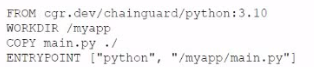


Which of the following actions will achieve the objectives with the least effort?

A. Perform docker pull before executing docker run.

B. Execute docker update using a local cron to get the latest container version.

C. Change the image to use python:latest on the image build process.

D. Update the Dockerfile to pin the source image version.

A.   Perform docker pull before executing docker run.

Explanation:

The goal is to ensure containers always run the latest version of the base image (to minimize vulnerabilities from outdated packages) while keeping the application stable on Python 3.10 (which is incompatible with other versions). The custom images are rebuilt whenever a new source image version is released.

The provided Dockerfile (typically something like FROM python:3.10 or FROM python:3.10-slim) uses a specific tag (e.g., 3.10). Docker caches images locally by default. When you run docker run without pulling first, it may use an outdated local copy even if a newer patched version of the python:3.10 tag exists upstream.

docker pull <image> before docker run forces Docker to check the registry and download the latest version of that exact tag. This is:

The least effort solution — no changes to the Dockerfile, no new build process, no cron jobs or automation scripts required.
Effective for reducing vulnerabilities because it pulls the most recent patches/security updates published to the python:3.10 tag by the maintainers.
Safe for the application because it stays on the Python 3.10 series (the tag python:3.10 is maintained with updates within the 3.10.x minor versions, not jumping to 3.11 or 3.12).

This practice is a standard operational step in container workflows for security hygiene.
It aligns with CompTIA Cloud+ CV0-004 objectives, especially:

4.1 – Manage container and orchestration environments (image management, pulling latest images, vulnerability reduction).
3.2 / 4.2 – Security controls for containers (patching, minimizing attack surface through updated base images).
2.4 – Technical operations and maintenance (image lifecycle and updates).

Why the other options are incorrect (or require more effort)

B. Execute docker update using a local cron to get the latest container version.
docker update modifies running container resource limits (CPU/memory), not the image itself. There is no standard docker update command for pulling new image versions. Setting up a cron job adds unnecessary complexity and maintenance overhead compared to simply pulling before running.

C. Change the image to use python:latest on the image build process.
This would break the application. The python:latest tag points to the newest Python release (e.g., 3.12 or 3.13), which is explicitly incompatible with the apps that require Python 3.10. It violates the compatibility requirement and introduces risk of runtime failures.

D. Update the Dockerfile to pin the source image version.
Pinning (e.g., changing to FROM python:3.10.4 or a specific digest) does the opposite of the goal. It locks the image to an older, potentially vulnerable version and prevents automatic updates to newer patches. This increases (rather than reduces) vulnerability exposure and requires manual Dockerfile updates + rebuilds every time a new patch is released — far more effort.

Best Practice Recommendation

In production, combine docker pull with tools like:

CI/CD pipelines that rebuild and push your custom image when the base updates.
Vulnerability scanners (Trivy, Grype, etc.) in the pipeline.
Orchestrators (Kubernetes) with imagePullPolicy: Always.

For simple setups or scripts, prefixing runs with docker pull is the minimal, effective step.

A systems engineer is migrating a batch of 25 VMs from an on-premises compute cluster to a public cloud using the public cloud's migration agent. The migration job shows data copies at a rate of 250Mbps. After five servers migrate, the data copies at a rate of 25Mbps. Which of the following should the engineer review first to troubleshoot?

A. The on-premises VM host hardware utilization

B. The on-premises ISP throttling rate

C. The IOPS on the SAN backing the on-premises cluster

D. The compute utilization of the VMs being migrated

A.   The on-premises VM host hardware utilization

Explanation:

The migration starts at a healthy 250 Mbps but drops dramatically to 25 Mbps (a 10x slowdown) after only five of the 25 VMs have been migrated. This sudden degradation points to a resource constraint that appears once multiple migrations run concurrently.

Why check on-premises VM host hardware utilization first?
- The public cloud's migration agent typically runs on the source (on-premises) side. It reads VM disks/memory, compresses data if possible, and streams it over the network.
- When multiple VMs are migrated in parallel, the on-premises host (or cluster nodes) can quickly become saturated in CPU (for compression/processing), memory, network interface, or overall I/O.
- Once the host reaches high utilization, the migration throughput collapses — exactly as described (initial good speed → sharp drop after a few VMs).
- This is the most common root cause in real-world lift-and-shift migrations using agents (e.g., AWS SMS, Azure Migrate, VMware HCX, etc.).
- Checking host CPU, RAM, network bandwidth usage, and disk queue depth on the on-premises hypervisor hosts should be the first troubleshooting step.

Why the Other Options Are Less Likely as the First Step
B. The on-premises ISP throttling rate: ISP throttling is usually consistent or time-of-day based. It would likely affect the speed from the very beginning or show gradual degradation, not a sharp drop specifically after five servers.
C. The IOPS on the SAN backing the on-premises cluster: SAN/storage IOPS can become a bottleneck, but the question does not mention high disk activity or random I/O patterns typical of storage saturation. Hardware host utilization (which includes the hypervisor's ability to serve the SAN) is broader and should be checked first.
D. The compute utilization of the VMs being migrated: Individual VM CPU/memory usage inside the guest OS rarely limits the migration agent’s transfer rate. The agent usually quiesces or snapshots the VM rather than being heavily impacted by the VM’s internal load.

Key Takeaways for CompTIA Cloud+ (CV0-004)
- This question tests migration troubleshooting and performance bottleneck identification during cloud adoption (Domain 2: Cloud Deployments and Domain 3: Cloud Operations and Support).
- Always start troubleshooting at the source when using a migration agent.
- Common migration performance issues: source host saturation, network bandwidth, storage IOPS, and agent configuration (concurrency limits).
- Best practice: Monitor host metrics (CPU, RAM, network tx/rx, disk latency) during the migration window and adjust concurrency or schedule fewer simultaneous migrations if needed.

This matches the exact question and correct answer from multiple CV0-004 practice resources and study guides.

A systems administrator needs to configure backups for the company's on-premises VM cluster. The storage used for backups will be constrained on free space until the company can implement cloud backups. Which of the following backup types will save the most space, assuming the frequency of backups is kept the same?

A. Snapshot

B. Ful

C. Differential

D. Incremental

D.   Incremental

Explanation:

The requirement is to choose a backup methodology that minimizes storage space consumption, given a constraint on free space. The key differentiator between the types is how much data each subsequent backup captures. The method that only saves the data that has changed since the very last backup—whether it was a full or another incremental—will always consume the least amount of space over time, as it avoids redundant data storage.

Correct Option

D. Incremental
An incremental backup only captures the data blocks that have changed since the last backup of any kind.

For example, after a full backup on Sunday, Monday's incremental backs up changes since Sunday. Tuesday's incremental only backs up changes since Monday, and so on.

This results in the smallest backup size for each subsequent job, minimizing the total storage footprint. The trade-off is a more complex restore process, as it requires the last full backup plus all subsequent incremental backups.

Incorrect Options

A. Snapshot
A snapshot is typically a point-in-time state of a volume or VM. While space-efficient initially through copy-on-write mechanisms, multiple snapshots can still consume significant space as changes accumulate. They are often not the most space-efficient method for long-term, traditional backup strategies to external storage.

B. Full
A full backup captures the entire dataset every time it runs. While simple to restore, it is the most storage-intensive option because it copies all data repeatedly, regardless of whether it has changed. This would quickly exhaust the constrained space.

C. Differential
A differential backup captures all data that has changed since the last full backup. For example, after a full on Sunday, Monday's differential backs up changes since Sunday. Tuesday's differential backs up all changes since Sunday (including Monday's changes), growing larger each day until the next full backup.

While more space-efficient than a full backup, it is significantly less space-efficient than an incremental backup, as it redundantly re-backs up the same changes day after day.

Reference
CompTIA Cloud+ (CV0-004) Exam Objectives: 3.1 - Given a scenario, implement and maintain cloud backup and restore. This objective requires knowledge of different backup types and their characteristics, including the storage space implications of full, differential, and incremental strategies. Incremental backups are specifically recognized for their space efficiency.

A cloud engineer is developing an operating expense report that will be used to purchase various cloud billing models for virtual machine instances. The cloud billing model must meet the following requirements:

• The instance cannot be ephemeral.
• The minimum life cycle of the instance is expected to be five years.
• The software license is charged per physical CPU count.

Which of the following models would best meet these requirements?

A. Dedicated host

B. Spot instance

C. Pay-as-you-go

D. Reserved resources

D.   Reserved resources

Explanation

The requirements are:
The VM instance cannot be ephemeral (it must be persistent and reliably available for the full duration).
The minimum life cycle is five years (long-term, predictable, steady-state workload).
The software license is charged per physical CPU count (typically a bring-your-own-license or per-core licensing model, common with many enterprise software vendors like Microsoft, Oracle, etc.).

Why D. Reserved resources (Reserved Instances) is the best fit:
Reserved resources (also called Reserved Instances in AWS/Azure terminology) allow you to commit to a specific instance type and capacity for a long term—commonly 1 or 3 years, with some providers offering extended terms or the ability to renew for up to 5+ years of effective coverage.
This model provides significant discounts (often 40-75% off pay-as-you-go) for predictable, long-running workloads, making it ideal for a 5-year minimum life cycle.
The instance is not ephemeral — it is reserved and guaranteed for the term (unlike spot instances).
Many reserved models support bring-your-own-license (BYOL) or per-physical-CPU/core licensing, which aligns with the software license requirement. You pay for the reserved capacity while handling the license based on the underlying physical cores allocated to the reserved instance.

This matches CompTIA Cloud+ objectives
This aligns with cloud billing/pricing models, cost optimization, and selecting the right purchasing option for long-term workloads (typically covered in Domain 2: Cloud Deployments or Domain 4: Operations and Support).

Why the other options are incorrect
A. Dedicated host: This provides a physical server dedicated entirely to your organization (great for strict compliance, regulatory requirements, or per-physical-CPU licensing that requires isolation). However, it is usually more expensive than reserved instances and is not primarily a billing model optimized for long-term cost savings. The question focuses on a billing/purchasing model for an OpEx report, and dedicated hosts are a hosting type rather than the primary long-term commitment model here. The long 5-year lifecycle and cost considerations point more strongly to reserved resources.
B. Spot instance: These are ephemeral by design (can be interrupted/reclaimed by the provider with little notice when capacity is needed elsewhere). They are the cheapest option but unsuitable for any workload requiring reliability or a multi-year lifecycle. This directly violates the "cannot be ephemeral" requirement.
C. Pay-as-you-go (On-Demand): This is flexible with no long-term commitment, but it is the most expensive per-hour rate with no discounts for long-term use. It does not optimize costs for a predictable 5-year workload and offers no special advantage for per-CPU licensing.

An IT security team wants to ensure that the correct parties are informed when a specific user account is signed in. Which of the following would most likely allow an administrator to address this concern?

A. Creating an alert based on user sign-in criteria

B. Aggregating user sign-in logs from all systems

C. Enabling the collection of user sign-in logs

D. Configuring the retention of all sign-in logs

A.   Creating an alert based on user sign-in criteria

Explanation:

A. Creating an alert based on user sign-in criteria
This action directly fulfills the requirement. An alerting system can be configured with specific criteria (e.g., "when user X signs in" or "when a sign-in occurs from a foreign country").

Once the criteria are met, the system automatically triggers a notification via email, SMS, or a ticketing system to inform the designated parties immediately.

This is a proactive measure that ensures the right people are informed at the right time, enabling a swift response.

Incorrect Options

B. Aggregating user sign-in logs from all systems
Aggregation consolidates logs into a central location for analysis. While this is a crucial step before setting up alerts and is useful for forensic investigation, it is a passive data collection technique. It does not, by itself, create or send any notifications.

C. Enabling the collection of user sign-in logs
This is the foundational first step for any monitoring. Without logs, there is no data to analyze. However, simply collecting the data does not address the requirement to inform parties. The data remains dormant until a process (like an alert) acts upon it.

D. Configuring the retention of all sign-in logs
Retention policies determine how long log data is stored. This is important for compliance and historical analysis but is completely unrelated to the immediate, active notification of an event as it happens.

Reference
CompTIA Cloud+ (CV0-004) Exam Objectives: 4.2 - Given a scenario, analyze monitoring metrics and alerts to ensure performance and availability. This objective includes the implementation of alerting based on specific criteria or thresholds. Configuring alerts for security events like user sign-ins is a direct application of this objective to meet security and operational requirements.

A company has developed an online trading platform. The engineering team selected event-based scaling for the platform's underlying resources. The platform resources scale up with every 2,000 subscribed users. The engineering team finds out that although compute utilization is low, scaling is still occurring. Which of the following statements best explains why this is the case?

A. Event-based scaling does not scale down resources.

B. Event-based scaling should not be triggered at the 2,000-user frequency.

C. Event-based scaling should not track user subscriptions.

D. Event-based scaling does not take resource load into account.

D.   Event-based scaling does not take resource load into account.

Explanation:

This question explores the difference between dynamic scaling (based on performance metrics) and event-based scaling (based on specific triggers).
D. Event-based scaling does not take resource load into account (Correct)
In this scenario, the "event" triggering the scaling is the number of subscribed users (specifically, every 2,000 users).
The system is programmed with a "hard" rule: If Users = 2,000, then Add Server. This rule is blind to actual hardware performance. Even if those 2,000 users are idle and the CPU/RAM utilization remains very low, the event (the 2,000th subscription) has occurred, so the scaling action is triggered automatically.

A. Event-based scaling does not scale down resources
This is incorrect. While scaling up is triggered by an event, scaling down can also be event-based (e.g., "when users drop below 1,500, remove a server"). The lack of "scaling down" doesn't explain why it is scaling up despite low utilization.

B. Event-based scaling should not be triggered at the 2,000-user frequency
This is a subjective business decision, not a technical explanation. The frequency (2,000) is just a parameter set by the team; it doesn't explain the mechanical reason why the servers are scaling while the load is low.

C. Event-based scaling should not track user subscriptions
While tracking subscriptions might not be the most efficient metric for this specific app, event-based scaling is designed to track any defined event. Tracking subscriptions is a valid use of the tool; it just results in the behavior described (scaling regardless of load).

Reference
CompTIA Cloud+ (CV0-004) Domain 1.0: Cloud Architecture and Design (Scalability and Elasticity).

A software engineer needs to transfer data over the internet using programmatic access while also being able to query the data. Which of the following will best help the engineer to complete this task?

A. SQL

B. Web sockets

C. RPC

D. GraphQL

D.   GraphQL

Explanation:

Summary
The requirement involves two key actions: transferring data over the internet via programmatic access (an API) and having the ability to query that data. This means the client software needs to be able to specify exactly what data it wants to retrieve, including the fields and relationships, rather than receiving a fixed, predetermined data structure. The solution must be an API query language that is efficient and flexible over HTTP.

Correct Option

D. GraphQL
GraphQL is an API query language and runtime that allows a client to request exactly the data it needs, and nothing more, in a single request.

The software engineer can write queries programmatically to specify the precise fields and nested relationships required from the data set.

It is designed for efficient data fetching over the internet (HTTP), making it ideal for transferring data while providing powerful querying capabilities that avoid over-fetching or under-fetching of information.

Incorrect Options

A. SQL (Structured Query Language)
SQL is a language for managing and querying data within a database. It is not designed as a protocol for transferring data securely over the internet. Exposing a database directly to the internet with SQL is a severe security anti-pattern.

B. Web Sockets
Web Sockets provide a full-duplex, persistent communication channel over a single TCP connection, ideal for real-time, bi-directional data streaming (e.g., live chats, gaming). It is a transport mechanism, not a query language. It does not have built-in capabilities for structuring and requesting specific data like a query language does.

C. RPC (Remote Procedure Call)
RPC is a protocol where a client can execute a procedure (function) on a remote server. While it allows for programmatic data transfer, it is operation-oriented (e.g., getUser(123)). It is not query-oriented; the client cannot dynamically specify the shape and fields of the returned data in a single request like it can with GraphQL.

Reference
CompTIA Cloud+ (CV0-004) Exam Objectives: 1.4 - Given a scenario, use the appropriate cloud assessment tools. This objective includes understanding different API styles and data interaction models used in cloud services. GraphQL is a modern API technology that provides efficient, flexible data querying and retrieval for web and mobile applications, fitting the described use case perfectly.

Five thousand employees always access the company's public cloud-hosted web application on a daily basis during the same time frame. Some users have been reporting performance issues while attempting to connect to the web application Which of the following is the best configuration approach to resolve this issue?

A. Scale vertically based on a trend.

B. Scale horizontally based on a schedule

C. Scale vertically based on a load.

D. Scale horizontally based on an event

B.   Scale horizontally based on a schedule

Explanation:

The scenario describes a predictable, recurring workload: 5,000 employees access the web application every day during the same time frame. Performance issues occur because the current infrastructure cannot handle the consistent spike in concurrent users during those known peak hours.

Horizontal scaling (adding more instances/servers, often behind a load balancer) is the preferred approach for web applications because:
It distributes load across multiple instances.
It provides better fault tolerance and higher overall capacity.
Modern public clouds make it easy and cost-effective to add/remove instances dynamically.

Since the usage pattern is highly predictable (same time every day), scaling based on a schedule is the most efficient and proactive solution. You can configure auto-scaling groups or scheduled scaling policies to:
Add extra instances just before the daily peak starts.
Remove them after the peak ends.

This prevents performance degradation without over-provisioning resources 24/7, helping control costs.

Why the other options are not the best choice

A. Scale vertically based on a trend
Vertical scaling means increasing resources (CPU, RAM) on a single instance. It has limits (instance size caps), causes downtime or reboot in many cases, and is less effective for web apps with many concurrent users. Trends are for long-term gradual growth, not daily peaks.

C. Scale vertically based on a load
Again, vertical scaling has practical limits and is not ideal for handling thousands of concurrent sessions. Load-based vertical scaling is also slower and less elastic than horizontal.

D. Scale horizontally based on an event
Event-based (reactive) scaling triggers on metrics like high CPU or connection count. While useful, it reacts after the issue starts, which can still cause brief performance problems. A scheduled approach is better when the peak is fully predictable.

Relevance to CompTIA Cloud+ (CV0-004)
This question tests the Cloud Management and Technical Operations domain, specifically:
Scaling and optimization techniques (horizontal vs. vertical).
Choosing the right scaling method based on workload patterns (predictable/scheduled vs. reactive/load-based vs. trend-based).
Auto-scaling configurations in public cloud environments.

Horizontal scaling combined with scheduled policies is a standard best practice for predictable enterprise workloads.

Page 1 out of 26 Pages

CompTIA Cloud+ (2025) Practice Questions

CompTIA Cloud+ CV0-004 Official Exam Blueprint And Our Practice Questions


CompTIA Cloud+ CV0-004 Domain Official Exam Weight Our Practice Questions
Cloud Architecture 23% 24
Our Practice Questions Covers Subtopics: Cloud service models, IaaS, PaaS, SaaS, FaaS, Public cloud, Private cloud, Hybrid cloud, Multi-cloud environments, Cloud storage technologies, Virtualization concepts, Containers, High availability, Scalability, Load balancing, Cloud networking, Resource optimization, Cloud-native design concepts
Deployment 19% 51
Our Practice Questions Covers Subtopics: Cloud deployment models, Provisioning resources, Infrastructure as code (IaC), Migration strategies, Resource templates, Virtual machine deployment, Container deployment, Application deployment, Cloud integration, Configuration management, Storage deployment, Network deployment, Automation deployment, Resource allocation, Deployment validation
Operations 17% 117
Our Practice Questions Covers Subtopics: Cloud monitoring, Observability, Performance optimization, Resource management, Backup and recovery, Capacity planning, Cost optimization, SLA management, Incident management, Cloud maintenance, Automation operations, Logging and monitoring, Business continuity, Disaster recovery, Operational governance, Cloud administration
Security 19% 40
Our Practice Questions Covers Subtopics: Cloud security controls, Identity and access management (IAM), Authentication methods, Encryption, Key management, Compliance standards, Security policies, Vulnerability management, Data protection, Secure cloud architecture, Network security, Security monitoring, Risk management, Access controls, Security best practices
DevOps Fundamentals 10% 9
Our Practice Questions Covers Subtopics: CI/CD pipelines, DevOps concepts, Source control, Git workflows, Automation tools, Infrastructure as code, Agile concepts, Configuration management, Container orchestration, Kubernetes basics, DevSecOps, Continuous integration, Continuous deployment
Troubleshooting 12% 15
Our Practice Questions Covers Subtopics: Connectivity troubleshooting, Performance troubleshooting, Resource failures, Network latency, Storage issues, Deployment failures, Security troubleshooting, Log analysis, Root cause analysis, Service outages, Monitoring alerts, Diagnostic utilities, Incident remediation, Cloud recovery procedures

Get Certified in Cloud Technologies with CompTIA Cloud+ CV0-004


CompTIA Cloud+ CV0-004 certification is a globally recognized credential for IT professionals who build, manage, and secure cloud environments. Unlike vendor-specific certifications, CompTIA Cloud+ focuses on the skills required to deploy and operate cloud solutions across a variety of platforms, making it an excellent choice for professionals working in hybrid or multi-cloud environments.

Exam Details


Exam Code: CV0-004
Number of Questions: Maximum of 90
Question Types: Multiple-choice and performance-based
Length: 90 minutes
Passing Score: 750 (on a scale of 100–900)
Recommended Experience: 2–3 years in system administration or networking, with cloud experience

Who Should Take Cloud+ CV0-004?


This certification is ideal for:

Cloud Engineers validating vendor-neutral skills
Systems Administrators transitioning to cloud roles
Security Specialists focusing on cloud environments
DevOps Professionals managing cloud infrastructure
IT Professionals needing DoD 8570 compliance

Recommended Experience:
CompTIA Network+ and Server+ (or equivalent)
2-3 years of systems administration experience
6+ months hands-on with cloud platforms

Prepare for Real Cloud Challenges

The performance-based questions on automation troubleshooting were identical to my daily work as a cloud engineer. Passed with a 790!
Andrew, Cloud Infrastructure Specialist

Cloud+ requires understanding of cloud models, virtualization, and infrastructure across multiple platforms. Preptia CV0-004 practice test covered AWS, Azure, and on-premises scenarios perfectly. The questions were challenging and exam-accurate. Passed with confidence!
Thomas Wright, Cloud Administrator | Phoenix, AZ

Cloud infrastructure preparation became much more manageable with Preptia.com practice exams for Cloud+ (CV0-004). The materials focused on deployment models, security, and cloud operations.
Ahmed Rahman | Malaysia