CompTIA CNX-001 Practice Test 2026
Updated On : 4-Feb-2026Prepare smarter and boost your chances of success with our CompTIA CNX-001 practice test 2026. These CompTIA CloudNetX Exam test questions helps you assess your knowledge, pinpoint strengths, and target areas for improvement. Surveys and user data from multiple platforms show that individuals who use CNX-001 practice exam are 40–50% more likely to pass on their first attempt.
Start practicing today and take the fast track to becoming CompTIA CNX-001 certified.
1840 already prepared
84 Questions
CompTIA CloudNetX Exam
4.8/5.0
A customer asks a MSP to propose a ZTA (Zero Trust Architecture) design for its globally distributed remote workforce. Given the following requirements: Authentication should be provided through the customer's SAML identity provider. Access should not be allowed from countries where the business does not operate. Secondary authentication should be added to the workflow to allow for passkeys. Changes to the user's device posture and hygiene should require reauthentication into the network. Access to the network should only be allowed to originate from corporate-owned devices. Which of the following solutions should the MSP recommend to meet the requirements?
A. Enforce certificate-based authentication. Permit unauthenticated remote connectivity only from corporate IP addresses. Enable geofencing. Use cookie-based session tokens that do not expire for remembering user log-ins. Increase RADIUS server timeouts.
B. Enforce posture assessment only during the initial network log-on. Implement RADIUS for SSO. Restrict access from all non-U.S. IP addresses. Configure a BYOD access policy. Disable auditing for remote access
C. Chain the existing identity provider to a new SAML. Require the use of time-based one-time passcode hardware tokens. Enable debug logging on the VPN clients by default. Disconnect users from the network only if their IP address changes.
D. Configure geolocation settings to block certain IP addresses. Enforce MFA. Federate the solution via SSO. Enable continuous access policies on the WireGuard tunnel. Create a trusted endpoints policy.
Explanation:
Let's break down each requirement and map it to the correct solution elements in Option D.
"Authentication should be provided through the customer's SAML identity provider."
This is met by "Federate the solution via SSO." SAML (Security Assertion Markup Language) is a core protocol used for Single Sign-On (SSO) and federation, allowing the customer's existing identity provider to be the source of truth for authentication.
"Access should not be allowed from countries where the business does not operate."
This is directly met by "Configure geolocation settings to block certain IP addresses." This is the definition of geofencing, where access decisions are made based on the geographic source of the connection attempt.
"Secondary authentication should be added to the workflow to allow for passkeys."
This is met by "Enforce MFA." Multi-Factor Authentication (MFA) is the mechanism that requires a secondary form of authentication after the primary (e.g., username/password). Passkeys are a modern, phishing-resistant form of authentication that can be used as a factor within an MFA workflow.
"Changes to the user's device posture and hygiene should require reauthentication into the network."
This is met by "Enable continuous access policies..." A core tenet of Zero Trust is continuous verification. Continuous access policies can monitor the device's state (e.g., OS version, encryption status, firewall enabled) in real-time. If a policy is violated (e.g., antivirus is disabled), the system can automatically trigger a reauthentication or disconnect the session, ensuring compliance is maintained throughout the connection, not just at login.
"Access to the network should only be allowed to originate from corporate-owned devices."
This is met by "Create a trusted endpoints policy." A trusted endpoints policy allows the administrator to define criteria for what constitutes a "corporate-owned" or compliant device. This can be achieved through certificates installed only on corporate devices, by checking for specific software, or by integrating with a Mobile Device Management (MDM) system. This policy explicitly blocks personal (BYOD) devices.
Why the Other Options Are Incorrect:
A.
"Permit unauthenticated remote connectivity only from corporate IP addresses" contradicts Zero Trust's "never trust, always verify" principle. No access should be granted without authentication.
"Use cookie-based session tokens that do not expire" is a major security risk and violates the requirement for reauthentication based on posture changes.
"Increase RADIUS server timeouts" makes sessions longer, which is the opposite of the continuous verification requirement.
B.
"Enforce posture assessment only during the initial network log-on" directly violates the requirement for reauthentication upon posture changes. It is not continuous.
"Configure a BYOD access policy" directly violates the requirement to only allow corporate-owned devices.
"Disable auditing" is a terrible security practice and is never recommended, especially for remote access.
C.
"Chain the existing identity provider to a new SAML" is unnecessary complexity. The requirement is to use the existing SAML IdP, not to add another one to the chain.
"Disconnect users from the network only if their IP address changes" is insufficient. The requirement is much broader, covering any change in device posture and hygiene (e.g., antivirus definition updates, software installed).
"Enable debug logging on the VPN clients by default" is an operational setting, not a security control, and could pose a privacy risk. It does not meet any of the core requirements.
Reference:
The principles described align with core Zero Trust tenets as defined by frameworks from NIST (SP 800-207) and CISA, which emphasize identity federation, device trust, continuous assessment, and granular access controls.
A cloud network engineer needs to enable network flow analysis in the VPC so headers and payload of captured data can be inspected. Which of the following should the engineer use for this task?
A. Application monitoring
B. Syslog service
C. Traffic mirroring
D. Network flows
Explanation:
The requirement is to capture network data for deep inspection, including both headers and payload. This level of detail is necessary for tasks like intrusion detection, deep packet inspection (DPI), and advanced troubleshooting.
Here's why Traffic Mirroring is the correct choice and why the others are not:
Option C (Traffic Mirroring) is correct because it is specifically designed to copy (mirror) network packets from a source (like an EC2 instance's elastic network interface or a Network Load Balancer) in a VPC and forward them to a target for analysis. The target can be an security appliance, monitoring instance, or a managed service that can inspect the full contents of the packets, including headers and payload.
Option A (Application monitoring) is incorrect.
Application monitoring tools (e.g., Amazon CloudWatch RUM, Application Insights) focus on metrics related to application performance, such as latency, error rates, and transaction times. They do not capture and provide the raw network packets for inspection.
Option B (Syslog service) is incorrect.
Syslog is a protocol for transporting log messages and event data from various devices and systems to a central collector. While extremely valuable, it does not contain the actual packet data flowing through the network. It contains logs about that traffic (e.g., allowed/denied connections).
Option D (Network flows) is incorrect.
Flow logs (e.g., VPC Flow Logs) capture metadata about the IP traffic going to and from network interfaces in a VPC. This includes source/destination IP, ports, protocol, and action (ACCEPT/REJECT). This is excellent for traffic analysis and security auditing but explicitly does not include the packet payloads and cannot be used to inspect the contents of the data.
Reference:
This functionality is defined by cloud providers' specific services. For example, in AWS, the service is called VPC Traffic Mirroring. Its official documentation states it is used to "copy network traffic from network interfaces and send it to security and monitoring appliances for deep packet inspection."
End users are getting certificate errors and are unable to connect to an application deployed in a cloud. The application requires HTTPS connection. A network solution architect finds that a firewall is deployed between end users and the application in the cloud. Which of the following is the root cause of the issue?
A. The firewall on the application server has port 443 blocked.
B. The firewall has port 443 blocked while SSL/HTTPS inspection is enabled.
C. The end users do not have certificates on their laptops.
D. The firewall has an expired certificate while SSL/HTTPS inspection is enabled
Explanation:
This scenario is a classic symptom of a man-in-the-middle (MITM) proxy, like a next-generation firewall performing SSL/TLS inspection, having an issue with its certificate.
Here’s a detailed breakdown:
How SSL Inspection Works:
To inspect encrypted HTTPS (port 443) traffic for threats, the firewall acts as a proxy. It terminates the incoming HTTPS connection from the user, decrypts the traffic, inspects it, then re-encrypts it and forwards it to the destination server. To do this, it presents its own certificate to the end user's computer instead of the web server's actual certificate.
The Root Cause (Option D):
For this process to work seamlessly, the firewall's certificate must be trusted by the end users' devices. This is typically done by installing the firewall's internal Certificate Authority (CA) certificate as a trusted root on all corporate laptops. If the specific certificate presented by the firewall expires, or if the CA certificate used to sign it is not trusted on the laptops, users will receive certificate errors (e.g., "Certificate is not valid," "Certificate authority is invalid"). This is the exact symptom described.
Why the Other Options Are Incorrect:
Option A (The firewall on the application server has port 443 blocked):
This is incorrect. If port 443 were blocked on a firewall, the result would be a complete connection timeout or a "connection refused" error. Users would not be able to initiate a TLS handshake at all, and therefore would not receive a certificate error, which occurs during the handshake process after a connection is established.
Option B (The firewall has port 443 blocked while SSL/HTTPS inspection is enabled):
This is incorrect and logically inconsistent. If port 443 were blocked, SSL inspection would be irrelevant as no traffic would pass through. Furthermore, the error would be a connection failure, not a certificate error.
Option C (The end users do not have certificates on their laptops):
This is incorrect. For standard HTTPS browsing, clients (end users' laptops) do not need their own certificates. Client certificates are used for mutual TLS (mTLS), which is a specific authentication method not mentioned in the question. The typical HTTPS flow only requires the server to present a certificate, which the client must validate. The error is happening because the client is rejecting the certificate presented by the (firewall acting as a) server.
Reference:
This is a common operational issue documented by firewall vendors like Palo Alto Networks, Cisco, Fortinet, and others in their knowledge bases. The solution is to ensure the certificate used for SSL decryption/inspection is valid and that the root CA certificate is properly deployed to all trusted endpoints.
Server A (10.2.3.9) needs to access Server B (10.2.2.7) within the cloud environment since theyare segmented into different network sections. All external inbound traffic must be blocked to those servers. Which of the following need to be configured to appropriately secure the cloud network? (Choose two.)
A. Network security group rule: allow 10.2.3.9 to 10.2.2.7
B. Network security group rule: allow 10.2.0.0/16 to 0.0.0.0/0
C. Network security group rule: deny 0.0.0.0/0 to 10.2.0.0/16
D. Firewall rule: deny 10.2.0.0/16 to 0.0.0.0/0
E. Firewall rule: allow 10.2.0.0/16 to 0.0.0.0/0
F. Network security group rule: deny 10.2.0.0/16 to 0.0.0.0/0
C. Network security group rule: deny 0.0.0.0/0 to 10.2.0.0/16
Explanation:
The goal is to allow specific internal communication while explicitly blocking all external inbound traffic. This is a fundamental cloud security concept using security groups (stateful firewalls at the instance/interface level) with a default-deny and explicit-allow model.
Let's analyze the requirements:
Allow Server A (10.2.3.9) to access Server B (10.2.2.7): This requires an explicit allow rule.
Block all external inbound traffic to those servers: This is the default behavior of cloud security groups, but it's reinforced by an explicit deny rule for clarity and to ensure no other allow rules permit external access.
They are in different network sections (subnets): This means the traffic must traverse the cloud network, making Network Security Groups (or their cloud-equivalent, like AWS Security Groups or Azure NSGs) the primary tool for this task.
Why A and C are correct:
Option A (NSG rule:
allow 10.2.3.9 to 10.2.2.7): This is an explicit allow rule that meets the first requirement precisely. It permits the specific IP of Server A to access the specific IP of Server B.
Option C (NSG rule:
deny 0.0.0.0/0 to 10.2.0.0/16):This is an explicit deny rule that meets the second requirement. It blocks all traffic (0.0.0.0/0 meaning "anywhere") from reaching the entire VNet/VPC where the servers reside (10.2.0.0/16). In most cloud platforms, an explicit deny rule is not strictly necessary because the default security group behavior is to deny all inbound traffic. However, adding this rule provides an explicit layer of security, ensures the intent is clear, and prevents any accidental changes by overriding any less specific allow rules. It is a best practice for a "default deny" posture.
Why the Other Options Are Incorrect:
Option B (NSG rule:
allow 10.2.0.0/16 to 0.0.0.0/0): This is an outbound rule (it allows the source 10.2.0.0/16 to go to any destination 0.0.0.0/0). The question is focused on securing inbound access to the servers. This rule does not help and is overly permissive for outbound traffic, which is not required by the scenario.
Option D (Firewall rule:
deny 10.2.0.0/16 to 0.0.0.0/0): This rule is likely for a network-level firewall. It is misconfigured. It would block all traffic originating from the internal servers (10.2.0.0/16) trying to go out to the internet (0.0.0.0/0). This is the opposite of what we want. We want to block traffic coming from the internet to the servers.
Option E (Firewall rule:
allow 10.2.0.0/16 to 0.0.0.0/0): This is also an outbound rule. It would explicitly allow the servers to talk to the internet, which is not a requirement stated in the question. The requirement is only to block inbound traffic.
Option F (NSG rule:
deny 10.2.0.0/16 to 0.0.0.0/0): Similar to Option D, this syntax for an NSG would be interpreted as an outbound rule. It would block Server A and Server B from initiating any outbound connections, which would break the required communication between them. We need to control inbound traffic to the servers.
Key Takeaway:
The correct options use inbound rules on Network Security Groups (which are attached to the servers themselves) to explicitly allow the required internal traffic and deny all other external traffic. Cloud security groups are stateful, so the return traffic for the allowed connection (Server B responding to Server A) is automatically permitted.
An architecture team needs to unify all logging and performance monitoring used by global applications across the enterprise to perform decision-making analytics. Which of the following technologies is the best way to fulfill this purpose?
A. Relational database
B. Content delivery network
C. CIEM
D. Data lake
Explanation:
The requirement is to "unify all logging and performance monitoring" from "global applications across the enterprise" for the purpose of "decision-making analytics." This describes a classic Big Data challenge that requires ingesting, storing, and analyzing vast amounts of diverse, semi-structured, and unstructured data.
Here’s why a Data Lake is the best fit:
Unification of Diverse Data:
Logs and performance metrics come from many different sources (applications, networks, servers, security devices) and in various formats (JSON, CSV, plain text, Avro, Parquet). A data lake is specifically designed to store this raw, heterogeneous data at scale without needing to define a rigid schema upfront ("schema-on-read").
Scalability:
The volume of log and monitoring data generated by a global enterprise is enormous and grows continuously. Data lakes are built on scalable object storage (like Amazon S3, Azure Data Lake Storage, or Google Cloud Storage), which is cost-effective for storing petabytes of data.
Analytics and Decision-Making:
The primary purpose is analytics. Data lakes are integrated with a wide range of analytics tools (e.g., Spark, Presto, Hadoop, AWS Athena, Azure Synapse) and machine learning frameworks. This allows data scientists and analysts to run complex queries and build models on the entire unified dataset to derive insights and support decision-making.
Why the Other Options Are Incorrect:
Option A (Relational database):
Relational databases (RDBMS) require a predefined schema ("schema-on-write"). Ingesting diverse, unstructured log files into tables with fixed columns is extremely difficult and inefficient. They are not designed for the scale and variety of enterprise-wide logging data and would become a performance bottleneck and very expensive.
Option B (Content delivery network):
A CDN is a geographically distributed network of proxy servers used to deliver web content (like images, videos, HTML pages) quickly to users based on their location. It is a performance optimization technology, not a data unification and analytics platform. It does not store or process application logs.
Option C (CIEM):
CIEM (Cloud Infrastructure Entitlement Management) is a specialized security tool focused on managing identities and permissions (entitlements) in cloud environments. Its purpose is to reduce risk by ensuring the "least privilege" principle. While it might generate its own logs, it is not a platform for unifying and analyzing all types of enterprise application logs and performance data.
Reference:
The pattern of aggregating logs and telemetry data into a central data lake for enterprise-wide analytics is a well-established best practice in data architecture. It is supported by all major cloud providers through their data lake solutions (e.g., AWS Lake Formation, Azure Data Lake, Google Cloud Dataplex).
A network engineer is working on securing the environment in the screened subnet. Before penetration testing, the engineer would like to run a scan on the servers to identify the OS, application versions, and open ports. Which of the following commands should the engineer use to obtain the information?
A. tcpdump -ni eth0 src net 10.10.10.0/28
B. nmap -A 10.10.10.0/28
C. nc -v -n 10.10.10.x 1-1000
D. hping3 -1 10.10.10.x -rand-dest -I eth0
Explanation:
The requirement is to scan servers to identify the OS, application versions, and open ports. This is a direct description of the functionality provided by the Nmap security scanner.
Here’s why the nmap -A command is the correct choice:
nmap (Network Mapper): The industry-standard tool for network discovery and security auditing.
-A (Aggressive Scan): This is a single option that enables several critical features:
OS Detection: Attempts to determine the operating system of the target hosts.
Version Detection: Probes open ports to determine the application name and version (e.g., Apache httpd 2.4.52).
Script Scanning: Runs a default set of Nmap Scripting Engine (NSE) scripts for further discovery.
Traceroute: Performs a traceroute to the host.
10.10.10.0/28: This is the target, specifying the network range of the screened subnet (DMZ) to be scanned.
This single command efficiently fulfills all the requirements: OS detection, application versioning, and port discovery.
Why the Other Options Are Incorrect:
Option A (tcpdump -ni eth0 src net 10.10.10.0/28):
This is a packet capture tool. It listens on the network interface eth0 and captures packets coming from (src) the specified network. It does not actively scan for open ports or service versions; it only passively records traffic that happens to be flowing. It will not provide a list of open ports or OS versions.
Option C (nc -v -n 10.10.10.x 1-1000):
This uses netcat (the "Swiss army knife" of networking) to attempt a TCP connection to ports 1 through 1000 on a single host (x). The -v (verbose) flag might show if a connection was successful, indicating an open port. However, it is a very rudimentary port scanner. It does not perform OS detection, application version detection, or UDP scanning. It is also inefficient for scanning a range of hosts (/28), as the command is written for a single IP address.
Option D (hping3 -1 10.10.10.x -rand-dest -I eth0):
This is a packet crafting tool. This specific command:
-1: Sends ICMP ping packets.
-rand-dest: Sets random destination ports (meaningless for ICMP).
-I eth0: Uses the eth0 interface.
This command is essentially sending a flood of ICMP echo requests to a single host. It is primarily used for host discovery ("is this host up?") or network stress testing. It does not identify open TCP/UDP ports, OS versions, or application versions.
Reference:
The nmap tool and its flags are documented extensively in its official manual pages (man nmap) and on its website (nmap.org). The -A option is explicitly described as enabling "Aggressive mode" which includes OS and version detection, script scanning, and traceroute.
An administrator must ensure that credit card numbers are not contained in any outside messaging or file transfers from the organization. Which of the following controls meets this requirement?
A. Intrusion detection system
B. Egress filtering
C. Data loss prevention
D. Encryption in transit
Explanation:
The requirement is to prevent specific sensitive data (credit card numbers) from leaving the organization via outside messaging or file transfers. This is a textbook definition of a control designed to stop data exfiltration.
Option C (Data Loss Prevention - DLP) is correct because DLP systems are specifically engineered to detect and prevent the unauthorized transmission of sensitive information. They work by:
Content Inspection:
Scanning outbound traffic (email, web uploads, file transfers, instant messages) for patterns that match predefined criteria, such as credit card numbers (which follow a specific, recognizable pattern like the Luhn algorithm).
Policy Enforcement:
When a policy violation is detected (e.g., a credit card number is about to be emailed), the DLP system can actively block the transmission, quarantine the message, and alert administrators.
Why the Other Options Are Incorrect:
Option A (Intrusion Detection System - IDS):
An IDS is designed to monitor network traffic for signs of malicious activity or policy violations coming into the network or moving laterally. While some IDS might have basic data exfiltration detection capabilities, its primary focus is on inbound threats (intrusions), not on comprehensively monitoring and controlling outbound data flows based on content. It is not the best tool for this specific requirement.
Option B (Egress Filtering):
Egress filtering controls the type of traffic that is allowed to leave a network based on IP addresses, ports, and protocols (e.g., blocking all outbound traffic except web traffic on port 443). It operates at the network layer and does not inspect the actual content or payload of the communications. Therefore, it cannot identify or block a credit card number contained within an allowed protocol like HTTPS or SMTP.
Option D (Encryption in Transit):
Encryption (e.g., TLS/SSL for web traffic, VPNs) protects data from being read by unauthorized parties while it is moving between networks. However, it does not prevent the data from being sent in the first place. If an authorized user (maliciously or accidentally) sends a file containing credit card numbers, encryption would ensure the data is secure during transit but would not stop the transfer from occurring. The data would still successfully leave the organization, just in an encrypted form.
Reference:
Data Loss Prevention is a core component of information security frameworks and is often required for compliance with standards like the Payment Card Industry Data Security Standard (PCI DSS), which specifically mandates protection against the exfiltration of cardholder data.
After a company migrated all services to the cloud, the security auditor discovers many users have administrator roles on different services. The company needs a solution that: Protects the services on the cloud Limits access to administrative roles Creates a policy to approve requests for administrative roles on critical services within a limited time Forces password rotation for administrative roles Audits usage of administrative roles Which of the following is the best way to meet the company's requirements?
A. Privileged access management
B. Session-based token
C. Conditional access
D. Access control list
Explanation:
The scenario describes a classic case of excessive and unmanaged privileged access (users having administrator roles) in a cloud environment. The requirements are a direct match for the capabilities of a Privileged Access Management (PAM) solution.
A PAM solution is specifically designed to secure, manage, and monitor access to privileged accounts and credentials. Let's map each requirement to a PAM feature:
"Protects the services on the cloud" & "Limits access to administrative roles": PAM solutions enforce the principle of least privilege by allowing organizations to discover, vault, and manage privileged credentials. Users no longer have direct, standing administrative access.
"Creates a policy to approve requests for administrative roles... within a limited time": This is just-in-time (JIT) access. A core feature of PAM is that users must request elevated privileges, which triggers an approval workflow. Once approved, access is granted for a specific, limited timeframe and then automatically revoked.
"Forces password rotation for administrative roles": PAM solutions can automatically manage the passwords for administrative accounts. After a privileged session is over, the PAM system can automatically rotate the password, ensuring that the credential used is never static and is unknown to the user.
"Audits usage of administrative roles": PAM solutions provide comprehensive session monitoring and auditing. They record all activities performed during a privileged session (often with video-like playback), creating a detailed audit trail for compliance and forensic analysis.
Why the Other Options Are Incorrect:
Option B (Session-based token):
A session token (like those used in web authentication) is used to maintain a user's state and permissions during a single login session. While important for security, it does not address the management, approval, rotation, or auditing of privileged roles. It is a technical component, not a comprehensive management solution.
Option C (Conditional access):
Conditional Access (CA) is a feature in identity providers (like Azure AD) that grants access to applications based on specific conditions (e.g., user location, device compliance, risk level). While CA can help protect access (e.g., by requiring MFA for admin roles), it does not provide the just-in-time access, credential vaulting, password rotation, or session auditing that a dedicated PAM solution offers. CA controls if you can sign in, but not what you do with privileged credentials after.
Option D (Access control list):
An Access Control List (ACL) is a basic network or file system security mechanism that defines which users or systems are granted or denied access to a specific object. It is a simple permit/deny list based on attributes like IP address. ACLs are far too rudimentary and lack the workflow, temporal, auditing, and credential management capabilities required to solve this problem. They cannot enforce just-in-time access or password rotation.
Reference:
The described solution aligns with best practices from cybersecurity frameworks like NIST (Special Publication 1800-21: Privileged Account Management for the Financial Services Sector) and is a core requirement of major compliance standards. Cloud providers also offer native PAM tools (e.g., Azure AD Privileged Identity Management - PIM) or integrate with third-party solutions to meet these exact requirements.
Which of the following helps the security of the network design to align with industry best practices?
A. Reference architectures
B. Licensing agreement
C. Service-level agreement
D. Memorandum of understanding
Explanation:
The question asks what helps ensure a network design's security aligns with industry best practices. A reference architecture is specifically designed for this purpose.
Option A (Reference architectures) is correct because they are pre-built, documented blueprints or frameworks that incorporate industry best practices, patterns, and standards. They are created by expert bodies (like NIST, SANS, CSA), cloud providers (AWS Well-Architected Framework, Azure Architecture Center), and security vendors. By using a reference architecture, a network engineer can be confident that their design follows proven, peer-reviewed security principles such as layered defense (defense in depth), least privilege, and segmentation, rather than relying on ad-hoc or untested designs.
Why the Other Options Are Incorrect:
Option B (Licensing agreement):
A licensing agreement is a legal contract that defines the terms under which a piece of software or technology can be used (e.g., number of users, duration, costs). It is a commercial and legal document that has no bearing on the technical or security best practices of a network design.
Option C (Service-level agreement):
An SLA is a contractual agreement between a service provider and a customer that defines the level of service expected, primarily focused on metrics like uptime, availability, and performance. While an SLA is crucial for ensuring operational reliability, it does not provide guidance on how to architect a network securely. It defines the "what" (e.g., 99.9% uptime), not the "how" (e.g., how to segment subnets for security).
Option D (Memorandum of understanding):
An MOU is a formal agreement between two or more parties that expresses a convergent will and outlines a common line of action. It is often used to signify intent to cooperate on a project or initiative. It is a diplomatic or collaborative document, not a technical guide for implementing secure network designs based on industry standards.
Reference:
The use of reference architectures is a foundational principle in enterprise IT and cybersecurity. For example:
The NIST Cybersecurity Framework and NIST SP 800-53 provide reference architectures and controls for federal systems.
The CIS Critical Security Controls offer a prioritized set of best practices.
Cloud providers publish reference architectures for secure cloud deployments (e.g., AWS Well-Architected Framework, Microsoft Cloud Adoption Framework).
These documents are explicitly created to help organizations align their security posture with industry best practices.
A network administrator is troubleshooting a user's workstation that is unable to connect to the company network. The results of ipconfig and arp -a are shown. The user’s workstation:
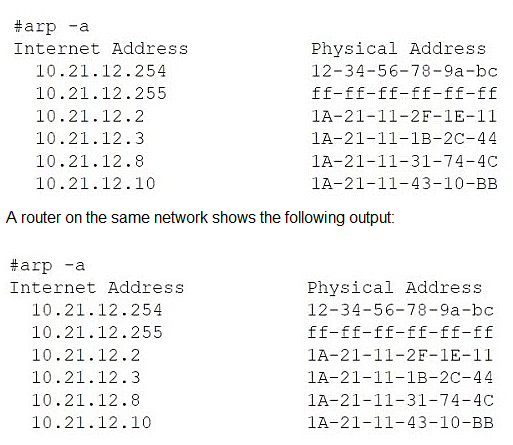
Has an IP address of 10.21.12.8
Has subnet mask 255.255.255.0
Default gateway is 10.21.12.254
ARP table shows 10.21.12.8 mapped to 1A-21-11-31-74-4C (a different MAC address than the local adapter)
A. Asynchronous routing
B. IP address conflict
C. DHCP server down
D. Broadcast storm
Explanation:
The evidence from the ipconfig /all and arp -a outputs strongly indicates an IP address conflict on the network.
Let's break down the key clues:
The Workstation's Identity:
The ipconfig /all command shows the workstation has:
IP Address: 10.21.12.8
Physical (MAC) Address: IA-21-11-33-44-5A
The ARP Table Anomaly:
The arp -a command displays the workstation's own ARP cache.
In this cache, the IP address 10.21.12.8 (its own IP) is not mapped to its own MAC address (IA-21-11-33-44-5A).
Instead, it is mapped to a different MAC address: 1A-21-11-31-74-4C.
This is the definitive symptom of an IP address conflict. Here’s why:
The ARP protocol resolves IP addresses to MAC addresses. When the workstation needs to communicate with itself (a common internal process) or when it receives traffic for its own IP, it looks in its ARP table.
The presence of its own IP address (10.21.12.8) mapped to a foreign MAC address (1A-21-11-31-74-4C) means another device on the same network segment is also using the IP address 10.21.12.8.
The workstation has likely received an ARP reply or broadcast from this other device claiming that IP address, causing its ARP cache to be updated incorrectly. This disrupts the workstation's ability to manage its own network identity and process incoming traffic correctly, leading to connectivity issues.
Why the Other Options Are Incorrect:
Option A (Asynchronous routing):
This occurs when the path out of a network is different from the path back in, often due to misconfigured routers. The problem here is isolated to a single IP address on a single subnet, and the ARP table provides no evidence of a routing issue. The gateway (10.21.12.254) is present and has a valid MAC in the ARP table.
Option C (DHCP server down):
If the DHCP server were down, the workstation would not have a valid IP address. It would likely have an APIPA address in the 169.254.x.x range. The output shows the workstation does have a valid IP address (10.21.12.8), subnet mask, and default gateway, proving DHCP (or static configuration) was functional.
Option D (Broadcast storm):
A broadcast storm is a network-level event caused by switching loops, where broadcast traffic (like ARP requests) floods the network, crippling all connectivity. The provided outputs show a stable and populated ARP table, which would not be possible during a storm. The problem is specific to one IP-MAC mapping, not a widespread network failure.
Conclusion:
The ARP table showing the workstation's own IP address mapped to another device's MAC address is a classic and clear sign of an IP address conflict. The administrator needs to find the device with the MAC address 1A-21-11-31-74-4C and change its IP address or configure the DHCP server to prevent it from handing out 10.21.12.8 again.
| Page 1 out of 9 Pages |