Security
An administrator must secure an account for a user who is going on extended leave. Which of the following steps should the administrator take? (Choose two)
A. Set the user’s files to immutable.
B. Instruct the user to log in once per week.
C. Delete the user’s /home folder.
D. Run the command passwd -l user.
E. Change the date on the /home folder to that of the expected return date.
F. Change the user’s shell to /sbin/nologin.
Explanation:
When a user is going on extended leave, the goal is to secure the account without deleting it so that data and permissions remain intact but login is prevented.
passwd -l user:
Locks the user’s password by placing an ! in front of the hash in /etc/shadow.
This prevents password-based logins while keeping the account and files intact.
Change shell to /sbin/nologin:
Updates the user’s shell in /etc/passwd to /sbin/nologin.
This prevents interactive logins, displaying a polite message instead.
Common hardening practice for service accounts or inactive users.
❌ Why the Other Options Are Wrong
Set the user’s files to immutable → Prevents modification of files, not account access.
Instruct the user to log in once per week → Defeats the purpose of securing the account.
Delete the user’s /home folder → Destroys user data, not a secure or reversible measure.
Change the date on the /home folder → Irrelevant to account security.
👉 So the administrator should:
- Lock the account with passwd -l user.
- Change the shell to /sbin/nologin.
Which of the following describes PEP 8?
A. The style guide for Python code
B. Python virtual environments
C. A package installer for Python
D. A Python variable holding octal values
Explanation:
PEP 8 (Python Enhancement Proposal 8) is the primary document that provides guidelines and best practices on how to write Python code.
Consistency and Readability:
The core philosophy is that "code is read much more often than it is written". PEP 8 ensures that code written by different developers looks consistent and is easy for others to maintain.
Key Guidelines:
It covers various formatting rules, including:
- Indentation: Use 4 spaces per indentation level.
- Line Length: Limit all lines to a maximum of 79 characters.
- Naming Conventions: Using snake_case for function and variable names, and PascalCase for classes.
- Whitespace: Proper use of spaces around operators and after commas.
Explanation of Incorrect Answers
Python virtual environments: This refers to tools like venv or virtualenv, which allow developers to create isolated environments for different projects to avoid dependency conflicts. While PEPs exist for virtual environments (like PEP 405), PEP 8 is strictly about coding style.
A package installer for Python: The standard package installer for Python is pip. It is used to install and manage additional libraries from the Python Package Index (PyPI).
A Python variable holding octal values: In Python, octal values are represented by prefixing a number with 0o (zero and the letter "o"), such as 0o10. PEP 8 is a documentation standard, not a data type or variable.
Reference
CompTIA Exam Objective: Domain 3.0 (Scripting, Containers, and Automation) – Subsection 3.1: "Identify scripting languages and their common features" (specifically Python syntax and best practices).
Reference: Python Enhancement Proposal 8 (PEP 8) – "Style Guide for Python Code"; Official CompTIA Linux+ Study Guide, Chapter on Scripting and Automation.
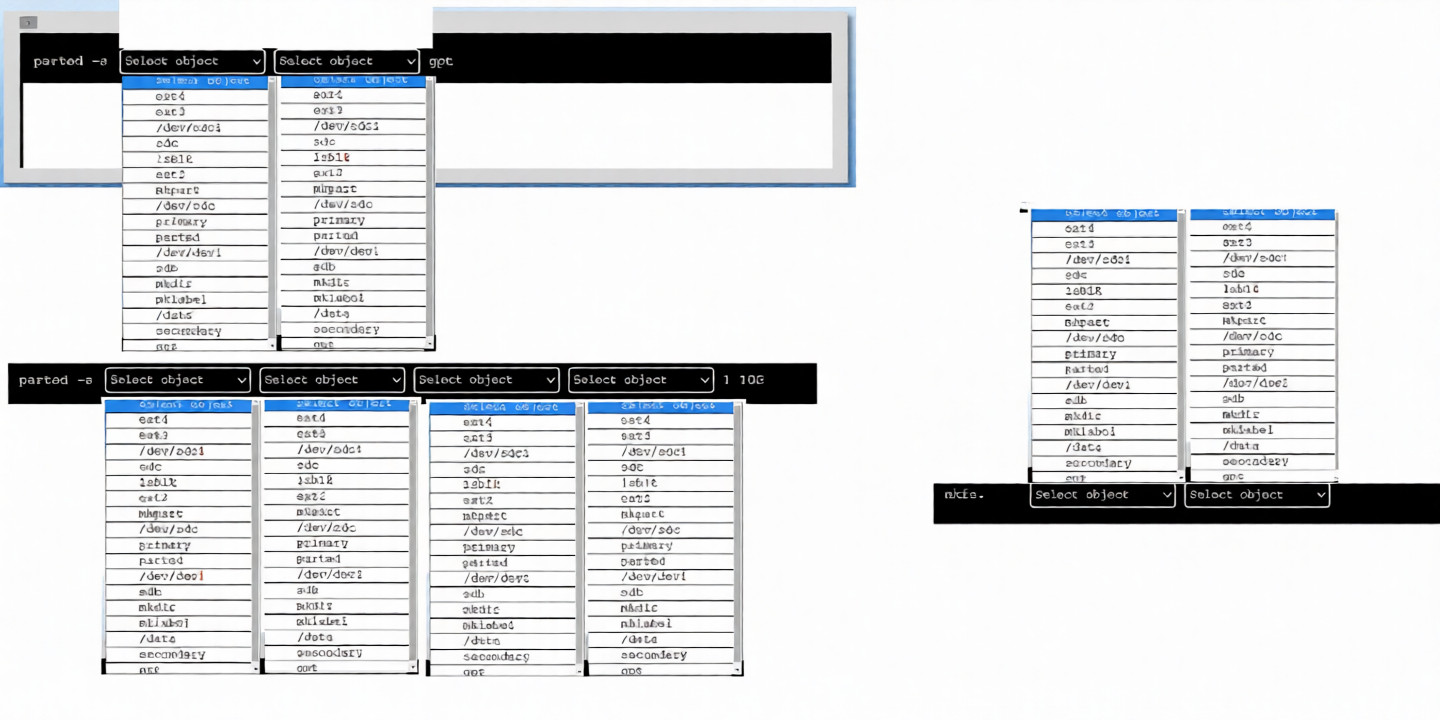
A new drive was recently added to a Linux system. Using the environment and tokens provided, complete the
following tasks:
• Create an appropriate device label.
• Format and create an ext4 file system on the new partition.
The current working directory is /.
Explanation:
The PBQ is an interactive simulation using parted in a graphical or dropdown-style interface (common in CompTIA Linux+ exams like XK0-005 and XK0-006 performance-based questions). The goal is to prepare a newly added drive: create a partition table (disk label), create a partition covering the full disk (or a large portion), and format it as ext4.
From the screenshots:
The interface shows repeated "Select object" dropdowns (likely for choosing the device, then partition type, filesystem type, and size).
Devices listed include /dev/sda, /dev/sdb, /dev/sdc, /dev/sdd, along with options such as primary, msdos, gpt, ext4, and sizes like 1GiB, 10GiB, or 100%.
Some dropdowns show selected items such as /dev/sdc, primary, ext4, msdos, or gpt.
One frame implies mklabel via selection of label type (msdos or gpt).
Another shows mkpart configuration with primary, ext4, and start/end values like 1 to 100%.
Final frames indicate mkfs.ext4 or equivalent formatting.
Step-by-Step Solution (Typical Sequence for This PBQ)
Create an Appropriate Device Label (Initialize the Partition Table)
Run parted on the new disk and use mklabel.
For modern systems, gpt is preferred. For legacy compatibility in exams, msdos (MBR) is often accepted.
Select the new drive (typically /dev/sdc or /dev/sdd — the one without existing partitions).
Select mklabel (or equivalent create label option).
Choose gpt (or msdos if required).
This completes the first task: creating the device label.
Create the Partition
After mklabel, create a new partition covering the disk.
Select the disk again if necessary.
Use mkpart (create partition option).
Partition type: primary.
Filesystem type: ext4 (sets partition type, not formatting yet).
Start: 1MiB (or 1, 0%, depending on options available).
End: 100% (or full disk size shown).
This creates a partition such as /dev/sdc1 covering the entire disk.
Format and Create an ext4 File System
Exit parted if necessary (quit).
Use mkfs.ext4 on the newly created partition.
Example: mkfs.ext4 /dev/sdc1 (adjust device name as needed).
This formats the partition with the ext4 filesystem.
Summary of Commands (In Order)
Launch parted on the new drive: parted /dev/sdc (or the correct new device).
Inside parted:
mklabel gpt (or mklabel msdos).
mkpart primary ext4 1MiB 100%.
print (optional verification).
quit
Then format:
mkfs.ext4 /dev/sdc1
Key Tips for the Exam Simulation:
The new drive is usually /dev/sdc or similar (not /dev/sda, which is often the system disk). Choose the device without existing partitions.
Dropdowns are sequential: select device → mklabel → label type → mkpart → primary → ext4 → start/end.
After partitioning, the simulation may display the new partition (for example, /dev/sdc1).
For formatting, select mkfs.ext4 and choose the new partition.
Mounting is not required unless explicitly stated in the task.
This aligns with standard CompTIA Linux+ storage objectives related to partitioning and formatting disks.
Which of the following commands should an administrator use to see a full hardware inventory of a Linux system?
A. dmidecode
B. lsmod
C. dmesg
D. lscpu
Explanation:
The dmidecode command is the most comprehensive tool for viewing a full hardware inventory of a Linux system. It retrieves hardware information from the DMI (Desktop Management Interface) / SMBIOS (System Management BIOS) tables, providing detailed information about the system's hardware components.
What dmidecode reveals:
Output includes detailed information about:
Component - Information Provided
- System: Manufacturer, product name, serial number, UUID
- BIOS: Vendor, version, release date, ROM size
- Baseboard: Motherboard manufacturer, model, serial number
- Chassis: Type, manufacturer, lock status
- Processor: CPU type, speed, core count, socket, cache sizes
- Memory: RAM modules, size, type, speed, manufacturer, serial numbers
- Cache: L1/L2/L3 cache details
- Connectors: Port and connector information
Example output:
# System Information
$ sudo dmidecode -t system
Handle 0x0001, DMI type 1, 27 bytes
System Information
Manufacturer: Dell Inc.
Product Name: PowerEdge R740
Serial Number: ABC123XYZ
UUID: 4c4c4544-0050-3610-8031-b6c04f4e4c31
# Memory Information
$ sudo dmidecode -t memory
Handle 0x0045, DMI type 17, 40 bytes
Memory Device
Array Handle: 0x0044
Total Width: 72 bits
Data Width: 64 bits
Size: 32768 MB
Form Factor: DIMM
Locator: DIMM A1
Speed: 2933 MT/s
Manufacturer: Samsung
Serial Number: 12345678
Why other options are incorrect:
❌ lsmod:
Shows loaded kernel modules only.
Displays which drivers are currently loaded.
Does NOT show hardware inventory.
Example output shows module names, size, and dependencies.
Limited to software/driver information.
❌ dmesg:
Displays kernel ring buffer messages (boot logs).
Shows kernel detection of hardware during boot.
Good for troubleshooting hardware issues.
Not a structured inventory; mixed with other kernel messages.
Output is verbose and not formatted as an inventory.
❌ lscpu:
Shows CPU-specific information only.
Great for processor details (architecture, cores, threads, speeds).
Does NOT show full hardware inventory.
Limited to CPU and some basic system info.
Comparison of Hardware Information Commands:
Command Scope Best For
dmidecode Full system hardware Complete inventory, warranty info, memory details
lshw Full hardware Hardware tree with configuration
lscpu CPU only CPU architecture and features
lsblk Block devices Disk and partition layout
lspci PCI devices PCI/PCIe devices (GPU, NIC, storage controllers)
lsusb USB devices USB peripherals
dmesg Kernel messages Hardware detection and troubleshooting
lsmod Kernel modules Loaded drivers
Useful dmidecode Options:
# View specific types of information
dmidecode -t bios # BIOS information
dmidecode -t system # System information (manufacturer, product, serial)
dmidecode -t baseboard # Motherboard information
dmidecode -t chassis # Chassis information
dmidecode -t processor # CPU information
dmidecode -t memory # Memory modules
dmidecode -t cache # Cache information
dmidecode -t connector # Ports and connectors
# List available DMI types
dmidecode -s
# Get specific string (serial number, manufacturer, etc.)
dmidecode -s system-serial-number
dmidecode -s system-manufacturer
dmidecode -s system-product-name
Other Comprehensive Hardware Tools:
# lshw - List Hardware (comprehensive alternative)
sudo lshw
sudo lshw -short # Summary view
sudo lshw -class disk # Disk information only
# inxi - Full system information
inxi -F # Full system info
inxi -M # Machine info
inxi -m # Memory modules
Why dmidecode is Best for Full Inventory:
- Comprehensive: Covers all major hardware components
- Structured: Information is organized by DMI types
- Detailed: Includes manufacturer, model, serial numbers, firmware versions
- Warranty/Asset tracking: Serial numbers for support and inventory
- Memory details: Exact RAM configuration (critical for upgrades)
Reference:
DMI = Desktop Management Interface
SMBIOS = System Management BIOS
dmidecode requires root privileges (sudo)
Information comes from the system BIOS/firmware
Essential for hardware asset management and warranty verification
Which of the following is a protocol for accessing distributed directory services containing a hierarchy of users, groups, machines, and organizational units?
A. SMB
B. TLS
C. LDAP
D. KRB-5
Explanation:
LDAP (Lightweight Directory Access Protocol) is the industry-standard protocol for accessing and maintaining distributed directory information services.
Hierarchical Structure: LDAP organizes information in a tree-like structure called a Directory Information Tree (DIT). This allows for the logical grouping of users, groups, machines, and organizational units (OUs).
Centralized Authentication: In a Linux environment, LDAP is frequently used to allow users to log in to multiple different servers using the same set of credentials (often integrated via SSSD or PAM).
Distinguished Names (DN): Every entry in the hierarchy is uniquely identified by a DN, such as uid=jdoe,ou=users,dc=comptia,dc=org.
Explanation of Incorrect Answers
SMB (Server Message Block):
This is a network file-sharing protocol used primarily for providing shared access to files, printers, and serial ports. While it can integrate with directory services (like Active Directory), it is not the directory protocol itself.
TLS (Transport Layer Security):
This is a cryptographic protocol designed to provide communications security over a computer network. It is used to encrypt other protocols (such as LDAP becoming LDAPS), but it does not manage users or organizational hierarchies.
KRB-5 (Kerberos 5):
This is a network authentication protocol designed to provide strong authentication for client/server applications by using secret-key cryptography. While often used alongside LDAP in a "Single Sign-On" (SSO) environment, Kerberos handles authentication (proving who you are), while LDAP handles authorization and directory information (what groups you belong to and where you are in the hierarchy).
Reference
CompTIA Exam Objective: Domain 2.0 (Security) – Subsection 2.1: "Configure and manage identity and access management" (specifically Directory Services and LDAP).
Reference: Official CompTIA Linux+ Study Guide, Chapter on Identity and Access Management; OpenLDAP Documentation.
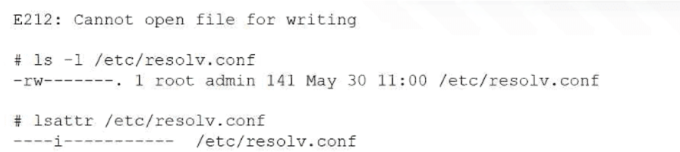
A systems administrator attempts to edit a file as root, but receives the following error:
Which of the following commands allows the administrator to edit the file?
A. chown root /etc/resolv.conf
B. chattr -i /etc/resolv.conf
C. chmod 750 /etc/resolv.conf
D. chgrp root /etc/resolv.conf
Explanation:
The administrator is receiving the error E212: Cannot open file for writing despite being the root user and having rw (read-write) permissions shown in the ls -l output.
The key information is in the lsattr output:
The ----i--------- output shows that the immutable attribute (i) is set on the file.
When a file is marked as immutable, no user—not even root—can modify, delete, rename, or write to it.
To make the file editable again, the administrator must use chattr -i to remove this attribute.
Why other options are incorrect
❌ chown root /etc/resolv.conf:
The ls -l output already shows the file is owned by root. Changing ownership to the current owner will not bypass the immutable flag.
❌ chmod 750 /etc/resolv.conf:
This command changes standard Linux permissions (rwx). Since the file already has write permissions for root (-rw-------), the issue is not with standard permissions, but with a file attribute that chmod cannot change.
❌ chgrp root /etc/resolv.conf:
Similar to chown, this only changes the group ownership. It does not affect the immutable attribute that is preventing the write operation.
Which of the following Ansible components contains a list of hosts and host groups?
A. Fact
B. Inventory
C. Playbook
D. Collection
Explanation:
In Ansible, the inventory is the component that contains the list of hosts and host groups that Ansible manages.
The inventory can be defined in:
- A static file (commonly /etc/ansible/hosts)
- A dynamic inventory script or plugin (pulling hosts from cloud providers, CMDBs, etc.)
Hosts can be grouped into logical collections (e.g., webservers, dbservers) for targeted playbook execution.
❌ Why the Other Options Are Wrong
Fact: Facts are variables collected from hosts at runtime (e.g., OS version, IP address).
Playbook: Playbooks define tasks, roles, and configurations to apply to hosts, not the host list itself.
Collection: Collections are bundles of Ansible content (roles, modules, plugins), not host definitions.
👉 So the Ansible component that contains a list of hosts and host groups is: Inventory
An administrator is trying to terminate a process that is not responding. Which of the following commands should the administrator use in order to force the termination of the process?
A. kill PID
B. kill -1 PID
C. kill -9 PID
D. kill -15 PID
Explanation:
Here's what each of these kill commands does:
kill -9 PID (SIGKILL) - This is the correct choice for forcefully terminating an unresponsive process. SIGKILL:
- Immediately terminates the process
- Cannot be ignored, blocked, or handled by the process
- The process doesn't get a chance to clean up or save data
- The kernel forces the process to stop immediately
- This is the "nuclear option" for process termination
kill PID (default SIGTERM) - Sends signal 15 (SIGTERM) by default:
- Politely asks the process to terminate
- Can be caught or ignored by the process
- Allows the process to clean up resources and save data
- Won't work if the process is completely hung/unresponsive
kill -1 PID (SIGHUP) - Hangup signal:
- Originally meant to indicate the terminal connection was lost
- Often used to reload configuration files (many daemons use this)
- Not intended for forceful termination
- The process can catch and handle this signal
kill -15 PID (SIGTERM) - Default termination signal:
- Same as just typing "kill PID"
- Graceful termination request
- Can be ignored by stuck processes
- Won't force-kill an unresponsive process
Why SIGKILL (-9) is needed for unresponsive processes:
When a process is "not responding" or hung, it's typically in a state where it can't handle any signals it receives. SIGKILL is special because it bypasses the normal signal handling mechanisms and forces the kernel to terminate the process immediately, even if the process itself is completely stuck.
Best Practice:
- First try kill PID (SIGTERM) - give the process a chance to shut down gracefully
- If that doesn't work after a few seconds, use kill -9 PID (SIGKILL) to force termination
Reference:
CompTIA Linux+ XK0-005 Objective 1.2: Given a scenario, manage processes and jobs
Linux man pages: man kill, man 7 signal
Which of the following is a characteristic of Python 3?
A. It is closed source.
B. It is extensible through modules.
C. It is fully backwards compatible.
D. It is binary compatible with Java.
Explanation:
Extensibility is one of Python’s core strengths and a primary reason for its popularity in system administration and automation.
Standard Library and Beyond: Python comes with a large "standard library" of pre-written code, but its true power lies in the ability to import external modules or packages.
Modular Architecture: Administrators can extend Python's functionality to perform specialized tasks—such as interacting with cloud APIs, managing databases, or parsing complex logs—by installing modules using tools like pip.
Code Reusability: This modularity allows developers to use existing, well-tested code instead of writing every function from scratch, which speeds up the development of automation scripts.
Explanation of Incorrect Answers
It is closed source:
Python is an open-source language managed by the Python Software Foundation (PSF). Its source code is freely available for anyone to inspect, modify, and distribute.
It is fully backwards compatible:
This is famously incorrect. One of the defining characteristics of Python 3 was that it was intentionally not fully backwards compatible with Python 2. This "clean break" was designed to fix inherent flaws in the language's design, which necessitated the long migration period known to many Linux administrators.
It is binary compatible with Java:
Python and Java are fundamentally different languages with different runtimes (Python uses an interpreter/bytecode VM, Java uses the JVM). While tools like Jython exist to run Python on the JVM, Python 3 itself is not "binary compatible" with Java.
Reference
CompTIA Exam Objective: Domain 3.0 (Scripting, Containers, and Automation) – Subsection 3.1: "Identify scripting languages and their common features".
Reference: Official CompTIA Linux+ Study Guide, Chapter on Scripting and Automation; Python.org Documentation.
On a Kubernetes cluster, which of the following resources should be created in order to expose a port so it is publicly accessible on the internet?
A. Deployment
B. Network
C. Service
D. Pod
Explanation:
In Kubernetes, to expose a port so that an application becomes publicly accessible on the internet, you need to create a Service resource of the appropriate type.
Here’s a breakdown of each option:
Deployment:
A Deployment manages Pods (replicas, rolling updates, scaling, etc.), but it does not handle networking or exposure to the outside world. Deployments define what runs, not how it's accessed from outside the cluster.
Network:
There is no core Kubernetes resource called "Network". (Network Policies exist for controlling traffic between Pods, but they restrict access — they do not expose anything publicly.)
Service: Correct.
A Service provides a stable abstraction (IP + DNS name) over a set of Pods and is the primary way to expose ports.
To make a Service publicly accessible from the internet, use one of these types:
- type: LoadBalancer → Provisions an external load balancer with a public IP (most common in cloud environments like AWS ELB, GCP, Azure).
- type: NodePort → Exposes the Service on a high port (30000–32767 range) on every node's IP address. External traffic can reach <NodePublicIP>:<NodePort>.
(ClusterIP is internal-only and does not expose to the internet.)
Pod:
Pods have IP addresses and can declare container ports, but Pods are ephemeral and their IPs are not stable or directly routable from the internet by default. Pods alone do not expose services publicly — you always need a Service (or Ingress) on top.
| Page 5 out of 15 Pages |