Free CompTIA XK0-006 Practice Questions 2026 - Page 3

System Management
A Linux administrator tries to install Ansible in a Linux environment. One of the steps is to change the owner and the group of the directory /opt/Ansible and its contents. Which of the following commands will accomplish this task?
A. groupmod -g Ansible -n /opt/Ansible
B. chown -R Ansible:Ansible /opt/Ansible
C. usermod -aG Ansible /opt/Ansible
D. chmod -c /opt/Ansible
Explanation:
The chown (change owner) command is the primary tool used to modify the ownership of files and directories.
Ansible:Ansible: This syntax defines both the owner and the group simultaneously. The first "Ansible" refers to the user account, and the second "Ansible" (following the colon) refers to the group name.
-R (Recursive): This flag is the most critical part of the requirement to change the owner of the directory and its contents. It ensures the ownership changes are applied to all subdirectories and files within /opt/Ansible.
/opt/Ansible: This is the target directory path being modified.
Explanation of Incorrect Answers
groupmod -g Ansible -n /opt/Ansible:
The groupmod command is used to modify group definitions (such as changing the Group ID or the group's name). It does not change the ownership of files or directories.
usermod -aG Ansible /opt/Ansible:
The usermod command is used to modify user accounts. This specific command would attempt to add a user to a group, but the syntax is incorrect as it uses a directory path (/opt/Ansible) where a username should be.
chmod -c /opt/Ansible:
The chmod command changes permissions (read, write, execute), not ownership. The -c flag stands for "changes," which outputs a diagnostic message for every file processed, but it does not address the requirement to change the owner and group.
Reference
CompTIA Exam Objective: Domain 1.0 (System Management) – Subsection 1.1: "Configure and manage software and kernel modules" (specifically File and Directory Permissions/Ownership).
Reference: Linux Man Pages (man chown); Official CompTIA Linux+ Study Guide, Chapter on File and Directory Management.
An administrator set up a new user account called "test". However, the user is unable to change their
password. Given the following output:
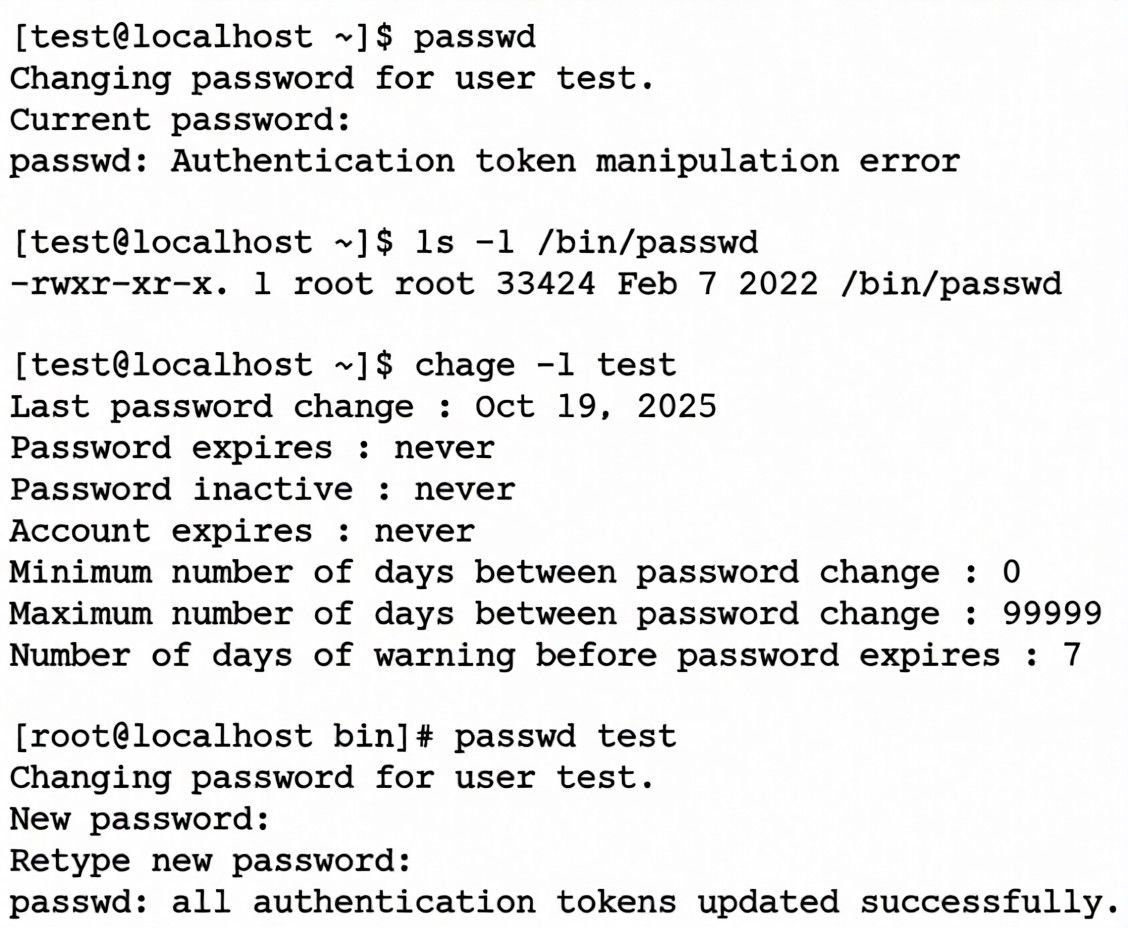
Which of the following is the most likely cause of this issue?
A. The SUID bit is missing on the /bin/passwd file.
B. The password provided by the user "test" does not meet complexity requirements.
C. The user "test" already changed the password today.
D. The password has been disabled for user "test".
Explanation:
The error message:
passwd: Authentication token manipulation error
usually indicates that the passwd binary cannot update the shadow password file because it lacks the necessary privileges.
Normally, /bin/passwd should be owned by root and have the SUID bit set (-rwsr-xr-x), allowing regular users to run it with root privileges for password changes.
In the output provided, /bin/passwd is shown as:
-rwxr-xr-x. 1 root root ...
→ Notice the missing s in the permissions. This confirms the SUID bit is not set, preventing the user test from changing their password.
Why the Other Options Are Wrong
The password provided by the user "test" does not meet complexity requirements: The error would be different (e.g., "BAD PASSWORD").
The user "test" already changed the password today: The chage output shows minimum days between changes = 0, so this is not a restriction.
The password has been disabled for user "test": The account is active, and root was able to change the password successfully.
Reference:
Linux man page: man passwd → Requires SUID to update /etc/shadow.
CompTIA Linux+ XK0-006 Exam Objectives: User and Group Management (Domain: Security).
An administrator receives the following output while attempting to unmount a filesystem:
umount /data1: target is busy.
Which of the following commands should the administrator run next to determine why the filesystem is busy?
A. ps -f /data1
B. du -sh /data1
C. top -d /data1
D. lsof | grep /data1
Explanation:
The "target is busy" error occurs because the kernel cannot unmount a filesystem if any files are currently open or if a process has its current working directory set within that mount point.
lsof (List Open Files): This utility provides a comprehensive list of all files currently opened by the system.
The Pipe and Grep: By piping the output to grep /data1, the administrator filters the thousands of open files down to only those specifically located on the /data1 partition.
Identification: The output will reveal the Process ID (PID) and the user responsible for the lock, allowing the administrator to either ask the user to exit the directory or terminate the process to free the filesystem.
Explanation of Incorrect Answers
ps -f /data1: The ps (process status) command is used to view running processes. While it can show process details, it does not natively accept a directory path as a filter to show which processes are using that specific directory.
du -sh /data1: The du (disk usage) command calculates the space used by files and directories. While it provides information about storage consumption, it does not provide any information regarding active file handles or process locks.
top -d /data1: The top command provides a dynamic, real-time view of running processes and system resource usage. The -d flag is used to specify the delay between screen updates (in seconds), not to filter by directory.
Reference:
CompTIA Exam Objective: Domain 5.0 (Troubleshooting) – Subsection 5.2: "Troubleshoot system-related issues" (specifically focusing on storage and unmounting issues).
Reference: Linux Man Pages (man lsof); Official CompTIA Linux+ Study Guide, Chapter on Performance Monitoring and Process Management.
A Linux administrator needs to analyze a compromised disk for traces of malware. To complete the analysis, the administrator wants to make an exact, block-level copy of the disk. Which of the following commands accomplishes this task?
A. cp -rp /dev/sdc/* /tmp/image
B. cpio -i /dev/sdc -ov /tmp/image
C. tar cvzf /tmp/image /dev/sdc
D. dd if=/dev/sdc of=/tmp/image bs=8192
Explanation:
The dd (Data Duplicator) command is the standard utility for performing block-level or bit-by-bit copies of storage devices. Unlike file-based tools, dd reads the raw data directly from the device file (e.g., /dev/sdc), capturing everything including the master boot record (MBR), partition tables, and even deleted file remnants that might still exist in unallocated space. This makes it the tool of choice for forensic analysis and malware investigations.
if=/dev/sdc: Specifies the input file, which in this case is the raw block device being analyzed.
of=/tmp/image: Specifies the output file, where the bit-for-bit image will be stored.
bs=8192: Sets the block size to 8192 bytes (8 KB) for the read/write operations, which helps speed up the imaging process compared to the default 512-byte block size.
Why other options are incorrect
cp -rp /dev/sdc/ /tmp/image*: The cp command is file-based. It only copies active files and directories and cannot capture the underlying disk structure or deleted data required for forensics.
cpio -i /dev/sdc -ov /tmp/image: cpio is an archiving tool. While it can handle device files, it is primarily used for moving sets of files into and out of archive files, not for creating a raw bitstream image of a physical disk.
tar cvzf /tmp/image /dev/sdc: tar creates an archive of the filesystem contents. It does not perform a block-level copy of the raw disk device.
Which of the following is the main reason for setting up password expiry policies?
A. To avoid using the same passwords repeatedly
B. To mitigate the use of exposed passwords
C. To force usage of passwordless authentication
D. To increase password strength and complexity
Explanation:
Password expiry policies (also called password aging) require users to change their passwords periodically (e.g., every 90 days). The primary security rationale behind enforcing regular password changes is:
To limit the window of opportunity for an attacker who has already obtained (or is in the process of obtaining) a valid password.
If a password is compromised (e.g., via phishing, keylogger, shoulder surfing, credential stuffing from a previous breach, or database leak), forcing periodic changes means the stolen credential will eventually become invalid — even if the attacker hasn't used it yet.
This is the main historical and still widely cited reason in security standards and CompTIA Linux+ objectives.
Why not the other options?
Option: To avoid using the same passwords repeatedly
This is addressed by password history / password reuse prevention rules (e.g., "cannot reuse last 10 passwords"), not by expiry/aging.
Option: To mitigate the use of exposed passwords
Correct — the core purpose of forced periodic changes is to invalidate credentials that may have already been compromised but not yet abused.
Option: To force usage of passwordless authentication
Password expiry has nothing to do with pushing passwordless methods (FIDO2, WebAuthn, passkeys, biometrics, etc.).
Option: To increase password strength and complexity
Strength/complexity is enforced by separate rules (minimum length, character classes, forbidden patterns) via tools like pwquality or cracklib — not by expiry.
CompTIA Linux+ Context (XK0-006):
Objective ~4.1 / 4.2: Configure and secure user accounts, apply security best practices, manage password policies.
Common exam emphasis: Understand the difference between:
* Password complexity/strength rules
* Password history/reuse prevention
* Password aging/expiry (focus: limiting exposure time of compromised credentials)
* Account lockout policies
Modern security guidance (NIST SP 800-63B since 2017, Microsoft, many CIS Benchmarks) actually discourages forced regular password changes for most users unless there's evidence of compromise, because it often leads to weaker passwords (incremental changes like Password1 → Password2). However, CompTIA Linux+ still tests the traditional rationale — mitigating exposed/compromised passwords — as the main reason organizations implement expiry policies.
Final answer: To mitigate the use of exposed passwords
Which of the following describes the method of consolidating system events to a single location?
A. Log aggregation
B. Health checks
C. Webhooks
D. Threshold monitoring
Explanation:
Log aggregation is the process of collecting system events and logs from multiple sources (applications, servers, containers, network devices) and consolidating them into a single location.
This makes it easier to:
* Monitor system health.
* Detect anomalies or security incidents.
* Perform centralized analysis and troubleshooting.
Tools like ELK Stack (Elasticsearch, Logstash, Kibana), Splunk, or Graylog are commonly used for log aggregation.
❌ Why the Other Options Are Wrong
Health checks → Monitor system availability and performance, not consolidate logs.
Webhooks → Provide event-driven notifications between systems, not log collection.
Threshold monitoring → Alerts when metrics exceed defined limits, but does not consolidate logs.
👉 So the method of consolidating system events to a single location is: Log aggregation.
Which of the following most accurately describes a webhook?
A. An authentication method for web-server communication
B. An SNMP-based API for network device monitoring
C. A means to transmit sensitive information between systems
D. An HTTP-based callback function
Explanation:
A webhook is a mechanism that allows one system to automatically send data to another system when a specific event occurs, using an HTTP request.
Instead of polling for updates, the receiving system is notified immediately.
How it works:
* Event occurs (e.g., Git push, CI/CD build completion).
* Source system sends an HTTP POST request to a predefined URL.
* Destination system processes the event data.
Example uses:
* GitHub notifying a CI/CD pipeline
* Payment systems notifying apps of transactions
* Monitoring tools sending alerts
❌ Why the Other Options Are Incorrect
❌ Authentication method for web-server communication
Webhooks may use authentication, but they are not an authentication method themselves.
❌ SNMP-based API
SNMP is used for network monitoring, unrelated to webhooks.
❌ Means to transmit sensitive information
Webhooks transmit event data, not specifically sensitive information.
Security depends on implementation.
🧠 Linux+ XK0-006 Exam Tip
Key distinction:
Term Behavior
API polling Client repeatedly asks for updates
Webhook Server pushes event via HTTP ✅
💡 Exam keyword trigger:
If you see event-driven HTTP notification, think webhook.
A Linux user runs the following command:
nohup ping comptia.com &
Which of the following commands should the user execute to attach the process to the current terminal?
A. renice
B. jobs
C. exec
D. fg
Explanation:
The fg (foreground) command is used to move a background process into the current terminal's foreground.
Process Resumption: When a command is run with an ampersand (&), it executes in the background, allowing the user to continue using the shell.
Attaching to Terminal: Running fg without arguments will bring the most recently backgrounded job to the foreground.
Interaction: Once a process is in the foreground, it "attaches" to the terminal, meaning it will display its output directly to the screen and respond to keyboard interrupts like Ctrl+C.
Context: The nohup (no hangup) utility ensures the process continues running even if the user logs out, but fg is the specific mechanism used to bring that running process back to the active terminal session.
Explanation of Incorrect Answers
renice:
This command is used to alter the scheduling priority (nice value) of an already running process. It affects how much CPU time the process receives but does not change whether the process is in the background or foreground.
jobs:
The jobs command lists the active jobs and their status (Running, Stopped, etc.) for the current shell session. While it helps you identify which job number to use with fg, it does not perform the attachment itself.
exec:
The exec command is used to replace the current shell with a new process. It does not resume or attach to an existing background process; instead, it terminates the current shell and starts the specified command in its place.
Reference
CompTIA Exam Objective: Domain 1.0 (System Management) – Subsection 1.1: "Summarize and utilize Linux command line tools" (specifically Process Management and Job Control).
Reference: Linux Man Pages (man fg, man jobs); Official CompTIA Linux+ Study Guide, Chapter on Process and Job Management.
A Linux systems administrator needs to extract the contents of a file named /home/dev/web.bkp to the /var /www/html/ directory. Which of the following commands should the administrator use?
A. cd /var/www/html/ && gzip -c /home/dev/web.bkp | tar xf -
B. pushd /var/www/html/ && cpio -idv < /home/dev/web.bkp && popd
C. tar -c -f /home/dev/web.bkp /var/www/html/
D. unzip -c /home/dev/web.bkp /var/www/html/
Explanation:
The administrator needs to extract the contents of a backup file:
/home/dev/web.bkp
into:
/var/www/html/
The correct command uses cpio, which is commonly used for backup archives (.bkp files).
pushd /var/www/html/ && cpio -idv < /home/dev/web.bkp && popd
What each part does
pushd /var/www/html/
Temporarily changes to the target directory.
cpio -idv
-i → extract files
-d → create directories as needed
-v → verbose output
< /home/dev/web.bkp
Reads archive input from the backup file.
popd
Returns to the original working directory.
✅ Result: files are extracted directly into /var/www/html/.
❌ Why the Other Options Are Incorrect
❌ cd ... && gzip -c ... | tar xf -
Assumes the backup is gzip + tar formatted.
No indication the file is compressed.
Incorrect extraction method.
❌ tar -c -f /home/dev/web.bkp /var/www/html/
-c creates an archive.
Opposite of what is required.
❌ unzip -c /home/dev/web.bkp /var/www/html/
unzip works only with .zip archives.
.bkp is not a ZIP file.
🧠 Linux+ XK0-006 Exam Tip
Common archive tools:
Tool Typical Extension
tar .tar, .tar.gz
cpio .cpio, .bkp ✅
gzip .gz
unzip .zip
💡 Exam keyword trigger:
If you see a generic backup file (.bkp) and redirection < file, think cpio -i for extraction.
A systems administrator manages multiple Linux servers and needs to set up a reliable and secure way to handle the complexity of managing event records on the OS and application levels. Which of the following should the administrator do?
A. Create an automated process to retrieve logs from the server by demand.
B. Implement a centralized log aggregation solution.
C. Configure daily automatic backups of logs to remote storage.
D. Deploy log rotation procedures to manage the records.
Explanation:
Managing multiple Linux servers means logs are scattered across different machines and applications.
A centralized log aggregation solution (e.g., ELK Stack, Splunk, Graylog, Fluentd) collects logs from all servers and applications into a single, secure location.
Benefits:
Simplifies troubleshooting and auditing.
Provides real-time monitoring and alerting.
Enhances security by preventing tampering with local logs.
Enables correlation of events across systems.
❌ Why the Other Options Are Wrong
Create an automated process to retrieve logs from the server by demand → Reactive and inefficient; doesn’t scale well.
Configure daily automatic backups of logs to remote storage → Provides redundancy but not real-time visibility or correlation.
Deploy log rotation procedures to manage the records → Prevents log files from growing too large, but doesn’t address complexity across multiple servers.
📖 Reference
Red Hat Documentation: Centralized logging improves monitoring and security.
CompTIA Linux+ XK0-006 Exam Objectives: Log Management and Monitoring (Domain: Security).
| Page 3 out of 15 Pages |