Free CompTIA CV0-004 Practice Questions 2026 - Page 9

Which of the following refers to the idea that data should stay within certain borders or territories?
A. Data classification
B. Data retention
C. Data sovereignty
D. Data ownership
Explanation:
Data sovereignty refers to the concept that data is subject to the laws and governance structures within the nation or territory where it is collected, stored, or processed.
It means data must remain within specific geographic boundaries or comply with the regulations of those borders, often due to legal, privacy, or compliance reasons.
This is especially important in cloud computing and cross-border data transfers, where different countries have different data protection laws.
Why the other options are incorrect:
A. Data classification:
Involves categorizing data based on sensitivity, confidentiality, or importance (e.g., public, confidential, secret), not location.
B. Data retention:
Refers to how long data is stored and preserved before deletion or archiving, not its geographic location.
D. Data ownership:
Concerns who legally owns or controls the data, but it doesn’t specify where data must physically reside.
Reference:
CompTIA Cloud+ CV0-004 exam objectives include data governance and compliance, covering data sovereignty as a key concept.
For example, the General Data Protection Regulation (GDPR) in the European Union enforces data sovereignty by controlling how EU citizens' data is handled across borders.
Which of the following is the best type of database for storing different types of unstructured data that may change frequently?
A. Vector
B. Relational
C. Non-relational
D. Graph
Explanation:
The question describes a database that needs to store different types of unstructured data that may change frequently. This scenario favors flexibility in data structure and schema adaptability.
Non-relational (C):
Also known as NoSQL databases, these are designed to handle unstructured, semi-structured, or polymorphic data. They support flexible schemas, allowing different document structures, key-value pairs, or wide-column formats within the same collection or table. This makes them ideal for data that changes frequently in structure or type, such as JSON documents, user profiles with varying attributes, or content management systems.
Vector (A):
Vector databases are specialized for storing and querying high-dimensional vector embeddings, primarily used in machine learning, similarity search, and AI applications (e.g., recommendation engines, semantic search). While they can store unstructured data in the form of embeddings, they are not general-purpose solutions for frequently changing, diverse unstructured data types.
Relational (B):
Relational databases (SQL) enforce a rigid, predefined schema with tables, rows, and columns. They are optimized for structured data with consistent formats and strong ACID compliance. Frequent changes to data structure or storing highly unstructured data would require costly schema migrations and are not well suited to this use case.
Graph (D):
Graph databases are designed for storing and querying highly connected data, such as social networks, recommendation engines, or fraud detection, where relationships between entities are a primary concern. While they can store unstructured properties on nodes and edges, they are not the best general-purpose choice for diverse, frequently changing unstructured data unless the primary requirement is relationship traversal.
Reference:
CompTIA Cloud+ CV0-004 Exam Objectives – Domain 1.0: Cloud Architecture and Design, specifically database types and their appropriate use cases (relational vs. non-relational).
Industry classifications: NoSQL (non-relational) databases include document stores (MongoDB), key-value stores (Redis), and wide-column stores (Cassandra), all of which excel at handling unstructured or semi-structured data with evolving schemas.
An organization wants to ensure its data is protected in the event of a natural disaster. To support this effort, the company has rented a colocation space in another part of the country. Which of the following disaster recovery practices can be used to best protect the data?
A. On-sit
B. Replication
C. Retention
D. Off-site
Explanation:
Off-site is the best disaster recovery practice in this scenario. By renting a colocation space in another part of the country, the organization ensures that copies of its data and systems are stored in a geographically separate location. This protects against localized natural disasters (e.g., floods, earthquakes, hurricanes, or fires) that could destroy or render the primary site inaccessible.
Off-site storage/backups or replication to a distant colocation facility is a fundamental DR strategy. It keeps data safe from the same disaster event that affects the main site, enabling recovery with acceptable RTO (Recovery Time Objective) and RPO (Recovery Point Objective).
Why the Other Options Are Incorrect:
A. On-site:
This refers to keeping backups or data at the same physical location as the primary systems. It offers no protection against a natural disaster that impacts the entire site or region — the exact risk the organization is trying to mitigate.
B. Replication:
Replication (copying data in real-time or near real-time to another system) is a valuable technique often used within off-site strategies. However, the question specifically highlights the rental of a remote colocation space, which directly points to the location aspect (off-site) rather than the method itself. Replication alone could still occur on-site.
C. Retention:
Data retention defines how long data must be kept (e.g., for compliance or business reasons) before it can be deleted. It has no direct relation to protecting data from physical disasters or geographic separation.
Reference:
This maps directly to Objective 3.3: Given a scenario, use appropriate backup and recovery methods and Objective 1.2 / DR concepts (under Cloud Architecture and Operations):
Backup locations: On-site vs. Off-site
Disaster recovery methods, including geographic diversity, colocation for DR, and ensuring data survivability against regional failures.
Related concepts: RTO/RPO, hot/warm/cold sites, replication (as a supporting method), and business continuity planning.
In cloud and hybrid environments, off-site often involves replicating to a secondary region, availability zone, or third-party colocation facility.
A cloud engineer needs to determine a scaling approach for a payroll-processing solution that runs on a biweekly basis. Given the complexity of the process, the deployment to each new VM takes about 25 minutes to get ready. Which of the following would be the best strategy?
A. Horizontal
B. Scheduled
C. Trending
D. Event
Explanation:
The key to this question lies in two specific details: the predictability of the workload and the long spin-up time of the VMs.
Predictability: Payroll is processed on a "biweekly basis." This is a known, recurring event. You know exactly when the spike in demand will happen.
Spin-up Time (Latency): Because it takes 25 minutes for a new VM to become ready, reactive scaling (waiting for CPU load to spike before starting a new VM) would result in a massive performance bottleneck. The system would be overwhelmed for nearly half an hour before help arrives.
Scheduled Scaling allows the engineer to set a policy that adds capacity before the payroll process begins (e.g., triggering the scale-out at 8:00 AM on payday), ensuring the resources are fully provisioned and "warmed up" by the time the work starts.
Why the others are incorrect:
A. Horizontal:
This is a direction of scaling (adding more VMs), not a strategy for when to add them. While the engineer will likely scale horizontally, "Scheduled" is the specific approach that solves the 25-minute delay issue.
C. Trending:
Trending (or Predictive) scaling uses machine learning to analyze historical data and guess when to scale. While it might work, it is unnecessarily complex for a simple, fixed biweekly schedule.
D. Event:
Event-based (or Dynamic) scaling responds to real-time triggers like "CPU > 80%." If the engineer used this, the payroll process would start, the CPU would hit 100%, the trigger would fire, and the system would then sit in a "lagging" state for 25 minutes while the new VMs initialized.
Reference:
Exam Domain: Cloud Architecture and Design (Domain 1.0)
Key Takeaway: If a workload is predictable and has a long initialization time, Scheduled Scaling is the most efficient and reliable choice.
Which of the following migration types is best to use when migrating a highly available application, which is normally hosted on a local VM cluster, for usage with an external user population?
A. Cloud to on-premises
B. Cloud to cloud
C. On-premises to cloud
D. On-premises to on-premises
Explanation:
The application is currently hosted on a local VM cluster (on-premises). Since the goal is to make it available to an external user population, the best migration strategy is on-premises to cloud. Moving the workload to a cloud environment provides scalability, global accessibility, and high availability features that external users require.
Here’s why the other options don’t fit:
A. Cloud to on-premises:
This would move workloads from cloud back to local infrastructure, which is the opposite of what’s needed.
B. Cloud to cloud:
Applies when migrating between cloud providers, not from a local VM cluster.
D. On-premises to on-premises:
Would keep the workload within local infrastructure, failing to meet the requirement of serving external users.
Reference:
CompTIA Cloud+ CV0-004 Exam Objectives (Domain 1.0: Cloud Architecture & Design, Domain 3.0: Cloud Deployment), and industry migration strategies (AWS Migration Whitepaper, Microsoft Azure Migration Guide).
Which of the following network types allows the addition of new features through the use of network function virtualization?
A. Local area network
B. Wide area network
C. Storage area network
D. Software-defined network
Explanation:
✅ Software-defined network (D):
SDN decouples the control plane (the "brains") from the data plane (the hardware). This architecture is designed to work hand-in-hand with Network Function Virtualization (NFV). In an SDN environment, you can deploy new features—like firewalls, load balancers, or intrusion detection systems—as virtualized software components (VNFs) rather than having to install new, dedicated physical hardware.
❌ Local area network (A):
A LAN is a network restricted to a small geographic area (like an office). While a LAN can utilize SDN or NFV, the term "LAN" itself describes the scope of the network, not the programmable architecture that enables feature addition via virtualization.
❌ Wide area network (B):
A WAN connects smaller networks over long distances. While SD-WAN is a popular modern implementation that uses virtualization, a traditional WAN is simply a connectivity type, not the underlying technology that allows for virtualized feature addition.
❌ Storage area network (C):
A SAN is a specialized, high-speed network that provides block-level network access to storage. It is focused on data transfer between servers and storage devices (like tape libraries or disk arrays), not on general network function virtualization.
Reference:
This topic is a core component of CompTIA Cloud+ (CV0-004) Domain 1.0: Cloud Architecture and Design, specifically Objective 1.3: Analyze the different networking technologies and their use cases. SDN and NFV are the primary technologies used to provide agility and "as-a-code" functionality to cloud networking.
A cloud solutions architect needs to design a solution that will collect a report and upload it to an object storage service every time a virtual machine is gracefully or non-gracefully stopped. Which of the following will best satisfy this requirement?
A. An event-driven architecture that will send a message when the VM shuts down to a logcollecting function that extracts and uploads the log directly from the storage volume
B. Creating a webhook that will trigger on VM shutdown API calls and upload the requested files from the volume attached to the VM into the object-defined storage service
C. An API of the object-defined storage service that will scrape the stopped VM disk and self-upload the required files as objects
D. A script embedded on the stopping VM's OS that will upload the logs on system shutdown
Explanation:
Event-driven architecture is designed to respond automatically to system events—in this case, a VM shutdown (both graceful and non-graceful).
When a VM stops, an event or message is triggered. This event can invoke a serverless function (like AWS Lambda, Azure Functions, or Google Cloud Functions) that collects logs directly from the VM’s storage volume and uploads them to the object storage service.
This method ensures automation without relying on the VM’s OS (which may not handle non-graceful shutdowns correctly).
It is also decoupled, scalable, and fits modern cloud best practices.
Why the other options are less suitable:
B. Creating a webhook that triggers on VM shutdown API calls:
Webhooks typically rely on well-defined API calls, but a non-graceful shutdown may not trigger API calls. Also, webhooks need a listening endpoint and are less flexible than event-driven architectures.
C. An API of the storage service scraping the stopped VM disk:
Object storage services don’t have direct access to VM disks; they store objects (files) themselves. This approach is technically impractical and violates separation of concerns.
D. A script embedded on the VM's OS for log upload on shutdown:
This only works for graceful shutdowns because the script runs during OS shutdown. Non-graceful (unexpected) shutdowns will skip this script, so logs may be lost.
Reference:
CompTIA Cloud+ CV0-004 exam covers event-driven architectures, serverless functions, and automated log collection as best practices in cloud environments. Cloud providers encourage event-driven solutions for infrastructure monitoring and automation.
An administrator used a script that worked in the past to create and tag five virtual
machines. All of the virtual machines have been created: however, the administrator sees
the following results:
{ tags: [ ] }
Which of the following is the most likely reason for this result?
A. API throttling
B. Service quotas
C. Command deprecation
D. Compatibility issues
Explanation:
The scenario describes an administrator who used a script that worked in the past to create and tag five virtual machines. All VMs were successfully created, but the tags are missing, as indicated by the output { tags: [ ] }.
C. Command deprecation:
This is the most likely reason. Cloud providers frequently update their APIs, CLI tools, and SDKs. If the script uses a command, parameter, or syntax that has been deprecated (marked as obsolete) but not yet removed, it may still execute without throwing an explicit error, yet certain features—such as tagging—may silently fail or be ignored. The VMs were created successfully because the core creation command remained functional, but the deprecated tagging parameter was no longer applied. This matches the symptoms: partial success with no clear failure indication.
A. API throttling:
Throttling occurs when too many requests are sent within a short time, causing the API to reject or delay requests. If throttling occurred, the VMs likely would not have been created successfully, or the administrator would have received rate-limit errors (e.g., HTTP 429). Since all five VMs were created, throttling is unlikely to be the cause of missing tags.
B. Service quotas:
Service quotas are limits on resources (e.g., maximum number of VMs per region). If a quota were exceeded, the VM creation itself would have failed for some or all of the attempts. Because all five VMs were created successfully, quotas are not the issue.
D. Compatibility issues:
While compatibility issues (e.g., using an older CLI version with a newer API) could cause problems, the term is broader and less precise than command deprecation. In cloud environments, deprecation is a specific, common cause where commands or parameters are phased out over time. The script "worked in the past" and now produces partial success strongly points to deprecation of the tagging parameter or method used.
Key Insight:
Cloud providers often deprecate CLI commands, API parameters, or syntax with advance notice. During the deprecation period, the command may still function but with reduced capability (e.g., ignoring certain flags). This results in scenarios exactly as described: the primary operation succeeds, but secondary features (like tagging) silently fail.
Reference:
CompTIA Cloud+ CV0-004 Exam Objectives – Domain 2.0: Deployment and Domain 5.0: Troubleshooting, specifically API/CLI deprecation and its impact on automation scripts.
Cloud provider best practices recommend regularly updating scripts to align with current API versions and reviewing deprecation announcements to prevent silent failures.
Two CVEs are discovered on servers in the company's public cloud virtual network. The CVEs are listed as having an attack vector value of network and CVSS score of 9.0. Which of the following actions would be the best way to mitigate the vulnerabilities?
A. Patching the operating systems
B. Upgrading the operating systems to the latest beta
C. Encrypting the operating system disks
D. Disabling unnecessary open ports
Explanation:
A CVSS score of 9.0 indicates a Critical severity vulnerability, and an attack vector of "network" means the flaw can be exploited remotely over the network (typically without requiring physical access, authentication, or user interaction).
The most direct and effective way to mitigate known CVEs (Common Vulnerabilities and Exposures) is to apply the official security patches released by the OS vendor or cloud provider. Patching fixes the root cause of the vulnerability in the software, eliminating the exploit path. In cloud environments, this often involves updating the OS on virtual machines (via automated patch management, golden images, or orchestration tools).
This aligns with standard vulnerability management best practices: Identify → Prioritize (by CVSS) → Remediate (patch) → Verify.
Why the Other Options Are Incorrect:
B. Upgrading the operating systems to the latest beta:
Beta versions are pre-release and may introduce new bugs, instabilities, or even additional vulnerabilities. They are not recommended for production environments, especially when stable patches are available.
C. Encrypting the operating system disks:
Disk encryption (e.g., at-rest encryption) protects data confidentiality if storage is compromised, but it does not address remote network-based exploits targeting software flaws in the OS. It is unrelated to fixing the CVE itself.
D. Disabling unnecessary open ports:
This is a good general hardening practice (reducing the attack surface), but it is not the best or most specific mitigation for already-identified CVEs. The vulnerabilities may exist on ports that must remain open (e.g., web server ports 80/443) or may not depend on open ports at all. Patching is still required even after port restrictions.
A cloud engineer is reviewing the following Dockerfile to deploy a Python web application:
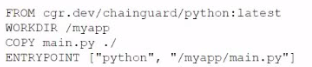
Which of the following changes should the engineer make lo the file to improve container
security?
A. Add the instruction "JSER nonroot.
B. Change the version from latest to 3.11.
C. Remove the EHTRYPOIKT instruction.
D. Ensure myapp/main.pyls owned by root.
Explanation:
Running containers as the root user is a common security risk because it gives processes inside the container elevated privileges. If the container is compromised, attackers could potentially gain root-level access to the host system. By adding the instruction USER nonroot (or another non-privileged user), the engineer enforces the principle of least privilege, significantly improving container security.
Here’s why the other options are less effective:
B. Change the version from latest to 3.11:
Pinning versions is a good practice for stability and reproducibility, but it doesn’t directly improve security.
C. Remove the ENTRYPOINT instruction:
ENTRYPOINT defines how the container runs. Removing it would break functionality, not enhance security.
D. Ensure myapp/main.py is owned by root:
This actually increases risk, since root ownership combined with running as root makes exploitation easier.
Reference:
CompTIA Cloud+ CV0-004 Exam Objectives (Domain 2.0: Cloud Infrastructure & Domain 4.0: Cloud Security)
| Page 9 out of 26 Pages |