Free CompTIA CV0-004 Practice Questions 2026 - Page 8

Which of the following is the most cost-effective and efficient strategy when migrating to the cloud?
A. Retire
B. Replatform
C. Retain
D. Refactor
Explanation:
The most cost-effective and efficient strategy when migrating to the cloud is Retire (also known as decommissioning or sunsetting).
Retire involves identifying applications, systems, or workloads that are no longer needed, used, or providing business value and simply turning them off (decommissioning them) instead of migrating them.
Cost-effectiveness: You avoid all migration costs, ongoing cloud compute/storage/network charges, licensing, maintenance, and operational overhead for that workload.
Efficiency: It requires the least time, effort, and risk. Many organizations discover during migration assessments that 10–30% (or more) of their applications can be retired, immediately simplifying the project and reducing total spend.
This is a core part of application portfolio rationalization in cloud migrations.
Why the other options are less cost-effective/efficient:
B. Replatform:
- Move the application to the cloud with some optimizations (e.g., lift-and-shift to managed services).
- Offers moderate benefits but still requires migration effort and ongoing costs.
C. Retain:
- Keep the application running on-premises (or as-is).
- Avoids immediate migration costs but continues high on-premises expenses (hardware, power, staffing) and misses cloud advantages.
D. Refactor:
- Completely re-architect or rewrite the application to be cloud-native (e.g., microservices).
- Delivers the greatest long-term value and scalability but is the most expensive and time-consuming option due to development, testing, and potential risks.
Key Takeaway for CV0-004 (Cloud+)
This question covers Domain 1.0: Cloud Concepts and Architecture — specifically the 6 Rs of cloud migration (Rehost, Replatform, Refactor/Rearchitect, Repurchase, Retain, Retire).
CompTIA Cloud+ stresses that a smart migration starts with rationalization: Retire unnecessary workloads first for quick wins in cost savings and reduced complexity. Refactor is powerful for innovation but costly; Retire is the cheapest and fastest when an application has no ongoing value.
References:
- CompTIA Cloud+ (CV0-004) exam objectives: Cloud migration strategies (the 6 Rs).
- Industry standard frameworks (AWS, Gartner, etc.): Retiring legacy/unused systems is highlighted as a top cost-saving opportunity during migration planning.
A company uses containers to implement a web application. The development team completed internal testing of a new feature and is ready to move the feature to the production environment. Which of the following deployment models would best meet the company's needs while minimizing cost and targeting a specific subset of its users?
A. Canary
B. Blue-green
C. Rolling
D. In-place
Explanation:
The development team has completed internal testing and wants to move a new feature to production while minimizing cost and targeting a specific subset of users.
A canary deployment releases the new feature to a small subset of users first before rolling it out to the entire user base. This approach allows the team to validate the feature in production with real traffic while limiting the impact if issues arise. It minimizes cost because only a small number of containers or instances need to be deployed initially for the canary group, rather than maintaining two full production environments. Targeting a specific subset of users is a core characteristic of canary deployments, often achieved through load balancer rules, user segmentation, or feature flags.
Why the other options are incorrect:
B. Blue-green deployment:
- Requires maintaining two identical production environments (blue for current, green for new) and switching traffic between them.
- While this provides a clean rollback mechanism, it doubles infrastructure cost during the transition and does not inherently target a specific subset of users—traffic is switched all at once or gradually but typically not segmented for selective user exposure.
C. Rolling deployment:
- Updates instances gradually in batches behind a load balancer.
- While it avoids downtime, it affects all users progressively rather than targeting a specific subset. It does not provide the controlled, user-segmented validation that canary deployments offer.
D. In-place deployment:
- Updates the existing environment directly, often stopping the application or replacing it in place.
- This typically causes downtime or performance degradation, does not allow targeting a subset of users, and provides no ability to test with a small group before full release.
References:
- CompTIA Official Exam Objectives for Cloud+ CV0-004:
- Domain 2.0: Deployment
- 2.4 Given a scenario, perform cloud resource deprovisioning and migration tasks. Deployment strategies include canary, blue-green, and rolling.
- 2.5 Given a scenario, implement continuous integration and continuous delivery (CI/CD) in a cloud environment. Includes deployment strategies and their appropriate use cases.
A cloud engineer needs to deploy a new version of a web application to 100 servers. In the past, new version deployments have caused outages. Which of the following deployment types should the cloud engineer implement to prevent the outages from happening this time?
A. Rolling
B. Blue-green
C. Canary
D. Round-robin
Explanation:
The key concern is:
- Previous deployments caused outages
- The engineer wants to prevent outages during deployment
The best approach is Canary Deployment.
👉 Canary deployment works by:
- Releasing the new version to a small subset of servers/users first
- Monitoring for issues (errors, performance, failures)
- Gradually rolling out to the rest if everything is stable
This minimizes risk because:
- If something breaks, only a small portion of users is affected
- The rollout can be stopped quickly
❌ Why the other options are wrong
A. Rolling:
- Updates servers in batches
- Still exposes a large portion of users at once compared to canary
B. Blue-green:
- Switches all traffic at once
- Fast, but if something goes wrong → full outage risk
D. Round-robin:
- Load balancing method, not a deployment strategy
🧠 Exam Tip
Look for these clues:
- “Prevent outages”
- “Test before full rollout”
- “Minimize impact”
➡️ Choose Canary deployment
If the question instead said “instant switch” or “two environments,” then it would be Blue-Green.
An organization's critical data was exfiltrated from a computer system in a cyberattack. A
cloud analyst wants to identify the root cause and is reviewing the following security logs of
a software web application:
"2021/12/18 09:33:12" "10. 34. 32.18" "104. 224. 123. 119" "POST /
login.php?u=administrator&p=or%201%20=1"
"2021/12/18 09:33:13" "10.34. 32.18" "104. 224. 123.119" "POST /login.
php?u=administrator&p=%27%0A"
"2021/12/18 09:33:14" "10. 34. 32.18" "104. 224. 123. 119" "POST /login.
php?u=administrator&p=%26"
"2021/12/18 09:33:17" "10.34. 32.18" "104. 224. 123.119" "POST /
login.php?u=administrator&p=%3B"
"2021/12/18 09:33:12" "10.34. 32. 18" "104. 224. 123. 119" "POST / login.
php?u=admin&p=or%201%20=1"
"2021/12/18 09:33:19" "10.34.32.18" "104. 224. 123.119" "POST / login.
php?u=admin&p=%27%0A"
"2021/12/18 09:33:21" "10. 34. 32.18" "104.224. 123.119" "POST / login.
php?u=admin&p=%26"
"2021/12/18 09:33:23" "10. 34. 32.18" "104. 224. 123.119" "POST / login.
php?u=admin&p=%3B"
Which of the following types of attacks occurred?
A. SQL injection
B. Cross-site scripting
C. Reuse of leaked credentials
D. Privilege escalation
Explanation:
The logs show repeated attempts to log in with suspicious query strings such as:
- p=or 1=1 → This is a classic SQL injection payload, designed to bypass authentication by making the condition always true.
- Other entries like p=%27 (single quote), p=%3B (semicolon), and p=%26 (ampersand) are typical SQL injection probes used to test how the database handles special characters.
This pattern indicates the attacker was trying to manipulate the SQL query behind the login form to gain unauthorized access and eventually exfiltrate data.
❌ Incorrect Options
B. Cross-site scripting (XSS):
- Would involve injecting JavaScript or HTML tags, not SQL operators.
C. Reuse of leaked credentials:
- Would show normal login attempts with valid usernames/passwords, not injection strings.
D. Privilege escalation:
- Happens after gaining access, not at the login stage.
🔗 Reference:
- Domain 4.0 Security → Web application attacks (SQLi, XSS, credential theft).
- Domain 5.0 Cloud Operations → Log analysis for root cause identification.
💡 Exam Tip
- When you see OR 1=1 in logs, the answer is SQL injection.
- If you see <script> tags, it’s XSS.
- If you see valid usernames/passwords being reused, it’s credential theft.
- If you see privilege escalation, it’s usually after login, not during.
Which of the following will best reduce the cost of running workloads while maintaining the same performance? (Select two).
A. Instance size
B. Taggingu
C. Reserved resources model
D. Spot instance model
E. Pay-as-you-go model
F. Dedicated host model
C. Reserved resources model
Explanation
The goal is to reduce the cost of running workloads while maintaining the same performance. Two strategies directly address this: selecting the appropriate instance size to avoid over-provisioning, and committing to a reserved resources model to obtain significant discounts compared to on-demand pricing.
A. Instance size
- Selecting the correct instance size ensures that workloads are not over-provisioned with more CPU, memory, or other resources than they actually need. Running an oversized instance wastes money without improving performance, while right-sizing to match actual resource consumption reduces cost while maintaining the same performance level. Cloud providers offer a wide range of instance families and sizes, allowing administrators to match capacity precisely to workload requirements.
C. Reserved resources model
- Reserved instances or capacity reservations commit to using a specific amount of resources for a one-year or three-year term in exchange for substantial discounts (typically 30% to 60% or more compared to on-demand pricing). This model does not change performance—the underlying resources are the same—but significantly reduces cost for steady-state, predictable workloads. It is one of the most effective ways to lower cloud costs while maintaining identical performance characteristics.
Why the other options are incorrect
B. Tagging
- Tagging is a metadata labeling practice used for organization, cost allocation, and resource management. While tagging helps track and manage costs, it does not directly reduce costs. It enables better visibility but does not change the pricing model or resource sizing.
D. Spot instance model
- Spot instances (or preemptible VMs) offer deep discounts but come with the risk of termination when cloud providers need the capacity back. While they reduce cost, they do not guarantee the same performance consistency because workloads can be interrupted. This model is suitable for fault-tolerant or batch workloads, not for maintaining guaranteed, uninterrupted performance.
E. Pay-as-you-go model
- Pay-as-you-go (on-demand) provides flexibility with no long-term commitment but is the most expensive pricing model per unit of resource. It does not reduce cost compared to reserved models; it is typically used for variable or short-term workloads where commitment is not feasible.
F. Dedicated host model
- Dedicated hosts provide single-tenant physical servers for compliance or licensing requirements. This is generally more expensive than multi-tenant virtualized options and does not reduce cost. It is used for specific regulatory or software licensing needs, not as a cost-saving measure.
References
- CompTIA Official Exam Objectives for Cloud+ CV0-004:
- Domain 1.0: Cloud Architecture and Design
- 1.6 Given a scenario, optimize cloud resource utilization and costs.
- Includes right-sizing instances, selecting appropriate pricing models (on-demand, reserved, spot), and using tagging for cost allocation.
A cloud solution needs to be replaced without interruptions. The replacement process can be completed in phases, but the cost should be kept as low as possible. Which of the following is the best strategy to implement?
A. Blue-green
B. Rolling
C. In-place
D. Canary
Explanation:
Rolling deployment is a strategy where the new version of a system or service is gradually deployed across servers or nodes, replacing the old version in phases.
This approach ensures that the system remains available, because not all instances are updated at the same time, avoiding downtime.
It is cost-effective compared to blue-green deployments because it does not require a full duplicate environment (like blue-green does).
Rolling updates are common in cloud environments, especially when updating VMs, containers, or application clusters.
Why the other options are less suitable:
A. Blue-green
Blue-green deployment involves duplicating the entire environment (blue = old, green = new) and switching traffic after full testing.
Pros: near-zero downtime.
Cons: high cost due to maintaining two full environments.
Not optimal here because the question emphasizes keeping cost low.
C. In-place
In-place deployment updates the existing systems directly.
Pros: cheap, no duplicate resources needed.
Cons: higher risk of downtime or failure during deployment, which violates the "without interruptions" requirement.
D. Canary
Canary deployment releases the new version to a small subset of users before a full rollout.
Pros: safe testing.
Cons: more complex traffic management and partial deployment might not be sufficient for cost reduction or full phased replacement.
Reference:
CompTIA Cloud+ CV0-004 Exam Objectives: Deployment models and strategies, including rolling, blue-green, and canary deployments.
A cloud administrator is working on the deployment of an e-commerce website. The administrator evaluates the scaling methods to be implemented when seasonal or flash sales are launched. Which of the following scaling approaches should the administrator use to best manage this scenario?
A. Scheduled
B. Load
C. Event
D. Trending
Explanation:
For an e-commerce website facing seasonal or flash sales, traffic spikes can be sudden, unpredictable in exact timing or intensity (e.g., a viral promotion or limited-time discount). Load-based scaling (also called load-triggered or demand-driven auto-scaling) is the best approach here. It automatically adjusts resources (horizontal or vertical scaling) in real time based on current metrics like CPU utilization, memory usage, request rate, or concurrent users.
This ensures the system scales up proactively as traffic builds and scales down afterward to optimize costs, without over-provisioning or risking performance degradation during unexpected surges.
Why the Other Options Are Incorrect:
A. Scheduled:
This works well for predictable, recurring patterns with known dates/times (e.g., a fixed Black Friday window where you pre-scale hours in advance). However, flash sales are often short-notice or unpredictable in exact impact, so purely scheduled scaling may leave the system under-provisioned if the spike is larger than forecasted or starts earlier than planned.
C. Event:
Event-based scaling triggers on specific discrete events (e.g., a webhook from a marketing system announcing a sale, or an order threshold). While useful for some promotions, it is less ideal than load-based for general traffic surges during sales, as it depends on a reliable external trigger rather than directly reacting to actual system load.
D. Trending:
Trending (or predictive/forecast-based) scaling analyzes historical patterns over time to anticipate future needs. It is more suited to gradual growth or seasonal baselines rather than abrupt, bursty flash sales, where real-time reaction is critical.
Reference to CompTIA CV0-004 Objectives:
This aligns with Objective 3.2: Given a scenario, configure appropriate scaling approaches:
Approaches: Triggered (including Load, Event, Trending) and Scheduled.
Types: Horizontal (adding/removing instances) and Vertical (resizing instances).
In practice, major cloud providers implement this via auto-scaling groups (AWS ASG, Azure VM Scale Sets, Google Cloud MIG) with policies based on CloudWatch / Azure Monitor / etc. metrics—exactly load-based scaling.
A systems administrator is configuring backups on a VM and needs the process to run as quickly as possible, reducing the bandwidth on the network during all times from Monday through Saturday. In the event of data corruption, the management team expects the mean time to recovery to be as low as possible. Which of the following backup methods can the administrator use to accomplish these goals?
A. Incremental backup daily to the cloud
B. Full backup on Sunday and incremental backups on all other days of the week
C. Differential backup daily to the cloud
D. Incremental backups during off-hours on Monday, Wednesday, and Friday
Explanation:
This scenario requires balancing three competing needs: speed of backup, low bandwidth consumption, and low Mean Time to Recovery (MTTR).
An Incremental Backup only saves the data that has changed since the last backup of any type (whether full or incremental).
Speed and Bandwidth: Because only the "deltas" (daily changes) are uploaded, the daily backup window is very short, and the bandwidth used is minimal compared to other methods.
MTTR: While a restore requires the last full backup plus every incremental backup in the chain, it remains the standard approach for daily operations to meet the bandwidth constraints mentioned (Monday through Saturday).
The Sunday Full Backup: You cannot have an incremental chain without a starting point. By performing the heavy "Full" backup on Sunday (the only day not restricted by the bandwidth requirement), the administrator ensures the baseline is established without impacting the network during the critical Monday–Saturday window.
Why the others are incorrect:
A. Incremental backup daily to the cloud:
This is incomplete. An incremental backup strategy must be anchored by a full backup at some point. Without establishing the full backup on Sunday (as specified in Option B), the chain is fundamentally flawed.
C. Differential backup daily to the cloud:
Differential backups grow larger each day because they save all changes made since the last full backup. By Friday or Saturday, a differential backup would be significantly larger than an incremental one, failing the requirement to "reduce bandwidth during all times" from Monday through Saturday.
D. Incremental backups during off-hours on Monday, Wednesday, and Friday:
This fails the MTTR and recovery requirements. If data corruption occurs on a Tuesday or Thursday, you would lose up to 24 hours of data (Recovery Point Objective failure), and it doesn't address the need for a baseline full backup.
Reference:
Exam Domain: Cloud Operations (Domain 3.0) / Troubleshooting (Domain 5.0)
A company has ten cloud engineers working on different manual cloud deployments. In the past, engineers have had difficulty keeping deployments consistent. Which of the following is the best method to address this issue?
A. Deployment documentation
B. Service logging
C. Configuration as code
D. Change ticketing
Explanation:
The best way to ensure consistent deployments across multiple engineers is to use configuration as code (also known as Infrastructure as Code, IaC). This approach allows cloud infrastructure and configurations to be defined in code (using tools like Terraform, Ansible, or CloudFormation). The code can be version-controlled, peer-reviewed, and reused, ensuring that deployments are standardized and repeatable regardless of who executes them.
Here’s why the other options are less effective:
A. Deployment documentation:
Helpful for guidance, but engineers may still interpret or execute steps differently, leading to inconsistencies.
B. Service logging:
Useful for monitoring and troubleshooting, but it doesn’t prevent inconsistent deployments.
D. Change ticketing:
Ensures changes are tracked and approved, but it doesn’t enforce consistency in the actual deployment process.
Reference:
CompTIA Cloud+ CV0-004 Exam Objectives (Domain 2.0: Cloud Infrastructure & Domain 3.0: Cloud Deployment), and industry best practices for Infrastructure as Code (HashiCorp Terraform documentation, AWS CloudFormation).
An e-commerce company is migrating from an on-premises private cloud environment to
a public cloud IaaS environment. You are tasked with right-sizing the environment to
save costs after the migration. The company's requirements are to provide a 20%
overhead above the average resource consumption, rounded up.
INSTRUCTIONS
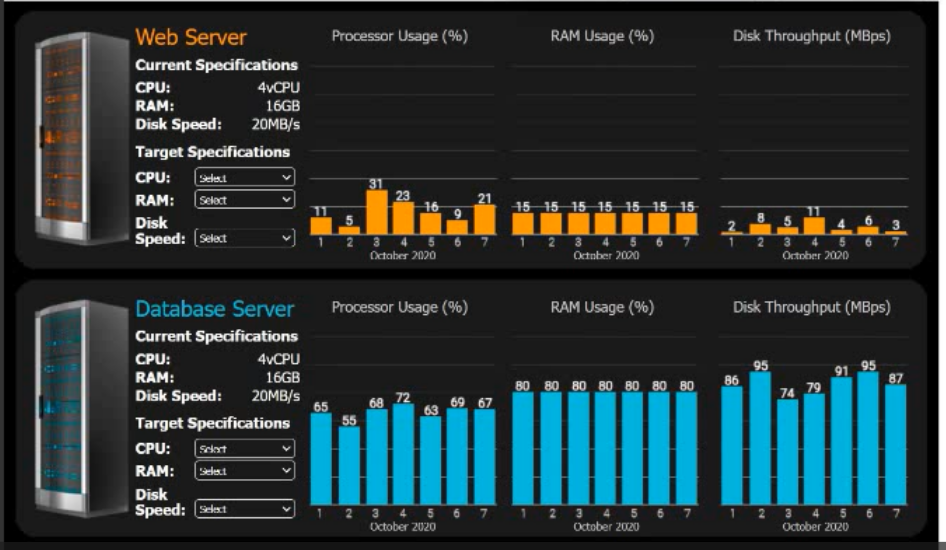
Review the specifications and graphs showing resource usage for the web and database
servers. Determine the average resource usage and select the correct specifications from
the available drop-down options.
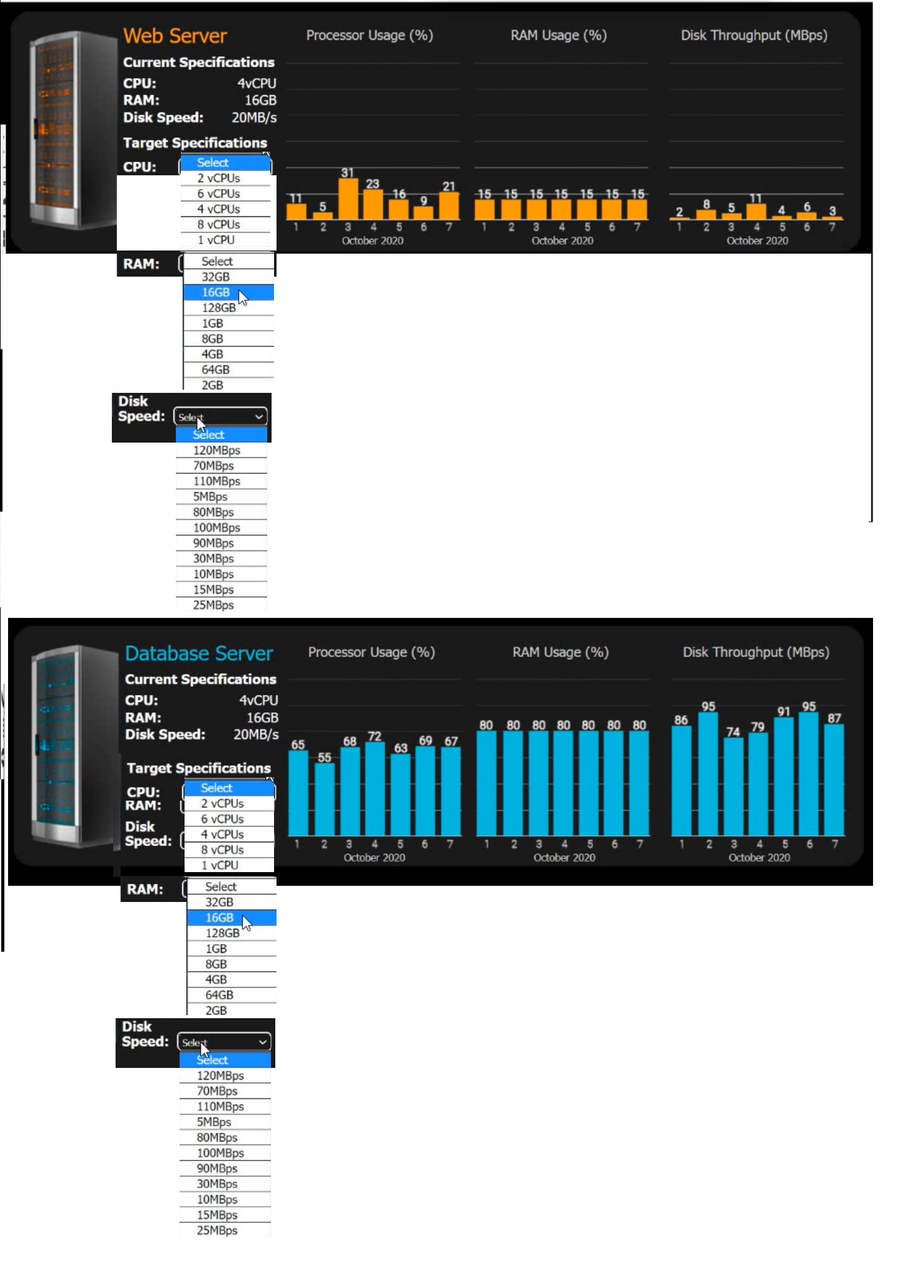
Answer:
Explanation:
This is a classic "right-sizing" performance analysis task often seen in the CompTIA Cloud+ exam. To solve this, we need to calculate the average for each metric, add the 20% overhead, and round up to the next available configuration option.
1. Web Server Analysis
Processor Usage (%):
Data points: 11, 5, 31, 23, 16, 9, 21.
Average: 116÷7≈16.57%.
With 20% Overhead: 16.57×1.20≈19.88%.
Calculation: The current CPU is 4 vCPU. 19.88% of 4 vCPU is roughly 0.8 vCPU.
Target Selection: 1 vCPU (The lowest available option that covers the requirement).
RAM Usage (%):
Data points: Constant at 15%.
With 20% Overhead: 15×1.20=18%.
Calculation: Current RAM is 16GB. 18% of 16GB is 2.88GB.
Target Selection: 4GB (Rounding up to the nearest available option above 2.88GB).
Disk Throughput (MBps):
Data points: 2, 8, 5, 11, 4, 6, 3.
Average: 39÷7≈5.57 MBps.
With 20% Overhead: 5.57×1.20≈6.68 MBps.
Target Selection: 10 MBps (The lowest available option above 6.68 MBps).
2. Database Server Analysis
Processor Usage (%):
Data points: 65, 55, 68, 72, 63, 69, 67.
Average: 459÷7≈65.57%.
With 20% Overhead: 65.57×1.20≈78.68%.
Calculation: Current CPU is 4 vCPU. 78.68% of 4 vCPU is 3.14 vCPU.
Target Selection: 4 vCPU (Since 3.14 is more than 2, we must keep 4).
RAM Usage (%):
Data points: Constant at 80%.
With 20% Overhead: 80×1.20=96%.
Calculation: Current RAM is 16GB. 96% of 16GB is 15.36GB.
Target Selection: 16GB (The closest available option that safely covers the requirement).
Disk Throughput (MBps):
Data points: 86, 95, 74, 79, 91, 95, 87.
Average: 607÷7≈86.71 MBps.
With 20% Overhead: 86.71×1.20≈104.05 MBps.
Target Selection: 110 MBps (Rounding up to the next available option).
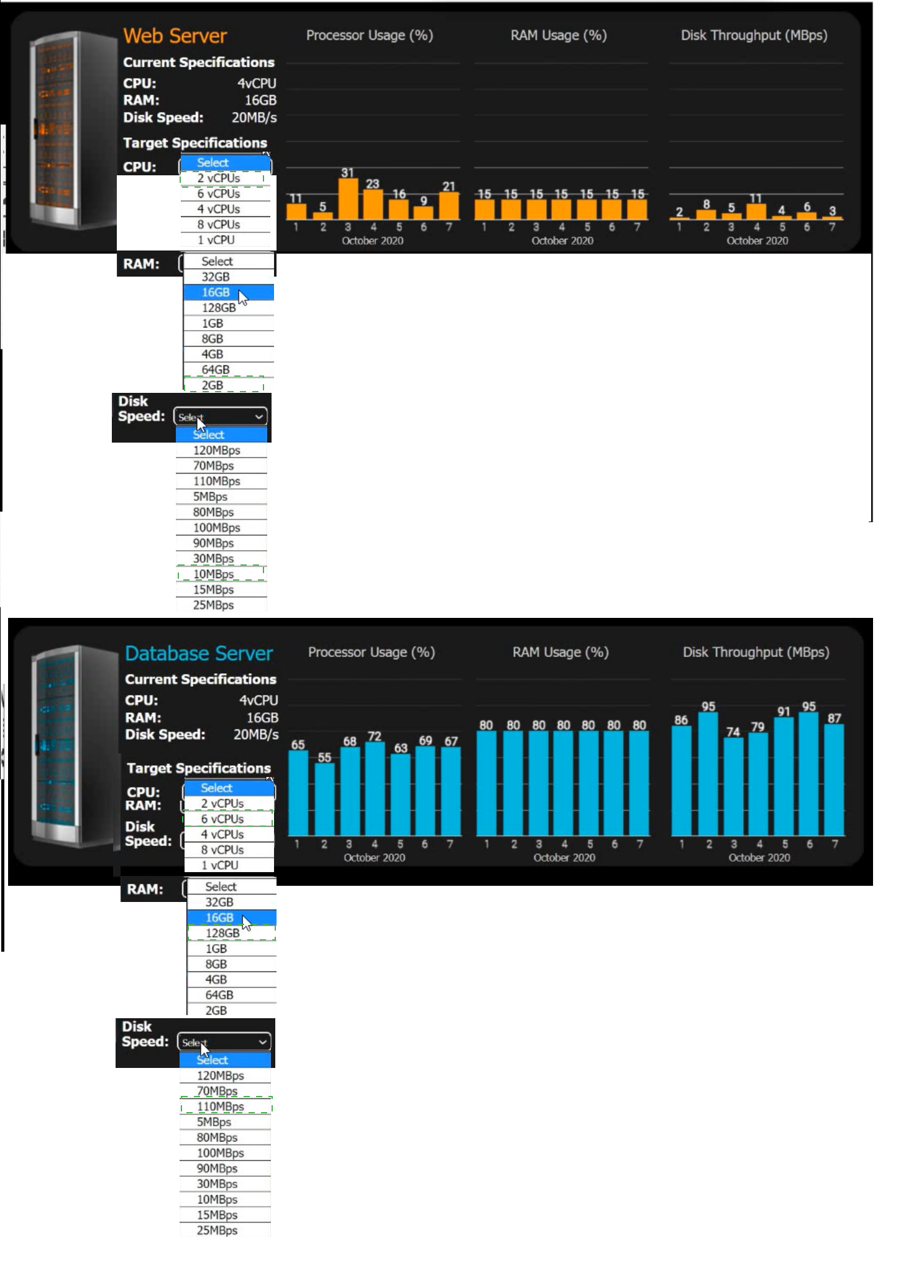
Final Target Specifications Table:
Server: Web Server | CPU: 1 vCPU | RAM: 4GB | Disk Speed: 10MBps
Server: Database Server | CPU: 4 vCPU | RAM: 16GB | Disk Speed: 110MBps
Key Concept: Right-Sizing
Right-sizing is a critical part of the Cloud Finance (FinOps) and Performance domains. In an on-premises environment, resources are often over-provisioned because physical hardware is hard to change. In IaaS, you pay for what you provision, so shrinking the Web Server from 4 vCPU to 1 vCPU and 16GB RAM to 4GB RAM provides significant cost savings without impacting performance.
| Page 8 out of 26 Pages |