Think You're Ready?

Your Final Exam Before the Final Exam.
Dare to Take It?

A cloud developer needs to update a REST API endpoint to resolve a defect. When too many users attempt to call the API simultaneously, the following message is displayed:
Error: Request Timeout - Please Try Again Later
Which of the following concepts should the developer consider to resolve this error?

A. Server patch

B. TLS encryption

C. Rate limiting

D. Permission issues

C.   Rate limiting

Explanation:

C. Rate limiting: This is a technique used to control the volume of traffic sent to or received by an API. When too many users call an API at once, the backend resources (CPU, memory, or database connections) can become exhausted, leading to a Request Timeout. By implementing rate limiting (or throttling), the developer can restrict the number of requests a user can make in a specific timeframe. This prevents the server from being overwhelmed, ensuring it remains stable and responsive for all users.

A. Server patch: While a patch might fix a software bug, "Request Timeout" under high load is almost always a resource or traffic management issue rather than a missing security or functional update.

B. TLS encryption: TLS (Transport Layer Security) handles the encryption of data in transit. It does not help with server-side processing delays or managing the volume of incoming requests; in fact, heavy encryption can sometimes increase CPU load.

D. Permission issues: If there were a permission issue, the user would receive a 401 Unauthorized or 403 Forbidden error, not a timeout.

A security analyst reviews the daily logs and notices the following suspicious activity:
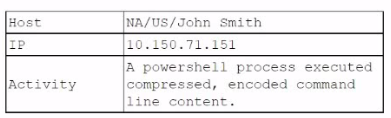


The analyst investigates the firewall logs and identities the following:
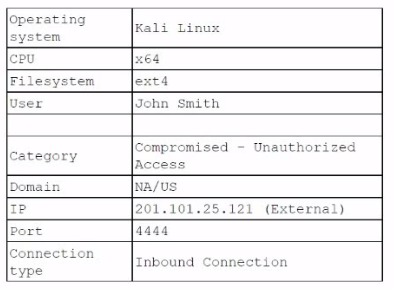
Which of the following steps should the security analyst take next to resolve this issue? (Select two).

A. Submit an IT support ticket and request Kali Linux be uninstalled from John Smith's computer

B. Block all inbound connections on port 4444 and block the IP address 201.101.25.121.

C. Contact John Smith and request the Ethernet cable attached to the desktop be unplugged

D. Check the running processes to confirm if a backdoor connection has been established.

E. Upgrade the Windows x64 operating system on John Smith's computer to the latest version.

F. Block all outbound connections from the IP address 10.150.71.151.

B.   Block all inbound connections on port 4444 and block the IP address 201.101.25.121.
D.   Check the running processes to confirm if a backdoor connection has been established.

Explanation:

From the logs:
- A PowerShell encoded command was executed → strong indicator of malicious activity
- External IP 201.101.25.121 connected inbound on port 4444
- Port 4444 is commonly used by tools like Metasploit (reverse shells/backdoors)
- System shows signs of compromise / unauthorized access

👉 This indicates a likely backdoor or remote shell has been established.

🔐 Why B is correct (Containment)
- Blocking:
  - External attacker IP (201.101.25.121)
  - Port 4444
- This immediately stops further malicious communication
- This is a containment step, which is critical in incident response

🔍 Why D is correct (Investigation)
- Checking running processes helps:
  - Identify malicious processes
  - Confirm if a backdoor is active
  - Gather forensic evidence

👉 This aligns with detection & analysis phase of incident response

❌ Why the other options are wrong
A. Uninstall Kali Linux:
- No evidence Kali is installed locally
- Kali is shown as the attacker’s system, not the victim’s

C. Unplug Ethernet cable:
- Too disruptive / last-resort containment
- Blocking specific traffic (B) is more precise and preferred

E. Upgrade OS:
- Not relevant during an active compromise
- Doesn’t address the immediate threat

F. Block outbound from 10.150.71.151:
- Overly broad and may disrupt business operations
- Better to target specific malicious traffic first

🧠 Exam Tip
For incident response questions, follow this priority:
- Contain the threat (block IPs, ports)
- Investigate (processes, logs, persistence)
- Eradicate (remove malware)
- Recover

👉 If you see:
- Suspicious IP + known attack port (like 4444)
- Encoded PowerShell commands

➡️ Think: Backdoor → Contain + Investigate

Which of the following best describes a system that keeps all different versions of a software separate from each other while giving access to all of the versions?

A. Code documentation

B. Code control

C. Code repository

D. Code versioning

D.   Code versioning

Explanation:

The question describes a system that:
- Keeps all different versions of software separate from each other
- Gives access to all of the versions

This is the core function of version control systems (VCS), which track changes to code over time, maintain distinct versions, and allow users to access, compare, and restore any previous version.

D. Code versioning
Code versioning (often referred to as version control) is the practice of managing changes to source code over time. It:

✅ Keeps all versions separate — each commit or revision is stored as a distinct snapshot or set of changes
✅ Gives access to all versions — developers can view, checkout, or roll back to any previous version
✅ Enables branching, merging, and collaboration without losing history
✅ Examples: Git, Subversion (SVN), Mercurial

Why the other options are incorrect:
A. Code documentation:
- Documentation explains how code works but does not store or manage multiple versions of the software. It is supplemental, not a version management system.

B. Code control:
- This is not a standard industry term. While it could be interpreted as a shortened form of "version control," the correct and widely recognized term is versioning or version control. Among the given choices, versioning is the precise and best answer.

C. Code repository:
- A code repository (e.g., GitHub, GitLab, Bitbucket) is a storage location where version-controlled code is hosted. However, the repository itself is not the system that keeps versions separate and provides access — it is the storage component of a version control system. The practice that enables this functionality is versioning.

Reference
CompTIA Cloud+ CV0-004 Exam Objectives:

Domain 2.0: Deployment
2.3: Given a scenario, implement infrastructure as code (IaC) and configuration management. Includes understanding version control systems for managing code changes, collaboration, and rollback capabilities.

Industry Context:
Version control is foundational to modern software development and DevOps. Tools like Git provide distributed versioning, allowing developers to maintain full history, create branches for parallel development, and access any previous state of the codebase. Versioning ensures traceability, collaboration, and the ability to revert to stable versions when issues arise.

Which of the following technologies should be used by a person who is visually impaired to access data from the cloud?

A. Object character recognition

B. Text-to-voice

C. Sentiment analysis

D. Visual recognition

B.   Text-to-voice

Explanation:

Text-to-voice (also known as Text-to-Speech or TTS) is an assistive technology that converts written digital text into spoken words. For a person who is visually impaired, this is the primary method for "reading" data stored in the cloud.

In a cloud context, major providers offer AI-powered TTS services (such as Amazon Polly, Google Cloud Text-to-Speech, or Azure Cognitive Services) that use deep learning to create natural-sounding synthetic speech. This allows users to navigate cloud-based dashboards, read documents, and interact with applications through audio output, ensuring that cloud resources remain accessible to all users regardless of physical ability.

Incorrect Answers
A. Object character recognition:
- While OCR (Optical Character Recognition) is used to convert images of text (like a scanned PDF) into machine-readable text, it is only a preprocessing step. On its own, it does not provide the audio output a visually impaired person needs to actually "access" or understand the data.

C. Sentiment analysis:
- This is a branch of Natural Language Processing (NLP) used to determine the emotional tone of a text (e.g., whether a customer review is positive or negative). It is a data analysis tool and not an accessibility interface.

D. Visual recognition:
- This technology (often called Computer Vision) allows computers to identify objects, people, or scenes in images. While it can help describe an image to a visually impaired person, it is not the standard technology for accessing general cloud data, which is predominantly text-based.

Reference
CompTIA Cloud+ (CV0-004) Objective:

Domain 1.0: Cloud Architecture and Design
Section 1.2: Given a business requirement, analyze the different types of cloud service models (e.g., AI/ML services, accessibility).

Domain 2.0: Deployment and Administration
Section 2.1: Given a scenario, deploy cloud solutions (e.g., SaaS, specialized application services).

A cloud service provider requires users to migrate to a new type of VM within three months. Which of the following is the best justification for this requirement?

A. Security flaws need to be patched.

B. Updates could affect the current state of the VMs.

C. The cloud provider will be performing maintenance of the infrastructure.

D. The equipment is reaching end of life and end of support.

D.   The equipment is reaching end of life and end of support.

Explanation:

When a cloud service provider requires customers to migrate to a new type of VM within a set timeframe (e.g., three months), the most common justification is that the underlying hardware or virtualization platform is reaching end of life (EOL) and end of support.

Cloud providers regularly retire older VM types when the hardware is no longer supported by vendors or when software updates are no longer available.

This ensures customers remain on secure, supported, and optimized infrastructure.

Migration deadlines are set to give customers time to transition workloads before the old VM types are decommissioned.

❌ Incorrect Options:
A. Security flaws need to be patched:
- Patching can be applied without requiring migration to a new VM type.

B. Updates could affect the current state of the VMs:
- Updates are routine, but they don’t justify forcing migration.

C. The cloud provider will be performing maintenance of the infrastructure:
- Maintenance is temporary; it doesn’t require permanent migration.

🔗 Reference:
Domain 2.0 Cloud Infrastructure → Lifecycle management of cloud resources.
Domain 5.0 Cloud Operations → End-of-life planning, upgrades, and migration strategies.

A software engineer at a cybersecurity company wants to access the cloud environment. Per company policy, the cloud environment should not be directly accessible via the internet. Which of the following options best describes how the software engineer can access the cloud resources?

A. SSH

B. Bastion host

C. Token-based access

D. Web portal

B.   Bastion host

Explanation:

B. Bastion host: A bastion host (also known as a jump box) is a specialized server designed to provide secure access to a private network from an external network, such as the internet. To comply with the policy that the cloud environment is not directly accessible, the engineer first connects to the bastion host (which is hardened and sits in a public subnet/DMZ). From that bastion host, the engineer can then "jump" into the internal, private instances that have no public IP addresses or internet-facing ports.

Why Other Options are Incorrect
A. SSH: SSH is a protocol, not an access strategy. While the engineer would likely use SSH to connect to the resources, simply stating "SSH" does not explain how they bypass the restriction of no direct internet access. SSH'ing directly into a private server from the internet would violate the company policy.

C. Token-based access: This refers to authentication (how you prove who you are), such as using MFA or OAuth tokens. It does not address the network architecture requirement of preventing direct internet exposure.

D. Web portal: Most cloud web portals (like the AWS or Azure consoles) are directly accessible via the internet. While they are used for management, the question implies accessing the underlying environment/resources (like servers or databases) for engineering work, which should be done via a secure path like a bastion or VPN.

A company wants to use a solution that will allow for quick recovery from ransomware attacks, as well as intentional and unintentional attacks on data integrity and availability. Which of the following should the company implement that will minimize administrative overhead?

A. Object versioning

B. Data replication

C. Off-site backups

D. Volume snapshots

A.   Object versioning

Explanation:

The question focuses on:
- Quick recovery from ransomware
- Protection against data integrity & availability issues
- Minimal administrative overhead

The best fit is Object versioning.

👉 Object versioning:
- Automatically keeps multiple versions of objects/files
- Allows you to roll back to a clean version instantly
- Protects against:
- Ransomware (encrypted files can be reverted)
- Accidental deletion or modification
- Requires very little management once enabled

❌ Why the other options are wrong
B. Data replication:
- Copies data across locations
- If ransomware encrypts data → replicates the corrupted data too

C. Off-site backups:
- Good for recovery, but:
- Slower restore times
- Higher administrative overhead (scheduling, management)

D. Volume snapshots:
- Useful, but:
- Typically manual or scheduled
- More management than automatic object versioning
- Less granular than per-object recovery

A company requests that its cloud administrator provision virtual desktops for every user. Given the following information:

• One hundred users are at the company
• A maximum of 30 users work at the same time.
• Users cannot be interrupted while working on the desktop.

Which of the following strategies will reduce costs the most?

A. Provisioning VMs of varying sizes to match user needs

B. Configuring a group of VMs to share with multiple users

C. Using VMs that have spot availability

D. Setting up the VMs to turn off outside of business hours at night

B.   Configuring a group of VMs to share with multiple users

Explanation:

This is a classic Virtual Desktop Infrastructure (VDI) cost-optimization scenario. The company needs 100 virtual desktops (one per user), but only a maximum of 30 users are ever working at the same time, and active sessions cannot be interrupted.

Configuring a group of VMs to share with multiple users (known as pooled desktops, non-persistent VDI, or multi-user session hosts) is by far the most cost-effective approach:

- You only provision and pay for enough VMs to handle ~30–40 concurrent sessions (with a small buffer for spikes), not 100 dedicated VMs.
- When a user logs in, they receive a desktop from the shared pool. When they log off, the desktop returns to the pool for the next user.
- Modern VDI platforms (Azure Virtual Desktop, Amazon WorkSpaces, Citrix, VMware Horizon) fully support this model without interrupting any active user session.

This dramatically reduces compute, storage, licensing, and operational costs while meeting the “no interruptions” requirement.

Why the other options are not the best (or are invalid):
A. Provisioning VMs of varying sizes to match user needs:
- Right-sizing helps a little, but you would still need roughly 100 VMs if each user has a dedicated desktop. The savings are minimal compared with pooling.

C. Using VMs that have spot availability:
- Spot/preemptible VMs are extremely cheap, but they can be terminated with little or no notice. This directly violates the “users cannot be interrupted” rule.

D. Setting up the VMs to turn off outside of business hours at night:
- This saves some money overnight, but during business hours you would still pay for (and manage) 100 VMs. It does not take advantage of the low concurrency ratio (30 vs. 100 users).

References:
CompTIA Cloud+ (CV0-004) objectives: Virtualization concepts, VDI, resource allocation, and cost-optimization techniques based on usage patterns.

A cloud administrator needs to collect process-level, memory-usage tracking for the virtual machines that are part of an autoscaling group. Which of the following is the best way to accomplish the goal by using cloud-native monitoring services?

A. Configuring page file/swap metrics

B. Deploying the cloud-monitoring agent software

C. Scheduling a script to collect the data

D. Enabling memory monitoring in the VM configuration

B.   Deploying the cloud-monitoring agent software

Explanation:

To collect process-level and memory-usage tracking for VMs in an autoscaling group, you need granular monitoring beyond basic metrics. Cloud-native monitoring services (AWS CloudWatch, Azure Monitor, GCP Operations Suite) provide default metrics like CPU utilization, disk I/O, and network traffic. However, process-level and detailed memory usage require installing a cloud monitoring agent inside the VM:

Cloud monitoring agents → Extend native monitoring to capture OS-level and application-level metrics, including memory usage per process, swap usage, and detailed performance counters.

This approach scales automatically with the autoscaling group, since new VMs will have the agent installed via automation (e.g., baked into the VM image or deployed via configuration management tools).

❌ Incorrect Options:
A. Configuring page file/swap metrics:
- Only tracks swap usage, not full process-level memory.

C. Scheduling a script to collect the data:
- Possible, but not cloud-native and doesn’t scale well with autoscaling groups.

D. Enabling memory monitoring in the VM configuration:
- Provides basic memory metrics, but not process-level tracking.

🔗 Reference:
Domain 5.0 Cloud Operations → Monitoring, logging, and performance optimization.
Domain 2.0 Cloud Infrastructure → Autoscaling and agent-based monitoring.

Which of the following storage resources provides higher availability and speed for currently used files?

A. Warm/HDD

B. Cold/SSD

C. Hot/SSD

D. Archive/HDD

C.   Hot/SSD

Explanation:

The question is asking for storage that is:
- Used for currently active data
- Provides high availability
- Provides high speed

Hot storage is designed for data that is accessed frequently and needs to be available immediately. When combined with SSD (Solid State Drives), it delivers the fastest performance and lowest latency.

This makes it the best option for active workloads where performance matters.

❌ Why the other options are wrong
A. Warm/HDD:
- Warm storage is for less frequently accessed data
- HDD is slower than SSD

B. Cold/SSD:
- Cold storage is meant for rarely accessed data
- Even with SSD, it is not optimized for high availability

D. Archive/HDD:
- Archive storage is for long-term retention
- Retrieval is slow and not suitable for active use

🧠 Exam Tip
If you see phrases like:
- “currently used”
- “high performance”
- “low latency”
➡️ Think Hot storage + SSD immediately.

Page 7 out of 26 Pages