An IT manager needs to deploy a cloud solution that meets the following requirements:
. Users must use two authentication methods to access resources.
· Each user must have 10GB of storage space by default.
Which of the following combinations should the manager use to provision these
requirements?
A. OAuth 2.0 and ephemeral storage
B. OIDC and persistent storage
C. MFA and storage quotas
D. SSO and external storage
Explanation:
The requirements are:
Users must use two authentication methods to access resources.
Each user must have 10GB of storage space by default.
Let’s break down why C is correct and why the other options do not meet both requirements.
Why C is correct
MFA (Multi-Factor Authentication) requires users to provide two or more authentication factors (e.g., password + one-time code, password + biometrics). This directly satisfies the two authentication methods requirement.
Storage quotas allow administrators to set per-user storage limits (e.g., 10GB). This directly satisfies the 10GB of storage space by default requirement.
Together, MFA and storage quotas address both requirements clearly and are commonly used features in cloud identity and storage management.
Why the other options are incorrect
A. OAuth 2.0 and ephemeral storage
OAuth 2.0 is an authorization framework, not an authentication method. It does not itself provide two-factor authentication.
Ephemeral storage is temporary and is typically destroyed when an instance or session ends. It cannot be used to guarantee persistent per-user storage quotas.
B. OIDC and persistent storage
OIDC (OpenID Connect) is an identity layer built on OAuth 2.0 and provides authentication, but it does not inherently enforce two authentication methods. MFA would need to be configured separately.
Persistent storage survives beyond the lifecycle of a VM or container, but it does not enforce per-user storage quotas by default. Quotas would need to be explicitly configured.
D. SSO and external storage
SSO (Single Sign-On) simplifies authentication by allowing one set of credentials to access multiple systems. It does not require or guarantee two authentication methods. In fact, SSO often reduces the number of times a user authenticates.
External storage does not inherently provide per-user quotas of 10GB; quotas must still be configured and enforced.
Reference
This aligns with:
Domain 2.0: Security – 2.5: Given a scenario, implement identity and access management (MFA, authentication methods, SSO, OAuth/OIDC distinctions)
Domain 3.0: Storage – 3.2: Given a scenario, configure storage provisioning (storage quotas, persistent vs. ephemeral storage)
A security analyst confirms a zero-day vulnerability was exploited by hackers who gained access to confidential customer data and installed ransomware on the server Which of the following steps should the security analyst take? (Select two).
A. Contact the customers to inform them about the data breach.
B. Contact the hackers to negotiate payment lo unlock the server.
C. Send a global communication to inform all impacted users.
D. Inform the management and legal teams about the data breach
E. Delete confidential data used on other servers that might be compromised.
F. Delete confidential data used on other servers that might be compromised.
D. Inform the management and legal teams about the data breach
Explanation:
This scenario involves a confirmed data breach (confidential customer data accessed via a zero-day vulnerability) combined with ransomware deployment. In incident response (especially in cloud environments), after detection and initial containment, the focus shifts to notification, compliance, and coordinated response.
Why A is correct
When personally identifiable or confidential customer data is compromised, organizations must notify affected individuals (data subjects) as required by various data protection regulations (e.g., GDPR, CCPA/CPRA, or industry-specific rules like HIPAA). Direct customer notification ensures transparency, allows individuals to take protective actions (e.g., monitor credit), and fulfills legal obligations. The security analyst should follow the organization's incident response and communications plan, typically involving legal/PR guidance for the exact wording and timing.
Why D is correct
Internal escalation to management (for business decisions, resource allocation, and oversight) and legal teams (for regulatory compliance, liability assessment, breach notification timelines, insurance claims, and potential law enforcement involvement) is a fundamental first step. Legal input helps determine who must be notified, when, and how to avoid additional violations or penalties. This aligns with standard incident response frameworks (Preparation → Identification → Containment → Eradication → Recovery → Lessons Learned), where stakeholder notification is key in the post-detection phase.
Why the other options are incorrect
B. Contact the hackers to negotiate payment to unlock the server
Never recommended. Paying ransomware rarely guarantees data recovery or prevents further attacks, and it can violate company policy or even laws in some jurisdictions. It also funds criminal activity. CompTIA and security best practices strongly advise against it.
C. Send a global communication to inform all impacted users
This is premature and risky. Not all users/customers may be impacted (only confirmed affected parties should be notified initially). A blanket "global" message could cause unnecessary panic, spread misinformation, or complicate legal compliance. Targeted, legally reviewed notifications are preferred over broad announcements.
E and F (both listed as "Delete confidential data used on other servers that might be compromised" — note: appears to be a duplication/typo in the question; one variant mentions modifying firewall rules)
Deleting data is destructive and could destroy evidence needed for forensics, legal defense, or recovery. It also risks violating data retention policies or regulations. Containment (isolating systems, snapshotting for investigation) comes before eradication. Firewall changes or IP blocking might be part of containment but are not the immediate priority steps asked here compared to proper notification and escalation. Premature deletion could worsen the situation.
Relevant CompTIA Cloud+ (CV0-004) Context
This question maps to Domain 4.0: Security (especially 4.4 Apply security best practices, 4.5 Apply security controls, and monitoring/responding to attacks like ransomware/vulnerability exploitation) and broader incident response principles covered in troubleshooting and operations objectives. Key themes include:
Following organizational incident response plans.
Compliance and regulatory notification requirements after breaches.
Proper escalation and communication during security incidents.
A government agency in the public sector is considering a migration from on premises to the cloud. Which of the following are the most important considerations for this cloud migration? (Select two).
A. Compliance
B. laaS vs. SaaS
C. Firewall capabilities
D. Regulatory
E. Implementation timeline
F. Service availability
D. Regulatory
Explanation:
✅ A. Compliance: Government agencies are bound by strict frameworks (such as FedRAMP in the US or similar regional standards) that dictate how data must be handled, stored, and protected. Ensuring a cloud provider meets these specific compliance standards is a foundational requirement for public sector migration.
✅ D. Regulatory: Public sector entities operate under legal mandates and privacy laws (e.g., GDPR, HIPAA, or specific national security regulations) that govern data sovereignty and access. These regulatory requirements often determine whether a migration can legally proceed and which cloud regions can be used.
Why Other Options are Incorrect
❌ B. IaaS vs. SaaS: While choosing a service model is part of the architectural planning, it is secondary to whether the chosen model can legally host government data based on compliance and regulations.
❌ C. Firewall capabilities: This is a technical implementation detail. While security is critical, "firewall capabilities" is too narrow of a focus compared to the broader legal and safety requirements of the public sector.
❌ E. Implementation timeline: Timelines are a project management concern. For a government agency, a fast migration is less important than a legally and securely compliant one.
❌ F. Service availability: While uptime is important for any organization, government migrations are uniquely defined by their strict legal and adherence-based barriers (Compliance/Regulatory) rather than just standard SLA metrics.
Exam Context
This question falls under Domain 1.0: Cloud Architecture and Design. In CompTIA exams, "Public Sector" or "Government" is almost always a keyword pointing toward Compliance and Regulatory hurdles, as these organizations face higher legal scrutiny than private enterprises.
Servers in the hot site are clustered with the main site.
A. Network traffic is balanced between the main site and hot site servers.
B. Offline server backups are replicated hourly from the main site.
C. All servers are replicated from the main site in an online status.
D. Which of the following best describes a characteristic of a hot site?
Explanation:
This question is testing your understanding of disaster recovery (DR) site types, a key topic in the CompTIA Cloud+ CV0-004.
A hot site is a fully operational, real-time replica of the primary (main) site.
🔥 What is a Hot Site?
A hot site:
Is fully configured and running
Has real-time or near real-time data replication
Can take over almost immediately (low RTO & RPO)
👉 Think: “Ready to go instantly”
🔍 Why Option C is Correct
✅ C. All servers are replicated from the main site in an online status.
Matches real-time replication
Systems are already powered on and synchronized
Enables immediate failover
✔ This is the defining characteristic of a hot site
❌ Why the Other Options Are Wrong
A. Network traffic is balanced between the main site and hot site servers
❌ This describes load balancing / active-active architecture
Not necessarily a DR hot site (though it can overlap in some designs)
B. Offline server backups are replicated hourly from the main site
❌ This is more like a warm or cold site
Not real-time → slower recovery
D. (Incomplete option in question stem formatting)
❌ Ignore — likely formatting issue
The real comparison is among A, B, and C
A cloud engineer was deploying the company's payment processing application, but it
failed with the following error log:
ERFOR:root: Transaction failed http 429 response, please try again Which of the following
are the most likely causes for this error? (Select two).
A. API throttling
B. API gateway outage
C. Web server outage
D. Oversubscription
E. Unauthorized access
F. Insufficient quota
Explanation:
The error code HTTP 429 specifically stands for "Too Many Requests." It is a rate-limiting response used by cloud services and APIs to protect resources from being overwhelmed.
API Throttling (Option A)
This occurs when a user or application exceeds the number of allowed requests within a specific timeframe (e.g., 100 requests per second). The server responds with a 429 error to tell the client to slow down.
Insufficient Quota (Option F)
Cloud providers often set monthly or daily limits on service usage (e.g., a maximum of 1 million API calls per month). Once this "quota" is exhausted, the gateway will block further attempts with a 429 or similar error until the quota is reset or increased.
Incorrect Answers
B. API gateway outage
An outage would typically result in a 502 Bad Gateway, 503 Service Unavailable, or a connection timeout, rather than a specific "Too Many Requests" message.
C. Web server outage
Similar to a gateway outage, a down web server usually returns a 5xx series error (Server Error), not a 429 client-side rate-limit error.
D. Oversubscription
This usually refers to over-allocating physical hardware resources (like CPU or RAM) to virtual machines. While it causes performance degradation, it does not trigger an HTTP 429 response.
E. Unauthorized access
This would result in an HTTP 401 (Unauthorized) or HTTP 403 (Forbidden) error.
Reference
CompTIA Cloud+ (CV0-004) Objective:
Domain 5.0: Troubleshooting
Section 5.3: Given a scenario, troubleshoot connectivity issues (e.g., common HTTP status codes).
Section 5.4: Given a scenario, troubleshoot cloud security issues (e.g., service quotas, throttling).
A cloud service provider just launched a new serverless service that is compliant with all security regulations. A company deployed its code using the service, and the company's application was hacked due to leaked credentials. Which of the following is responsible?
A. Customer
B. Cloud service provider
C. Hacker
D. Code repository
Explanation:
This scenario highlights the shared responsibility model in cloud computing:
The cloud service provider (CSP) is responsible for the security of the cloud — ensuring infrastructure, compliance, and regulatory adherence. In this case, the provider launched a secure, compliant serverless service.
The customer is responsible for security in the cloud — including application code, credentials, and configuration. Since the hack occurred due to leaked credentials, the breach falls under the customer’s responsibility.
The hacker is the attacker, but in exam terms, responsibility refers to who failed in their duties. Hackers exploit vulnerabilities; they aren’t considered the responsible party in the shared responsibility model.
The code repository is just a tool; while credentials may have been leaked there, the responsibility still lies with the customer to secure them (e.g., using secrets management, environment variables, or vaults).
Reference (CompTIA Cloud+ CV0-004 Objectives)
Domain 4.0 Security → Shared responsibility model, credential management, and application security.
NIST Cloud Computing Security → Distinguishes between provider responsibility (infrastructure) and customer responsibility (data, identity, access).
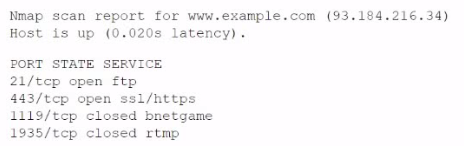
A company experienced a data leak through its website. A security engineer, who is
investigating the issue, runs a vulnerability scan against the website and receives the
following output:
Which of the following is the most likely cause of this leak?
A. RTMP port open
B. SQL injection
C. Privilege escalation
D. Insecure protocol
Explanation:
The Nmap scan shows that port 21/tcp is open and running FTP (File Transfer Protocol). FTP is a classic insecure protocol because it transmits data (including usernames, passwords, and file contents) in plain text with no encryption.
An attacker who can reach the website could:
- Sniff credentials or sensitive files in transit (e.g., using a packet sniffer on the network).
- Exploit anonymous FTP access (if enabled) or weak authentication to download/upload data.
This directly enables data exfiltration or leakage from the web server or associated backend.
This matches the reported data leak through the website perfectly. In cloud environments, exposing legacy insecure services like FTP on a public-facing web server is a common misconfiguration that violates security best practices.
Why the other options are incorrect
A. RTMP port open
Port 1935 (RTMP) is shown as closed. Even if it were open, RTMP is mainly for streaming media and not typically associated with general data leaks from a website (unless specifically used for sensitive file transfer, which is rare).
B. SQL injection
This is an application-layer vulnerability (e.g., in web forms or APIs). A vulnerability scan like Nmap (which is a port/service scanner) would not directly detect or indicate SQL injection. No evidence in the output points to database issues.
C. Privilege escalation
This involves gaining higher-level access after initial compromise (e.g., from user to root/admin). The scan shows open/closed ports and services but provides no indication of exploited privileges or escalation paths.
References
CompTIA Cloud+ (CV0-004) objectives: Security configurations, vulnerability scanning, and secure protocols.
A cloud administrator shortens the amount of time a backup runs. An executive in the company requires a guarantee that the backups can be restored with no data loss. Which of th€ following backup features should the administrator lest for?
A. Encryption
B. Retention
C. Schedule
D. Integrity
Explanation:
The key requirement in the question is:
“backups can be restored with no data loss”
This points directly to ensuring that the backup data is accurate, complete, and uncorrupted — which is exactly what integrity guarantees.
Backup integrity ensures that:
- Data has not been altered or corrupted
- The restored data matches the original data
- Verification mechanisms (like checksums or hashes) confirm reliability
Without integrity checks, a backup might complete quickly—but could be useless during restore.
Why the other options are wrong
A. Encryption
Protects confidentiality (data privacy)
Does not guarantee that data is intact or restorable without loss
B. Retention
Defines how long backups are stored
Does not affect data accuracy or restore quality
C. Schedule
Determines when backups run
Shortening backup time relates to scheduling, but it doesn’t ensure data correctness
Exam Tip
For Cloud+ and similar exams, remember the CIA triad:
- Confidentiality → Encryption
- Integrity → Accuracy / No corruption
- Availability → Access / uptime
If the question mentions:
- “no data loss”
- “accurate restore”
- “data consistency”
➡️ The answer is almost always Integrity.
A system surpasses 75% to 80% of resource consumption. Which of the following scaling approaches is the most appropriate?
A. Trending
B. Manual
C. Load
D. Scheduled
Explanation:
Load-based scaling (also known as dynamic scaling) is the most appropriate approach when a system hits a specific performance threshold, such as 75% to 80% CPU or memory consumption.
In cloud environments, auto-scaling groups are configured with "scaling policies" that monitor real-time metrics. When the load reaches a predefined watermark (the threshold), the cloud platform automatically provisions additional resources (scaling out) to handle the demand and maintain application performance. Once the load drops, it can automatically decommission those resources (scaling in) to save costs.
Incorrect Answers
A. Trending
Trending involves analyzing historical data over weeks or months to predict future capacity needs (Capacity Planning). While useful for long-term budget and hardware procurement, it is not a reactive "scaling approach" for an immediate spike in resource consumption.
B. Manual
Manual scaling requires a human operator to observe the high utilization and manually add more instances or upgrade the hardware. This is inefficient, slow, and prone to human error compared to automated load-based scaling.
C. Scheduled
Scheduled scaling is based on time, not performance. For example, a company might schedule extra servers to turn on every Monday at 9:00 AM because they know traffic spikes then. It would not react if an unexpected spike hit 80% utilization on a Tuesday.
Reference
CompTIA Cloud+ (CV0-004) Objective:
Domain 1.0: Cloud Architecture and Design
Section 1.2: Given a scenario, analyze the different types of cloud service models (e.g., scaling, elasticity, right-sizing).
Domain 2.0: Deployment and Administration
Section 2.4: Given a scenario, configure and optimize cloud capacity (e.g., auto-scaling, horizontal vs. vertical scaling).
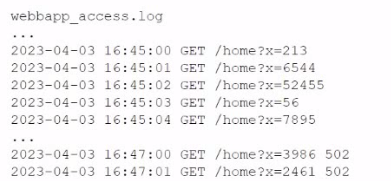
A company's website suddenly crashed. A cloud engineer investigates the following logs:
Which of the following is the most likely cause of the issue?
A. SQL injection
B. Cross-site scripting
C. Leaked credentials
D. DDoS
Explanation:
The access logs show a rapid series of GET /home?x= requests with quickly increasing parameter values (x=213 → 6544 → 52445 → 56 → 7895 → 3998 502 → 2461 502, etc.) in a very short time window (within seconds at 16:45:xx).
This pattern is characteristic of an automated SQL injection attack, specifically numeric/time-based blind SQL injection or error-based probing:
- The attacker is likely injecting payloads into the x parameter (e.g., x=1' OR '1'='1, x=1 UNION SELECT ..., or sleep-based payloads like x=1 AND (SELECT * FROM (SELECT(SLEEP(5)))...)).
- The rapidly changing numeric values represent the attacker testing different inputs, enumerating database contents, or causing delays/errors to confirm vulnerability.
- These repeated malicious requests overwhelm the web application (especially if it lacks proper input sanitization and runs expensive database queries for each request), leading to high CPU/database load and eventual crash.
In cloud environments, unpatched or poorly coded web apps exposed to the internet are highly susceptible to this. The sudden nature of the crash aligns with an active exploit rather than normal traffic.
Why the other options are incorrect
B. Cross-site scripting (XSS)
XSS involves injecting malicious JavaScript (usually via <script> tags) that executes in users' browsers. It does not typically appear as many server-side GET requests with numeric parameters in access logs, nor does it directly crash the backend server (it affects clients).
C. Leaked credentials
This would show successful logins (e.g., POST to /login with stolen creds) or unusual authenticated activity from unexpected IPs. The logs only show anonymous GET requests with a query parameter — no authentication evidence.
D. DDoS
A DDoS (especially volumetric) would show massive numbers of requests from many different IPs/sources, often without meaningful parameters or focused on a single endpoint. Here, the requests are highly patterned and targeted at a specific vulnerable parameter (?x=), indicating an application-layer attack rather than brute-force flooding.
References
CompTIA Cloud+ (CV0-004) objectives: Security vulnerabilities, web application security, log analysis for incident response.
OWASP Top 10: Injection (SQLi is #1 or near the top in most versions).
| Page 5 out of 26 Pages |