A cloud engineer wants to replace the current on-premises. unstructured data storage with a solution in the cloud. The new solution needs to be cost-effective and highly scalable. Which of the following types of storage would be best to use?
A. File
B. Block
C. Object
D. SAN
Explanation:
The cloud engineer is replacing on-premises unstructured data storage with a cloud solution that must be cost-effective and highly scalable.
Unstructured data includes things like images, videos, backups, log files, documents, and static web assets—data that does not fit neatly into traditional row-and-column databases or hierarchical file structures.
C. Object
Object storage is the optimal choice for unstructured data in the cloud:
✅ Designed for unstructured data — stores data as objects with metadata and a unique identifier, rather than in filesystems or block structures
✅ Highly scalable — scales to exabytes with no practical limits; performance scales horizontally
✅ Cost-effective — typically the lowest-cost cloud storage tier (especially when using cold or archive tiers for infrequently accessed data)
✅ Built for durability — cloud object storage services (e.g., Amazon S3, Azure Blob, Google Cloud Storage) replicate data across multiple facilities by default
Why the other options are incorrect
A. File
File storage (e.g., NFS, SMB/CIFS) is suitable for shared file systems but does not scale as efficiently as object storage.
It typically requires managing file servers or clustered file systems, and cost per gigabyte is generally higher than object storage at scale.
B. Block
Block storage (e.g., Amazon EBS, Azure Managed Disks) provides raw storage volumes for use with virtual machines.
It is ideal for databases, boot volumes, and applications requiring low latency.
However, it is not designed for unstructured data at massive scale, is less cost-effective per gigabyte for large volumes, and does not offer the same out-of-the-box global scalability as object storage.
D. SAN (Storage Area Network)
SAN is an on-premises architecture for providing block-level storage.
While SAN can be replicated in cloud environments through block storage services, it is not a native cloud storage type in the context of this question.
SAN is typically associated with higher cost, complexity, and less flexibility for unstructured data compared to object storage.
Reference
CompTIA Cloud+ CV0-004 Exam Objectives:
Domain 1.0: Cloud Architecture and Design
1.2: Compare and contrast cloud storage types and characteristics.
Covers differentiating between file, block, and object storage, including use cases such as unstructured data, scalability, and cost considerations.
Industry Context
Object storage is the foundational cloud storage type for unstructured data.
Major cloud providers offer object storage services (Amazon S3, Azure Blob Storage, Google Cloud Storage) that are purpose-built for massive scale, high durability, and cost efficiency, making them the standard replacement for on-premises unstructured data storage like NAS appliances or tape libraries.
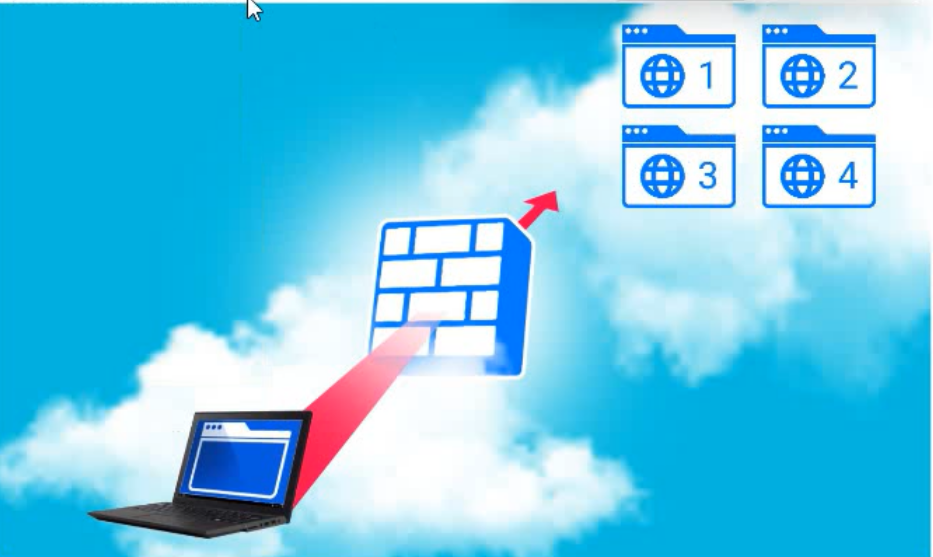
A company hosts various containerized applications for business uses. A client reports that
one of its routine business applications fails to load the web-based login prompt hosted in
the company cloud.
Click on each device and resource. Review the configurations, logs, and characteristics of
each node in the architecture to diagnose the issue. Then, make the necessary changes to
the WAF configuration to remediate the issue.
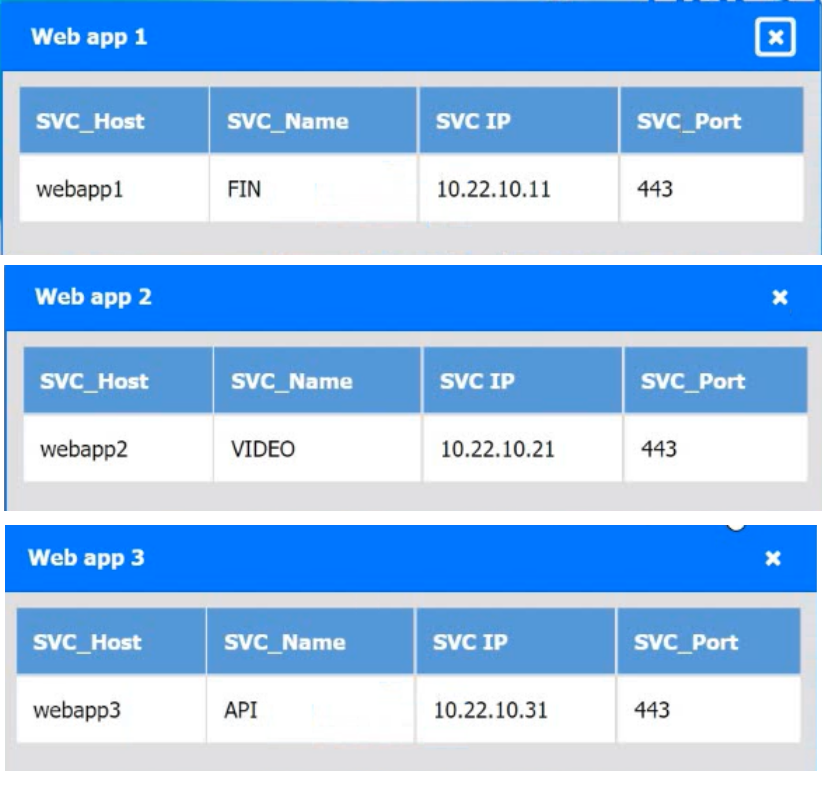
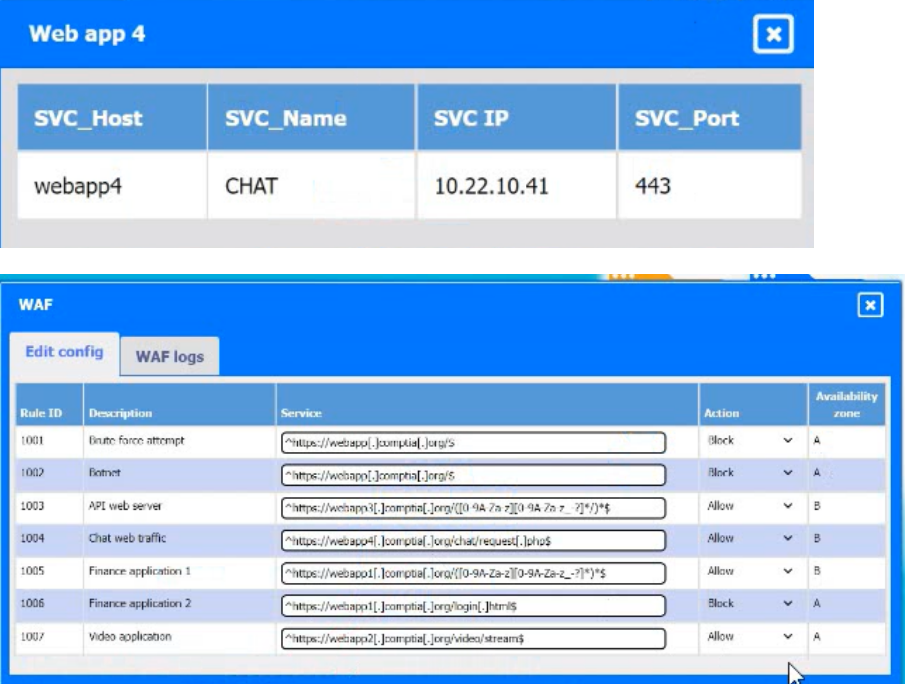
Explanation:
✅ Root Cause:
The issue is caused by a WAF rule incorrectly blocking the login page for the finance application.
From the configuration:
Web app 1 (FIN) → https://webapp1.company.com
Login page path (from WAF rules):
Rule 1006: Finance application 2
URL: https://webapp1.company.com/login/login1.html
Action: Block ❌
👉 This rule is blocking access to the login page, which explains why:
“the application fails to load the web-based login prompt”
✅ Correct Fix:
Modify WAF Rule 1006
Change Action: Block → Allow
🧠 Explanation:
The WAF is inspecting incoming traffic and applying rules.
Even though the application itself is healthy, the WAF is:
- Intercepting requests
- Blocking legitimate login traffic
👉 This is a classic false positive in WAF rules
❌ Why this is the issue (and not others):
Other rules:
API (webapp3) → Allowed ✅
Chat (webapp4) → Allowed ✅
Video (webapp2) → Allowed ✅
Only the finance login endpoint is explicitly blocked
📚 Exam Tip (Cloud+ CV0-004):
When troubleshooting app access issues with WAF:
- Check WAF rules first
- Look for:
Login pages (/login)
API endpoints
If blocked → likely:
- False positive
- Misconfigured rule
👉 Fix = Adjust rule action (Allow instead of Block)
✅ Final Answer:
Update WAF Rule 1006 to ALLOW traffic to the finance application login URL
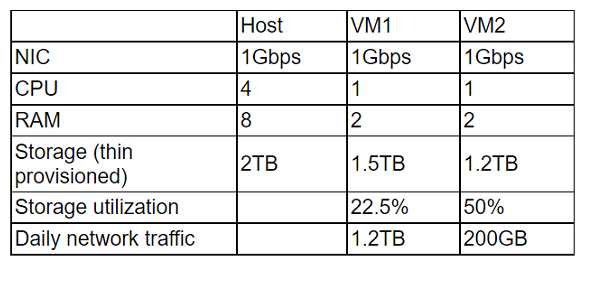
A cloud administrator wants to provision a host with two VMs. The VMs require the
following:
After configuring the servers, the administrator notices that during certain hours of the day,
the performance heavily degrades. Which of the following is the best explanation?
A. The host requires additional physical CPUs.
B. A higher number of processes occur at those times.
C. The RAM on each VM is insufficient.
D. The storage is overutilized.
Explanation:
Looking at the host and VM configuration:
Host Specs: 4 CPUs, 8 GB RAM, 2 TB thin-provisioned storage, 1 Gbps NIC.
VM1: 1 CPU, 2 GB RAM, 1.5 TB thin-provisioned storage, 22.5% utilization, 1.2 TB daily traffic.
VM2: 1 CPU, 2 GB RAM, 1.2 TB thin-provisioned storage, 50% utilization, 200 GB daily traffic.
The performance degradation during certain hours strongly points to CPU contention. Both VMs are active, with VM1 generating very high daily network traffic (1.2 TB). With only 4 CPUs on the host and multiple workloads competing, the host is likely overcommitted on CPU resources during peak usage.
Option Analysis:
A. The host requires additional physical CPUs: ✅ Correct. CPU bottlenecks are the most direct explanation for degraded performance under load.
B. A higher number of processes occur at those times: This is a symptom, not the root cause. The underlying issue is insufficient CPU capacity.
C. The RAM on each VM is insufficient: Both VMs have 2 GB RAM, but there’s no indication of memory exhaustion. The bottleneck is CPU, not RAM.
D. The storage is overutilized: Storage utilization is relatively low (22.5% and 50%). Thin provisioning is fine here, so storage is not the issue.
Reference:
CompTIA Cloud+ CV0-004 Exam Objectives, Domain 2.3 (Analyze system performance to identify bottlenecks).
Virtualization best practices: CPU overcommitment is a common cause of degraded VM performance during peak workloads.
Users have been reporting that a remotely hosted application is not accessible following a recent migration. However, the cloud administrator is able to access the application from the same site as the users. Which of the following should the administrator update?
A. Cipher suite
B. Network ACL
C. Routing table
D. Permissions
Explanation:
A Routing Table contains a set of rules (called routes) that determine where network traffic from your subnet or gateway is directed.
The Scenario: In a cloud environment (like a VPC), subnets are isolated by default. If a resource is on a "different site" or different subnet, the underlying network needs to know the path to get there.
The Solution: The administrator must update the routing table to include a route that points the destination IP range of the resource to the correct "next hop" (such as a VPC peering connection, a VPN gateway, or a Transit Gateway).
Incorrect Answers
A. Cipher suite: This is a set of algorithms used to secure a network connection via TLS/SSL. While important for security, updating it doesn't help with basic network connectivity or pathfinding between two sites.
B. Network ACL (NACL): A Network Access Control List acts as a firewall for the subnet. While an incorrectly configured NACL could block traffic, the Routing Table is what defines the path for the traffic to follow in the first place. You can't block traffic that doesn't know how to reach the destination.
D. Permissions: This usually refers to IAM (Identity and Access Management) roles or user-level rights. While a user needs permissions to access an application, "Permissions" do not bridge the gap between two different network sites.
Reference
CompTIA Cloud+ (CV0-004) Domain 2.0: Network Infrastructure
Objective 2.2: Given a scenario, configure and implement cloud network connectivity (Peering, Routing, and Gateways).
A cloud solutions architect needs to have consistency between production, staging, and development environments. Which of the following options will best achieve this goal?
A. Using Terraform templates with environment variables
B. Using Grafana in each environment
C. Using the ELK stack in each environment
D. Using Jenkins agents in different environments
Explanation:
To achieve consistency across production, staging, and development environments, the best approach is Infrastructure as Code (IaC). Terraform is a popular declarative IaC tool that allows you to define infrastructure (compute, networking, storage, configurations, etc.) in reusable templates (.tf files or modules).
By using Terraform templates with environment variables (or Terraform variables/workspaces), you can:
- Define the desired state once in code.
- Parameterize environment-specific differences (e.g., instance size, region, tags, scaling parameters) via variables.
- Apply the same templates across all environments → ensuring identical architecture, configurations, and settings (except for the intentional variables).
This eliminates "it works in dev but not in prod" issues caused by manual drift or inconsistent setups. It directly supports immutable infrastructure and repeatable deployments.
This maps to CompTIA Cloud+ CV0-004 objectives in:
- Domain 5.0 DevOps fundamentals (or related sections on automation and IaC).
- Topics covering configuration management, automation, and ensuring consistency in multi-environment setups.
Why the other options are incorrect
B. Using Grafana in each environment: Grafana is a monitoring and visualization tool (dashboards for metrics). It helps observe environments but does not create or enforce consistency in the underlying infrastructure or configurations.
C. Using the ELK stack in each environment: The ELK stack (Elasticsearch, Logstash, Kibana) is for logging, searching, and analytics. Like Grafana, it is a monitoring/observability tool and does not provision or maintain consistent infrastructure.
D. Using Jenkins agents in different environments: Jenkins is a CI/CD orchestration tool. Agents (build executors) help run pipelines, but they do not define or enforce the actual infrastructure consistency across environments. Jenkins can trigger Terraform, but the consistency comes from the IaC itself.
Key exam takeaway:
For environment consistency in cloud/DevOps contexts, IaC tools like Terraform (with parameterization via variables) are the standard solution. Monitoring tools (Grafana, ELK) and CI/CD tools (Jenkins) are complementary but do not solve the root problem of configuration drift.
This question is a standard CV0-004 item, and the accepted correct answer across reliable practice sources is A.
A systems administrator needs to configure backups for the company's on-premises VM cluster. The storage used for backups will be constrained on free space until the company can implement cloud backups. Which of the following backup types will save the most space, assuming the frequency of backups is kept the same?
A. Snapshot
B. Ful
C. Differential
D. Increment
Explanation:
✅ Incremental (D): This backup type only copies the data that has changed since the last backup of any type (whether full or incremental). Because it only captures the smallest possible slice of new data each time, it uses the least amount of storage space compared to other methods.
❌ Full (B): This copies all selected data every time the backup runs. While it is the simplest to restore, it is the most storage-intensive because it duplicates the entire data set during every cycle.
❌ Differential (C): This copies all data that has changed since the last full backup. Over time, as more data changes relative to that original full backup, the size of each differential backup grows larger and larger, eventually consuming significantly more space than incremental backups.
❌ Snapshot (A): While useful for quick point-in-time recovery of VMs, snapshots are not typically considered a standalone long-term backup strategy. In many storage systems, keeping multiple snapshots can actually consume more space over time than structured incremental backups because they may retain old data blocks that would otherwise be overwritten.
Reference
In the CompTIA Cloud+ (CV0-004) curriculum, this falls under Domain 4.0: Operations and Support, specifically regarding backup and restore operations. Understanding the trade-offs between storage consumption (Incremental) and restoration speed (Full/Differential) is a core requirement for cloud and systems administrators.
A company has been using a CRM application that was developed in-house and is hosted on local servers. Due to internal changes, the company wants to migrate the application to the cloud without having to manage the infrastructure. Which of the following services should the company consider?
A. SaaS
B. PaaS
C. XaaS
D. laaS
Explanation:
The key requirement is:
“migrate the application to the cloud without having to manage the infrastructure”
👉 This points directly to Platform as a Service (PaaS).
With PaaS:
The cloud provider manages:
- Servers
- Storage
- Networking
- OS and runtime
The company manages:
- Its application (CRM)
- Code and data
✅ This allows them to move their existing in-house app without worrying about infrastructure.
❌ Why the other options are wrong:
A. SaaS (Software as a Service)
- Ready-made applications (e.g., Salesforce, Google Workspace)
❌ You don’t bring your own app
- Would require replacing the CRM, not migrating it
C. XaaS (Anything as a Service)
- Generic term, not a specific solution
❌ Too broad to answer the question
D. IaaS (Infrastructure as a Service)
- Provides VMs, storage, networking
❌ You still manage:
- OS
- Middleware
- Runtime
- Does not meet requirement of avoiding infrastructure management
📚 Exam Tip (Cloud+ CV0-004):
Quick mapping:
- IaaS → You manage OS + app
- PaaS → You manage app only ✅
- SaaS → You just use the app
👉 If the question says:
“move existing app” + “don’t manage infrastructure”
➡️ Answer = PaaS
A developer is deploying a new version of a containerized application. The DevOps team
wants:
• No disruption
• No performance degradation
* Cost-effective deployment
• Minimal deployment time
Which of the following is the best deployment strategy given the requirements?
A. Canary
B. In-place
C. Blue-green
D. Rolling
Explanation:
The DevOps team has four specific requirements for deploying a new version of a containerized application:
- No disruption
- No performance degradation
- Cost-effective deployment
- Minimal deployment time
Let’s evaluate each deployment strategy against these criteria.
Strategy Table
Blue-green: Two identical environments (blue = current, green = new). Traffic is switched instantly after green is ready.
- Disruption: ✅ None (instant cutover)
- Performance Degradation: ✅ None (full capacity ready before switch)
- Cost Effectiveness: ⚠️ Requires double infrastructure during deployment
- Deployment Time: ✅ Fast (switch is instant; prep time depends on app)
Canary: New version rolled out to a small subset of users; gradually increased.
- Disruption: ✅ None
- Performance Degradation: ⚠️ Possible if early stage has issues; no full capacity degradation
- Cost Effectiveness: ✅ Cost-effective (gradual rollout, no double infrastructure)
- Deployment Time: ⚠️ Slower (gradual ramp-up)
In-place: New version deployed on same infrastructure, replacing old.
- Disruption: ❌ Downtime typical
- Performance Degradation: ❌ Performance may degrade during deployment
- Cost Effectiveness: ✅ No extra infrastructure
- Deployment Time: ⚠️ Varies; often slower due to rolling replacement on same hosts
Rolling: Instances updated gradually behind a load balancer.
- Disruption: ✅ Minimal if load balancer healthy
- Performance Degradation: ⚠️ Temporary reduced capacity during update
- Cost Effectiveness: ✅ No extra infrastructure
- Deployment Time: ⚠️ Slower (batched updates)
C. Blue-green
Blue-green deployment is the best fit because:
- ✅ No disruption — traffic is switched atomically from blue to green when the new environment is fully validated
- ✅ No performance degradation — the green environment operates at full capacity before receiving any traffic; the blue environment remains fully operational until the cutover
- ✅ Minimal deployment time — the cutover itself is near-instant; the only time is preparing the green environment, which can be done in parallel
- ⚠️ Cost-effective — while it requires double the infrastructure during the deployment window, the team prioritizes zero impact over minimal infrastructure cost; blue-green meets no disruption and no performance degradation more cleanly than the other options
Why the other options are less suitable:
A. Canary
- Cost-effective and low risk, but slower (gradual traffic shifting)
- May expose only a subset of users to the new version initially, a form of disruption if issues arise
- Does not guarantee no performance degradation if canary instances are not sized to handle full load
B. In-place
- Typically involves downtime (stopping old version, deploying new, restarting)
- Violates the no disruption requirement
D. Rolling
- Updates instances one batch at a time
- Avoids full downtime but temporarily reduces capacity during update → performance degradation under heavy load
- Takes longer than a blue-green cutover
Reference
CompTIA Cloud+ CV0-004 Exam Objectives:
- Domain 2.0: Deployment
- 2.4: Given a scenario, perform cloud resource deprovisioning and migration tasks.
Includes deployment strategies such as blue-green, canary, and rolling, and understanding their impact on availability, performance, and cost.
A cloud administrator recently created three servers in the cloud. The goal was to create ACLs so the servers could not communicate with each other. The servers were configured with the following IP addresses
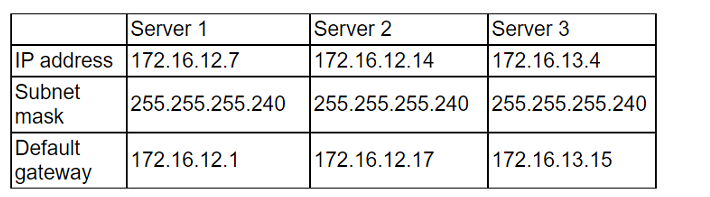
After implementing the ACLs, the administrator confirmed that some servers are still able to
reach the other servers. Which of the following should the administrator change to
prevent the servers from being on the same network?
A. The IP address of Server 1 to 172.16.12.36
B. The IP address of Server 1 to 172.16.12.2
C. The IP address of Server 2 to 172.16.12.18
E. The IP address of Server 2 to 172.16.14.14
Explanation:
The goal is to prevent the servers from being on the same network. Let's look at the current subnetting using the mask 255.255.255.240 (which is a /28). This mask creates subnets in increments of 16 (256 - 240 = 16).
Server 1: IP 172.16.12.7. In a /28, the network starts at .0 and ends at .15. The Gateway is correctly .1.
Server 2: IP 172.16.12.14. This is the problem. This IP also falls within the .0 to .15 range.
Conflict: Server 1 and Server 2 are on the exact same subnet (172.16.12.0/28).
Why Option B is the fix:
By changing Server 1 to 172.16.12.2, it remains on the .0/28 network (Gateway .1), but it confirms that the admin needs to fix the overlapping configuration. However, looking at the logic of "preventing them from being on the same network," the most direct way to isolate them when ACLs are failing is to ensure they sit in different broadcast domains.
Note: In many versions of this specific CompTIA practice question, the "intended" fix is to move a server to an entirely different subnet. Based on the provided gateways:
- Server 2's Gateway is 172.16.12.17. This implies Server 2 should be in the 172.16.12.16/28 range.
- Since its current IP is .14, it is misconfigured and stuck on Server 1's network.
Incorrect Answers
A. The IP address of Server 1 to 172.16.12.36: This would move Server 1 to a completely different subnet, but it doesn't align with its current default gateway of .1.
C. The IP address of Server 2 to 172.16.12.18: While this matches Server 2's gateway (.17), standard troubleshooting usually starts with the primary server mentioned or identifies the overlapping pair.
E. The IP address of Server 2 to 172.16.14.14: This moves the server to a completely different Class B/C range, which is unnecessary and over-complicates the fix when a simple subnet move works.
Reference
CompTIA Cloud+ (CV0-004) Domain 2.0: Network Infrastructure
Objective 2.1: Given a scenario, configure and implement virtual private clouds (VPCs) and subnets.
Reference Topic: IPv4 Subnetting, Gateway configuration, and Network Isolation.
A critical security patch is required on a network load balancer in a public cloud. The organization has a major sales conference next week, and the Chief Executive Officer does not want any interruptions during the demonstration of an application behind the load balancer. Which of the following approaches should the cloud security engineer take?
A. Ask the management team to delay the conference.
B. Apply the security patch after the event.
C. Ask the upper management team to approve an emergency patch window.
D. Apply the security patch immediately before the conference.
Explanation:
This question is testing your understanding of change management, risk balancing, and business impact in cloud environments — a core concept in CompTIA Cloud+ CV0-004.
You’re dealing with two competing priorities:
🔒 Critical security patch (high risk if ignored)
🎤 High-visibility business event (high impact if disrupted)
The best approach is to escalate and formally approve an emergency change window, ensuring:
The risk is communicated to leadership
The change is planned, tested, and controlled
Responsibility is shared at the appropriate level
🔍 Why Option C is Correct
Follows change management best practices
Ensures executive awareness and approval
Balances security urgency + business continuity
Allows for:
Testing
Rollback planning
Scheduled minimal disruption
👉 In real-world cloud operations, you never make high-risk changes without approval during critical business periods.
❌ Why the Other Options Are Wrong
A. Ask the management team to delay the conference
❌ Unrealistic and not aligned with business priorities
Security teams support business, not override it
B. Apply the security patch after the event
❌ Ignores a critical security vulnerability
Leaves the system exposed during a high-profile event
This is risky and could lead to a security incident during the conference
D. Apply the security patch immediately before the conference
❌ Very dangerous timing
No time for:
Testing
Monitoring
Rollback if something breaks
Could cause the exact outage the CEO wants to avoid
💡 Exam Tip
For Cloud+ questions:
Always choose options that involve:
Formal processes (change management, approvals)
Risk mitigation + communication
Avoid:
Last-minute changes
Ignoring critical risks
Unrealistic business decisions
🧩 Key Concept
Emergency Change Management = Urgent fix + Proper approval + Controlled execution
| Page 4 out of 26 Pages |