
Question 1
Choose 1
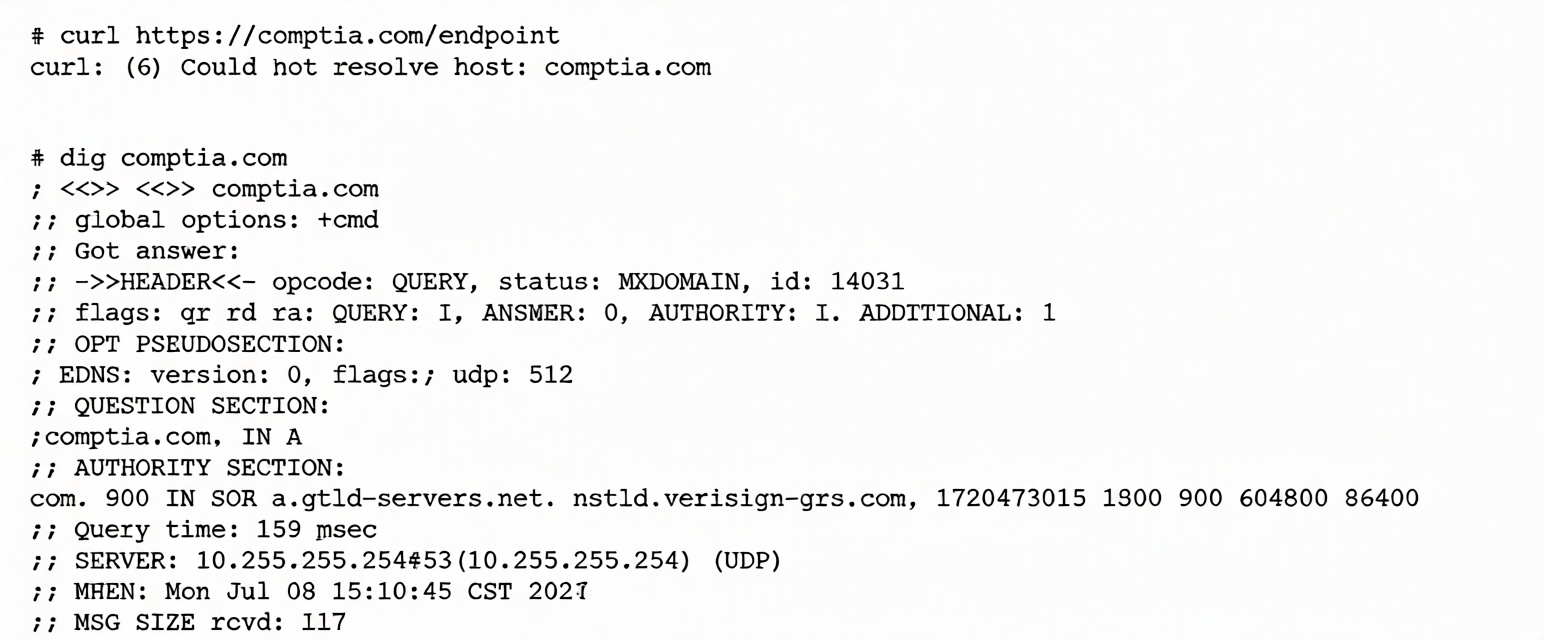
A systems administrator is having issues with a third-party API endpoint. The administrator receives the
following output:
Which of the following actions should the administrator take to resolve the issue?
Which of the following actions should the administrator take to resolve the issue?
Correct answer:
C. Review and fix the DNS client configuration file.
Explanation:
The provided command outputs indicate a failure in the Domain Name System (DNS) resolution process, which prevents the system from finding the IP address of the third-party API.
curl Analysis:
The output
curl: (6) Could not resolve host: comptia.com
shows that the application cannot proceed because it doesn't know where to send the data.
dig Analysis:
Status: NXDOMAIN — "Non-Existent Domain." The DNS server explicitly states it cannot find a record for the requested name.
ANSWER: 0 → No valid IP address was returned for the query.
Server Information: The system is querying an internal IP address, 10.255.255.254. This local nameserver is failing to provide public internet records.
The Action:
The DNS client configuration file in Linux is typically /etc/resolv.conf.
Reviewing and fixing this file — by adding a valid nameserver such as 8.8.8.8 — will allow the system to correctly resolve the API endpoint.
Explanation of Incorrect Answers
Open a secure port in the server's firewall:
Firewall issues usually result in "Connection Timed Out" or "Connection Refused" errors.
Because the error here is "Could not resolve host," the system hasn't even reached the stage where a firewall would block a port. It cannot connect without an IP address.
Request a new API endpoint from a third party:
The dig output shows the system is querying comptia.com, which is a valid domain.
The endpoint itself is likely fine. The problem lies with the local server's inability to resolve the domain.
Enable internet connectivity on the host:
The system is successfully communicating with its local DNS server at 10.255.255.254 (as evidenced by the dig response).
While general internet access might be required for the API call, the specific error here is DNS resolution, which must be fixed in /etc/resolv.conf first.
Reference:
CompTIA Exam Objective: Domain 5.0 (Troubleshooting) – Subsection 5.3: Analyze and troubleshoot network-related issues (DNS and Name Resolution).
Reference: Linux Man Pages (man resolv.conf, man dig); Official CompTIA Linux+ Study Guide, Chapter on Network Troubleshooting.
The provided command outputs indicate a failure in the Domain Name System (DNS) resolution process, which prevents the system from finding the IP address of the third-party API.
curl Analysis:
The output
curl: (6) Could not resolve host: comptia.com
shows that the application cannot proceed because it doesn't know where to send the data.
dig Analysis:
Status: NXDOMAIN — "Non-Existent Domain." The DNS server explicitly states it cannot find a record for the requested name.
ANSWER: 0 → No valid IP address was returned for the query.
Server Information: The system is querying an internal IP address, 10.255.255.254. This local nameserver is failing to provide public internet records.
The Action:
The DNS client configuration file in Linux is typically /etc/resolv.conf.
Reviewing and fixing this file — by adding a valid nameserver such as 8.8.8.8 — will allow the system to correctly resolve the API endpoint.
Explanation of Incorrect Answers
Open a secure port in the server's firewall:
Firewall issues usually result in "Connection Timed Out" or "Connection Refused" errors.
Because the error here is "Could not resolve host," the system hasn't even reached the stage where a firewall would block a port. It cannot connect without an IP address.
Request a new API endpoint from a third party:
The dig output shows the system is querying comptia.com, which is a valid domain.
The endpoint itself is likely fine. The problem lies with the local server's inability to resolve the domain.
Enable internet connectivity on the host:
The system is successfully communicating with its local DNS server at 10.255.255.254 (as evidenced by the dig response).
While general internet access might be required for the API call, the specific error here is DNS resolution, which must be fixed in /etc/resolv.conf first.
Reference:
CompTIA Exam Objective: Domain 5.0 (Troubleshooting) – Subsection 5.3: Analyze and troubleshoot network-related issues (DNS and Name Resolution).
Reference: Linux Man Pages (man resolv.conf, man dig); Official CompTIA Linux+ Study Guide, Chapter on Network Troubleshooting.