
Question 1
Choose 1
An
administrator is investigating the reason a Linux workstation is not resolving the website http://www.comptia.
org. The administrator executes some commands and receives the following output:
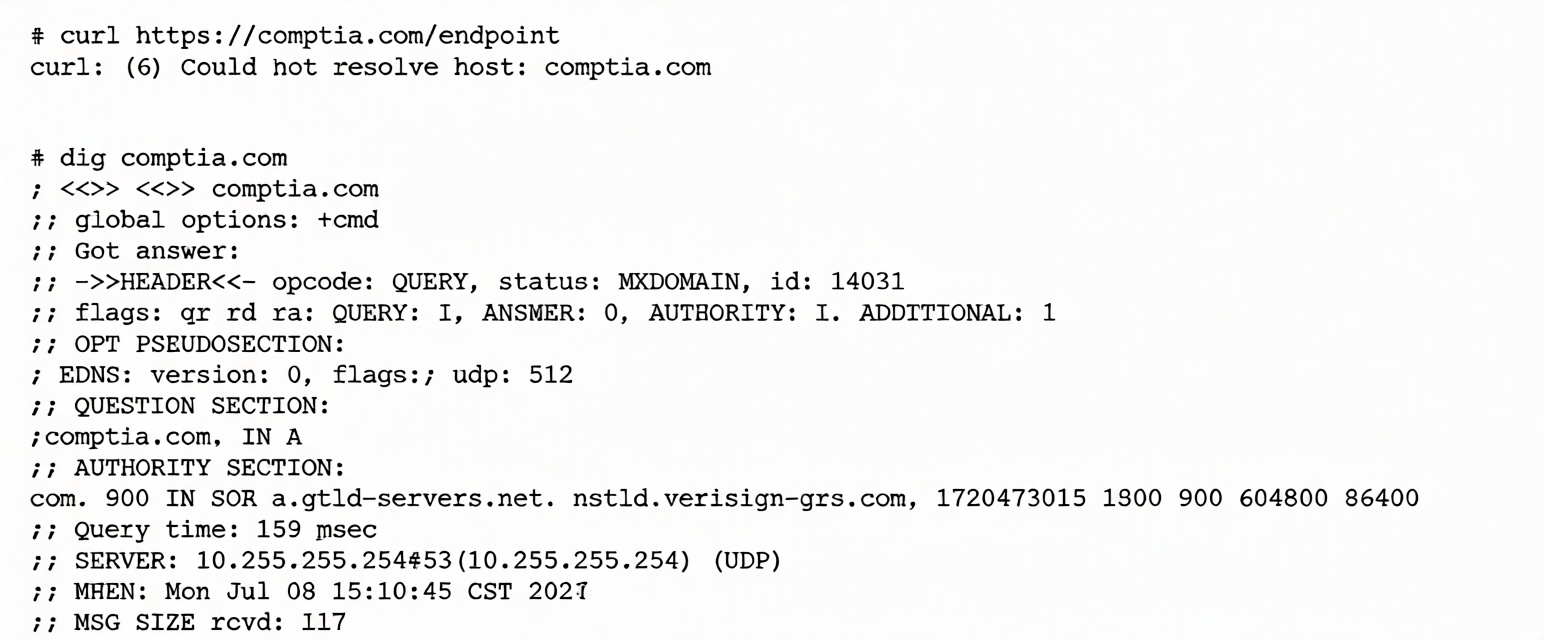
Which of the following is the most likely cause?
Which of the following is the most likely cause?
Correct answer:
A. The static entry needs to be removed from /etc/hosts.
Explanation:
The key error shown is:
curl: (6) Could not resolve host: comptia.com
This indicates a DNS resolution failure, not a web server or firewall problem.
Evidence from dig Output
status: NXDOMAIN
SERVER: 10.255.255.254#53
Important Observations:
The workstation is querying a DNS server at 10.255.255.254.
That DNS server is returning NXDOMAIN (domain does not exist).
comptia.com is a valid domain, so the response is incorrect.
This means the configured DNS server is incorrect or malfunctioning.
The root cause is a bad nameserver configuration, not a connectivity issue.
Updating /etc/resolv.conf to use a valid DNS server resolves the issue, for example:
nameserver 8.8.8.8
Why the Other Options Are Incorrect
Static entry in /etc/hosts
If /etc/hosts were the issue, dig would not query an external DNS server.
The output clearly shows that DNS queries are being sent to 10.255.255.254.
Remote website does not support IPv6
DNS resolution is failing before any connection attempt occurs.
IPv6 support is unrelated to this error.
Firewall needs outbound HTTP/HTTPS
Firewall problems would cause connection timeouts or connection refused errors.
Here, DNS resolution fails before any HTTP or HTTPS connection is attempted.
Linux+ Exam Tip
Troubleshooting Flow
Could not resolve host → DNS problem
Connection refused → Service not running or firewall blocking
Timeout → Routing or network connectivity issue
Check DNS configuration with:
cat /etc/resolv.conf
Keyword Trigger
NXDOMAIN response from an incorrect DNS server indicates a bad nameserver configuration.
The key error shown is:
curl: (6) Could not resolve host: comptia.com
This indicates a DNS resolution failure, not a web server or firewall problem.
Evidence from dig Output
status: NXDOMAIN
SERVER: 10.255.255.254#53
Important Observations:
The workstation is querying a DNS server at 10.255.255.254.
That DNS server is returning NXDOMAIN (domain does not exist).
comptia.com is a valid domain, so the response is incorrect.
This means the configured DNS server is incorrect or malfunctioning.
The root cause is a bad nameserver configuration, not a connectivity issue.
Updating /etc/resolv.conf to use a valid DNS server resolves the issue, for example:
nameserver 8.8.8.8
Why the Other Options Are Incorrect
Static entry in /etc/hosts
If /etc/hosts were the issue, dig would not query an external DNS server.
The output clearly shows that DNS queries are being sent to 10.255.255.254.
Remote website does not support IPv6
DNS resolution is failing before any connection attempt occurs.
IPv6 support is unrelated to this error.
Firewall needs outbound HTTP/HTTPS
Firewall problems would cause connection timeouts or connection refused errors.
Here, DNS resolution fails before any HTTP or HTTPS connection is attempted.
Linux+ Exam Tip
Troubleshooting Flow
Could not resolve host → DNS problem
Connection refused → Service not running or firewall blocking
Timeout → Routing or network connectivity issue
Check DNS configuration with:
cat /etc/resolv.conf
Keyword Trigger
NXDOMAIN response from an incorrect DNS server indicates a bad nameserver configuration.