Topic · 2 of 8 questions freeTopic 2 : Performance Based Questions (PBQ)
Question 1
You have been contacted through the help desk chat application. A user is setting up a
replacement SOHO router. Assist the user with setting up the router. INSTRUCTIONS
Select the most appropriate statement for each response. Click the send button after each
response to continue the chat.
If at any time you would like to bring back the initial state of the simulation, please click the
Reset All button.
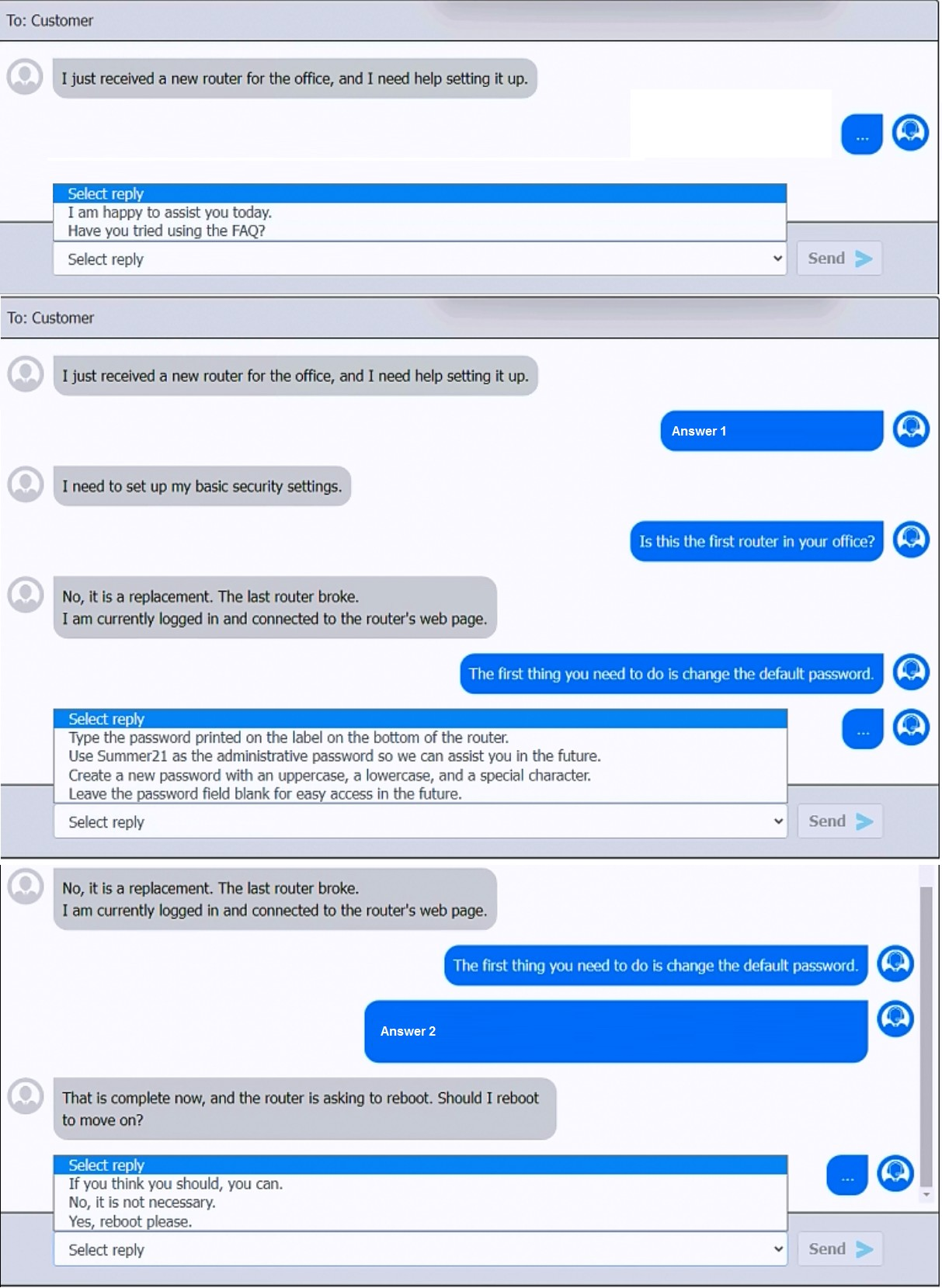
Explanation:
✅ Answer 1
The first thing you need to do is change the default password.
From the choices given in the screenshot, the correct follow-up to this is:
→ Create a new password with an uppercase, a lowercase, and a special character.
Why?
It’s best practice to replace the default administrative password on any network device for security.
CompTIA A+ Core 2 exam objectives (220-1102 and continuing into 220-1202) emphasize using strong passwords with complexity (upper/lowercase, numbers, symbols).
Reference:
CompTIA A+ 220-1102 Objective 2.3: “Given a scenario, apply security best practices to secure a workstation or SOHO network.”
Official CompTIA A+ Study Guide, Core 2 (Passwords: complexity, changing defaults, etc.)
✅ Answer 2
After changing the password, the user asks:
“The router is asking to reboot. Should I reboot?”
The correct answer is:
→ Yes, reboot please.
Why?
Many router configuration changes (especially admin password changes) require a reboot to take effect.
Advising the user to reboot finalizes the setup.
Reference:
CompTIA A+ 220-1102 Objective 2.6: “Given a scenario, configure SOHO multifunction devices / routers”
Vendor best practices for applying configuration changes
✅ Final Answers: Answer 1: Create a new password with an uppercase, a lowercase, and a special character.
Answer 2: Yes, reboot please.
Question 2
Multiple users are reporting audio issues as well as performance issues after downloading
unauthorized software. You have been dispatched to identify and resolve any issues on the
network using best practice procedures.
INSTRUCTIONS
Quarantine and configure the appropriate device(s) so that the users’ audio issues are
resolved using best practice procedures.
Multiple devices may be selected for quarantine.
Click on a host or server to configure services.
If at any time you would like to bring back the initial state of the simulation, please click the
Reset All button.
✅ Scenario Summary
Issue:
Multiple users report audio issues and performance problems.
Problem began after downloading unauthorized software.
Task: Quarantine and configure devices using best practice procedures.
✅ Best Practice Steps
From the context of the simulation and CompTIA A+ objectives:
Identify affected devices.
→ Look for machines running suspicious processes, unauthorized audio tools, or high CPU/memory usage.
Quarantine infected hosts.
→ Disconnect compromised systems from the network to prevent further spread or impact.
Terminate unauthorized software/processes.
→ End suspicious tasks or services that may cause audio/performance issues.
Remove unauthorized applications.
→ Uninstall the software that was downloaded without approval.
Run malware scans.
→ Check for malicious software that might be causing the performance problems.
Verify functionality.
→ Test audio and overall performance after cleanup.
Educate users.
→ Remind users not to download unauthorized software in the future.
✅ What to Do in the Simulation
From the blurred portions visible in your screenshot, it appears you are in a simulation screen listing devices (e.g. PCs, servers). Here’s what to do:
Click each host/device.
Look at running processes and installed applications.
Identify any suspicious audio software (e.g. unauthorized sound drivers, media players, toolbars).
Check CPU/memory usage for signs of malware.
Quarantine infected systems.
Select devices with suspicious software or abnormal resource usage.
Click “Quarantine” to disconnect them from the network.
Remove unauthorized software.
Use the uninstall feature or end suspicious processes on affected machines.
Confirm audio services are running normally.
Check Windows Audio services or other audio-related drivers.
Restart services if necessary.
Document and educate users.
✅ Likely Correct Simulation Actions
Quarantine any PCs showing unauthorized software related to audio or high resource usage.
Remove or disable any unauthorized audio applications.
Restart audio services on clean devices.
Scan for malware on affected devices.
Educate users as the final step.
That's the last free question in Topic 2 : Performance Based Questions (PBQ)
You've seen the free 30% of this topic (2 of 8 questions). Get complete access for every question, explanation and the timed mock exam.
Get exam-ready with a timed 220 1202 CompTIA A+ Core 2 mock exam designed to match the official exam's question format, question count, and time limit.
Build Exam Endurance Stay focused and perform confidently under exam conditions.
Improve Time Management Practice pacing yourself to finish within the time limit.
Fresh Questions Every Attempt Experience randomized questions from our extensive question bank.
Unlimited Practice Attempts Retake mock exams and improve your score at your own pace.
CompTIA A+ Core 2 (220-1202) Exam Blueprint & Question Bank
CompTIA 220-1202 Domain
Official Exam Weight
Our Practice Questions
1.0 Operating Systems
28%
90
Our Practice Questions Cover Subtopics: Windows OS features and tools, macOS and Linux fundamentals, OS installation and upgrades, command-line tools, cloud-based productivity tools, Microsoft Windows networking
2.0 Security
28%
119
Our Practice Questions Cover Subtopics: Physical and logical security, malware types and removal, wireless security protocols, social engineering attacks, authentication methods, workstation and mobile security, data destruction, browser security
3.0 Software Troubleshooting
23%
60
Our Practice Questions Cover Subtopics: Windows OS troubleshooting, PC security issue resolution, mobile OS and application troubleshooting, malware removal best practices
4.0 Operational Procedures
21%
56
Our Practice Questions Cover Subtopics: Documentation and change management, backup and recovery methods, safety procedures, environmental controls, licensing and policies, communication techniques, scripting basics, remote access, AI fundamentals
What Our Community Says
After passing 220-1201, I needed the same quality prep for 220-1202. Preptia.com delivered again with 220-1202 practice exam covering operating systems, security, and troubleshooting. The real exam felt like another practice session. Two passes, one trusted resource!
Amanda Foster, Desktop Support Specialist | Nashville, TN
Operating systems and troubleshooting topics became easier to understand while preparing for CompTIA A+ Core 2 using Preptia.com. The realistic 220-1202 practice exam made exam preparation simple and efficient.
Emily Carter | United Kingdom