After a user installs a mobile application from an advertisement, the phone's battery dies a
few hours later, and it is hot to the touch, even when not in use. Which of the following
should a technician do first?
Correct answer:
C. Run a mobile malware scan on the phone
Explanation:
The symptoms described — rapid battery drain and the phone becoming hot to the touch even when not in use — are classic signs of malware (especially adware, trojans, or cryptocurrency miners) running in the background after the user installed a suspicious application from an advertisement.
Mobile malware often:
Consumes CPU/GPU heavily (causing heat)
Runs background processes that drain the battery quickly
Was installed via deceptive ads or fake apps (a common social engineering vector)
The first action a technician should take is to run a reputable mobile malware/antivirus scan. This quickly checks for and can remove malicious apps/processes. Popular tools include Malwarebytes, Avast, Bitdefender, or the built-in Google Play Protect (on Android).
This fits perfectly under CompTIA A+ Core 2 (220-1202) objectives:
3.2 Troubleshoot common mobile OS and application issues
2.1 Compare and contrast common security threats (malware, adware, etc.)
Why the other options are not the first step A. Check for unauthorized device administrators — This is a good follow-up step (especially on Android, where malicious apps sometimes gain Device Admin rights). However, it is not the fastest or broadest first action. A malware scan will often detect this anyway.
B. Contact the software developer — Useless as a first step. The app came from an advertisement (likely not from an official developer or store), and the developer may be the attacker or non-existent.
D. Ensure appropriate MDM policies are applied — MDM (Mobile Device Management) policies are preventive and corporate-level. They are not useful as the immediate troubleshooting step for an already infected personal or company device.
Correct Troubleshooting Sequence (220-1202)
Run a mobile malware scan ← First step (as per the question)
Check running processes / battery usage stats (Settings → Battery)
Review installed apps and remove any suspicious ones (especially the one from the ad)
Check for unauthorized Device Administrators or Accessibility Services
Boot into Safe Mode (to isolate third-party apps)
Factory reset as a last resort (after backup)
Exam Tip: When you see “battery drains fast + phone gets hot” after installing something questionable, CompTIA expects you to think malware first and scan first.
Question 2Choose 1
A systems administrator logs in to a developer ' s machine to update the system and notices a performance
issue. To troubleshoot the issue, the administrator attempts to open Task Manager multiple times, but it does
not open. Which of the following is most likely the cause of this issue?
Correct answer:
C. The operating system has a malware infection.
Explanation:
When a system exhibits significant performance issues and core diagnostic tools like Task Manager fail to open, it is a classic indicator of a malware infection.
Why Malware Infection is correct:
Malicious software often attempts to protect itself from being discovered or terminated. By disabling or interfering with Task Manager, the malware prevents a technician from seeing the suspicious processes, checking resource spikes, or killing the malicious program.
Why other options are incorrect:
A software development application is running:
While dev tools can be resource-heavy and cause performance drops, they typically do not prevent Windows system utilities like Task Manager from launching.
Windows Update Service is set to manual:
This setting only affects how updates are triggered. It does not impact the system's ability to open administrative tools or cause general unresponsiveness.
A pagefile was moved to D:\ drive:
Moving the pagefile (virtual memory) to a different drive is a common optimization technique and would not cause Task Manager to fail to open; in fact, if the D: drive is faster (like an SSD), it might actually improve performance.
References:
This question falls under Domain 3.0 (Software Troubleshooting) of the CompTIA A+ 220-1202 objectives, specifically focusing on identifying and resolving malware symptoms.
Question 3Choose 1
A Windows service fails to start during system boot. Upon investigation, the technician finds that the service credentials are no longer valid due to multiple failed login attempts. What is the most likely cause of the issue?
Correct answer:
C. The service account is locked out.
Question 4Choose 1
A user is trying to install 3-D rendering software on a new Windows computer, but the installation fails. An
error states that the system does not meet the minimum hardware configuration. Which of the following
features should the user check first?
Correct answer:
B. GPU requirements
Explanation:
Why GPU Requirements are the Priority:
3-D rendering software is designed to perform complex mathematical calculations to generate images and models. These tasks are heavily dependent on the Graphics Processing Unit (GPU), specifically its architecture, video memory (VRAM), and driver support.
Software Verification:
When you run an installer, it often queries the system’s hardware configuration to ensure the application will function correctly. For 3-D rendering applications, the GPU is the most critical hardware component; if the software detects an integrated graphics chip instead of a dedicated GPU, or if the GPU does not support the required version of OpenGL or DirectX, the installer will flag a hardware incompatibility error.
Why the Other Options are Incorrect:
USB speed:
While important for data transfer speeds (e.g., if you were running the software directly off an external drive), the speed of a USB port is almost never a "minimum hardware configuration" requirement for the software's ability to run.
NIC bandwidth:
This relates to network speed. While an application might need an internet connection to download files or license the product, it would not cause a "minimum hardware configuration" error during the installation process itself.
PSU wattage:
While a powerful GPU requires sufficient power, an installer has no way to "read" your Power Supply Unit (PSU) wattage through software. The operating system cannot detect the physical output of the PSU, so this is not a check that the software performs.
CompTIA A+ Context:
In the Troubleshooting domain, this question highlights the importance of distinguishing between software-verifiable hardware components and general system components.
Software-Verifiable: CPU speed, RAM, Storage space, and GPU specifications (model, VRAM, API support) are easily readable by the OS and installer programs.
Physical/Power Requirements: Components like the PSU wattage or the physical size of a component cannot be verified by the software installer.
Question 5Choose 1
A smartphone user unsuccessfully attempts to open an email attachment that includes an
unexpected overdue invoice. After that attempt, the user notices performance issues while
using the mobile browser and other applications. The user restarts the smartphone, but the
issue persists. Which of the following actions would most likely resolve the issue?
Correct answer:
C. Wiping the device and resetting it to factory defaults
Explanation:
The user opened an email attachment (unexpected overdue invoice — a common phishing lure), and immediately afterward experienced performance issues in the browser and other applications. The issue persists even after a restart. These symptoms strongly indicate malware infection, likely from the attachment (e.g., a trojan, spyware, or crypto-mining malware). Since the malware survived a reboot, it has likely achieved persistence. The most reliable resolution is to wipe the device and reset it to factory defaults, removing all user data and installed applications, including the malware. After the reset, the user should restore only from a known clean backup.
Why other options are incorrect:
A. Forcing the smartphone to shut down and restarting it – The user already restarted the smartphone, and the issue persisted. A forced shutdown (holding power button) is functionally the same as a normal restart — it does not remove malware that has persistence mechanisms (e.g., startup scripts, background services). This step has already been attempted and failed.
B. Deleting the email containing the attachment – Deleting the email removes the infection vector but does not remove malware that has already executed and installed itself on the device. The damage is already done. The user needs to remove the active malware, not just the original email.
D. Uninstalling and reinstalling the mobile browser – The performance issues affect "the mobile browser and other applications," indicating a system-wide problem, not a browser-specific issue. Reinstalling the browser would not remove malware that has infected system processes, other apps, or the operating system itself. This step does not address the root cause.
References
CompTIA A+ 220-1102 Exam Objectives – Domain 2.0: Security – Malware removal and remediation (factory reset for mobile devices)
CompTIA A+ Core 2 Study Guide – "If a mobile device shows persistent performance issues after opening a suspicious attachment and restarting does not help, perform a factory reset to remove malware."
NIST SP 800-124 – Guidelines for Managing the Security of Mobile Devices: Factory reset is the recommended final step for compromised devices when malware cannot be removed by other means.
Question 6Choose 1
A user's computer is running slowly. Web pages take several seconds to open, and
applications are slow to respond. A technician opens the Windows Task Manager and sees
the following:
Disk: 2%
Network: 12%
GPU: 15%
CPU: 70%
Memory: 97%
Which of the following would a technician most likely do to resolve the issue?
Correct answer:
C. Close unnecessary programs
Explanation
The key to solving this performance issue lies in correctly interpreting the resource usage data provided by the Windows Task Manager. The numbers tell a clear story about where the bottleneck is.
1. Analyzing the Performance Data
Let's break down the metrics:
CPU:
70%: This is high, indicating the processor is under significant load, but it is not maxed out.
Memory:
97%: This is the critical number. It indicates that the computer's RAM is almost completely full. When physical RAM is exhausted, Windows is forced to use the hard drive (SSD or HDD) as "virtual memory." Accessing data on a drive is thousands of times slower than accessing data in RAM. This process, known as "paging" or "swapping," causes severe system-wide slowdowns, which manifest exactly as described: applications are slow to respond, and everything feels sluggish.
Disk:
2%: This low usage is a direct consequence of the high memory usage. The system is so bogged down by the memory bottleneck that it can't even queue up significant disk operations. The slowness is not caused by the disk itself being busy, but by the system waiting for memory management tasks.
Network:
12% and GPU: 15%: These are within normal ranges and are not contributing significantly to the problem.
2. Why Closing Unnecessary Programs is the Correct Solution:
The high memory usage is being caused by the programs and processes currently running. Each open application, browser tab, and background process consumes a portion of the available RAM.
Direct Impact:
By closing programs that are not needed, you immediately free up the RAM they were using. For example, closing a web browser with many tabs, a large Excel spreadsheet, or an unused photo editor can free up gigabytes of memory.
Immediate Effect:
This action has an instant and dramatic effect on performance. As the Memory usage drops from 97% to a healthier level (e.g., 70-80%), the system stops relying heavily on the slow paging file, and application responsiveness returns to normal.
3. In-Depth Analysis of the Other Options
A. Clear browser cached data (INCORRECT):
While clearing the browser cache can free up a small amount of disk space and potentially resolve website loading issues, it has a minimal impact on RAM usage. The cache is stored on the disk, not in active memory. This action does not address the primary bottleneck of 97% memory utilization.
B. Upgrade the network connection (INCORRECT):
The network utilization is only at 12%, which is not a bottleneck. The slowness described is system-wide (applications are slow), not just related to downloading web pages. Upgrading the network would have no effect on the memory-bound slowdown.
D. Delete temporary files (INCORRECT):
Similar to clearing the browser cache, this action frees up disk space. While good general maintenance, it does not free up the active RAM that is causing the current performance crisis. The Disk usage is already at 2%, proving that free disk space is not the issue. The problem is a lack of free memory.
Reference to CompTIA A+ Objectives:
This scenario falls under the Software Troubleshooting domain of the CompTIA A+ 220-1202 exam, specifically:
Objective 3.3: Given a scenario, use best practice procedures for malware removal. While this is not a malware scenario, the objective emphasizes using tools like Task Manager to identify resource-hogging processes.
Objective 3.6: Given a scenario, troubleshoot common OS and application issues. This includes troubleshooting performance problems and using system utilities to diagnose issues related to high resource utilization, particularly CPU and memory.
Conclusion:
A technician must be able to diagnose the root cause of a performance issue by reading system metrics. In this case, the Memory usage at 97% is the definitive bottleneck causing the system-wide slowdown. The most immediate, effective, and non-invasive solution is to close unnecessary programs to free up the over-utilized RAM.
Question 7Choose 1
A user reports that their computer is running extremely slowly. They are also often redirected to unknown
websites when attempting to access internal applications. The computer ' s antivirus software is outdated, and
the user cannot access certain security-related settings. A network administrator confirms that all other
workstations are operating normally, and network diagnostics show no issues. Which of the following should
the administrator do next to troubleshoot these issues?
Correct answer:
C. Disconnect the device from the network and investigate further.
Explanation:
The symptoms described—system slowness, browser redirections, disabled security settings, and outdated antivirus—are hallmark signs of a malware infection.
Why Disconnecting is correct:
According to the standard CompTIA 7-step Malware Removal Procedure, the second step after identifying symptoms is Quarantine the infected system. By disconnecting the device from the network (physically or by disabling Wi-Fi), the administrator prevents the malware from spreading to other workstations (lateral movement), communicating with a Command and Control (C2) server, or exfiltrating sensitive data while the investigation continues.
Why other options are incorrect:
Check firewall settings:
While malware often changes firewall rules, checking them while the machine is still "live" on the network risks further infection of the environment.
Clear browser cookies/cache:
This is a basic troubleshooting step for website loading issues, but it will not resolve a deep-seated OS infection or disabled security permissions.
Set security settings to highest:
If malware has already compromised the administrative ability to change security settings, this action will likely fail or be bypassed by the active infection.
References:
This follows the CompTIA A+ Malware Removal Best Practices found in Domain 2.4:
Identify symptoms.
Quarantine the infected system (the "Next" step here).
Disable System Restore.
Remediate (Update AV, scan, and remove).
Schedule scans and updates.
Enable System Restore and create a restore point.
Educate the end user.
Question 8Choose 1
A user needs to download some files from a vendor website. Downloading the specific file
type is blocked when using the Microsoft Edge web browser. A technician determines that
the files the user wants to download are safe. Which of the following should the technician
configure to allow these files to be downloaded?
Correct answer:
B. SmartScreen
Explanation:
Microsoft Edge uses SmartScreen (Windows Defender SmartScreen) as a security feature to block downloads of potentially malicious files. SmartScreen maintains a cloud-based reputation list of file types, URLs, and executables. When a specific file type is blocked (e.g., .exe, .scr, .js, or less common extensions), SmartScreen is likely enforcing this restriction. Since the technician has determined the files are safe, configuring SmartScreen to allow the download — either by temporarily lowering protection, adding the vendor URL to the allowed list, or disabling SmartScreen for that specific file type — resolves the issue.
Why other options are incorrect:
A. Defender – Microsoft Defender is the antivirus/anti-malware engine that scans files for known signatures. It does not block downloads based on file type before the download completes. Defender would quarantine or delete a file after download if it contains malware, but it does not prevent the download dialog from appearing or block specific extensions in Edge. The question describes a pre-download block, not post-download detection.
C. User Account Control (UAC) – UAC prompts for administrator approval when system-level changes are attempted (installing software, changing system settings). UAC does not block file downloads based on file type in a web browser. It may appear when running a downloaded executable, but it does not prevent the download itself. The issue occurs during download, not execution.
D. Firewall – A firewall (Windows Defender Firewall) controls network traffic by allowing or blocking ports, IP addresses, and protocols. It does not inspect file types within allowed web traffic (HTTPS/HTTP). If the vendor website is reachable, the firewall would not block a specific file extension. Firewall issues would prevent accessing the site entirely, not selectively block file types.
References
CompTIA A+ 220-1102 Exam Objectives – Domain 1.0: Operating Systems – Windows security features (SmartScreen, Defender, UAC, Firewall)
CompTIA A+ Core 2 Study Guide – "Windows Defender SmartScreen in Microsoft Edge blocks known malicious file types and URLs based on cloud reputation."
Microsoft documentation – SmartScreen in Edge: Helps block downloads of potentially harmful files, including blocking specific file extensions.
Question 9Choose 1
A technician is troubleshooting the reason that an application is down. The technician verifies that a service
that was running has unexpectedly stopped. The technician tries to manually start the service, but it fails to
start. Which of the following is the cause of this issue?
Correct answer:
C. The service account is locked out.
Explanation:
In a Windows environment, services often run under a specific user account (a service account) rather than the local system account. If that account's credentials have expired or if it has been locked out due to multiple failed login attempts, the service will fail to initialize.
Why Service account is locked out is correct:
When a service starts, it must authenticate with the OS using its assigned credentials. If the account is locked (often due to security policies triggered by an expired password or a brute-force attempt), the authentication fails, and the service cannot start. This is a common "real-world" scenario in enterprise environments.
Why other options are incorrect:
The service is set to automatically start:
This is a startup configuration, not a reason for a manual start to fail. If a service is set to automatic, it simply means Windows tries to start it at boot; if it fails there, it will still fail manually for the same underlying reason.
The service account needs administrative rights:
While true in some cases, if the service was previously running successfully, it already had the necessary permissions. Rights don't usually vanish unless a policy was changed, whereas account lockouts happen dynamically.
The service should be set to run under the system account:
This is a potential workaround, but not the cause of the failure. Changing it to the Local System account might bypass the credential issue, but it doesn't explain why the original account stopped working.
References:
This relates to Domain 3.0 (Software Troubleshooting) of the CompTIA A+ 220-1202 exam. Technicians are expected to understand how services interact with Windows authentication and how to use the Services.msc console to troubleshoot startup failures.
Question 10Choose 1
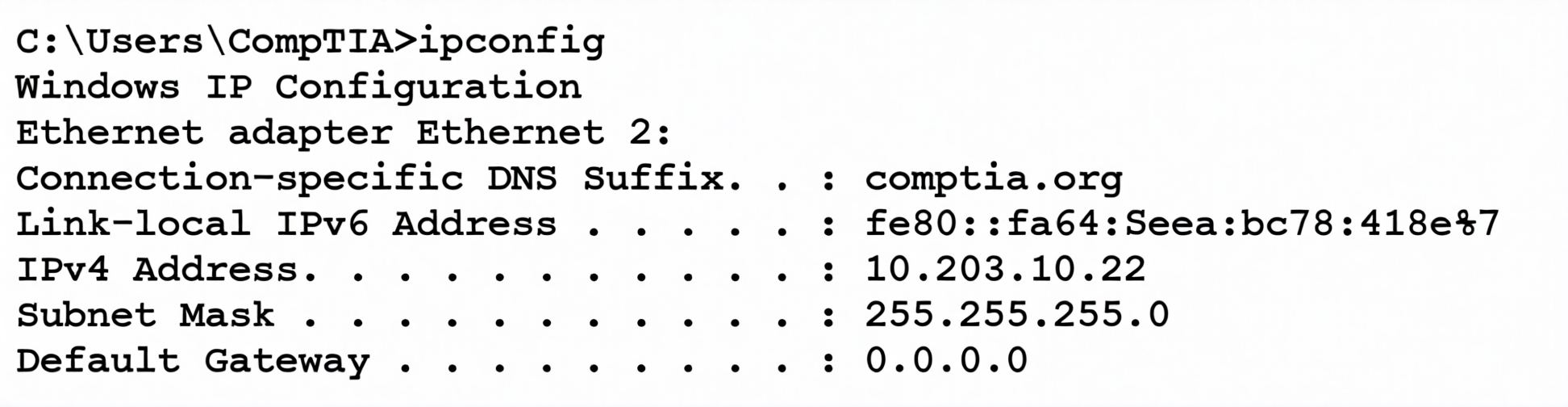
A technician inspects the following workstation configuration:
The workstation is unable to open any external websites. The browser displays an error message that says that the site cannot be reached.
Correct answer:
C. The default gateway is not set.
Explanation:
Why this answer is correct:
The ipconfig output clearly shows the Default Gateway is listed as 0.0.0.0. In IPv4 networking, a default gateway of all zeros indicates that no gateway (router) has been configured or assigned. The default gateway is responsible for routing traffic from the local subnet to external networks, including the internet. If this value is missing or set to 0.0.0.0, the workstation has no path to reach any device outside its own local network (10.203.10.x). Therefore, even if DNS were working perfectly, the computer would not know how to send the packets to the web server, resulting in the "site cannot be reached" error.
Why the other options are incorrect:
A. The wrong DNS suffix is assigned
The DNS suffix (comptia.org) is used for appending to unqualified hostnames. While a misconfigured DNS server could cause website resolution failures, the immediate problem is the lack of a gateway. Even with the correct DNS, the packets have nowhere to go. Furthermore, the error "site cannot be reached" is often a generic connectivity error before DNS resolution is even attempted.
B. The workstation IP address is incorrect
The IP address 10.203.10.22 with a mask of 255.255.255.0 is a perfectly valid private IP address. There is nothing inherently incorrect about it. The issue is the lack of a route (gateway) to the internet, not the IP itself.
D. The subnet mask is incorrect
The subnet mask 255.255.255.0 is the standard default mask for a Class C /24 network and is correct for the 10.203.10.22 address in many common configurations. If it were wrong, the computer might have trouble communicating even with local devices, but the specific symptom of failing to reach external sites points directly to the missing gateway.
CompTIA A+ Objective Reference:
This question falls under Domain 2.0: Networking. It aligns with objectives related to troubleshooting wired and wireless networks using the ipconfig command and interpreting its output to identify configuration issues like a missing default gateway.
Practice Like It's Exam Day
Get exam-ready with a timed 220 1202 CompTIA A+ Core 2 mock exam designed to match the official exam's question format, question count, and time limit.
Build Exam Endurance Stay focused and perform confidently under exam conditions.
Improve Time Management Practice pacing yourself to finish within the time limit.
Fresh Questions Every Attempt Experience randomized questions from our extensive question bank.
Unlimited Practice Attempts Retake mock exams and improve your score at your own pace.
CompTIA A+ Core 2 (220-1202) Exam Blueprint & Question Bank
CompTIA 220-1202 Domain
Official Exam Weight
Our Practice Questions
1.0 Operating Systems
28%
90
Our Practice Questions Cover Subtopics: Windows OS features and tools, macOS and Linux fundamentals, OS installation and upgrades, command-line tools, cloud-based productivity tools, Microsoft Windows networking
2.0 Security
28%
119
Our Practice Questions Cover Subtopics: Physical and logical security, malware types and removal, wireless security protocols, social engineering attacks, authentication methods, workstation and mobile security, data destruction, browser security
3.0 Software Troubleshooting
23%
60
Our Practice Questions Cover Subtopics: Windows OS troubleshooting, PC security issue resolution, mobile OS and application troubleshooting, malware removal best practices
4.0 Operational Procedures
21%
56
Our Practice Questions Cover Subtopics: Documentation and change management, backup and recovery methods, safety procedures, environmental controls, licensing and policies, communication techniques, scripting basics, remote access, AI fundamentals
What Our Community Says
After passing 220-1201, I needed the same quality prep for 220-1202. Preptia.com delivered again with 220-1202 practice exam covering operating systems, security, and troubleshooting. The real exam felt like another practice session. Two passes, one trusted resource!
Amanda Foster, Desktop Support Specialist | Nashville, TN
Operating systems and troubleshooting topics became easier to understand while preparing for CompTIA A+ Core 2 using Preptia.com. The realistic 220-1202 practice exam made exam preparation simple and efficient.
Emily Carter | United Kingdom