Topic · 29 of 98 questions freeTopic 2: Simulation Performance Based Questions
Question 11
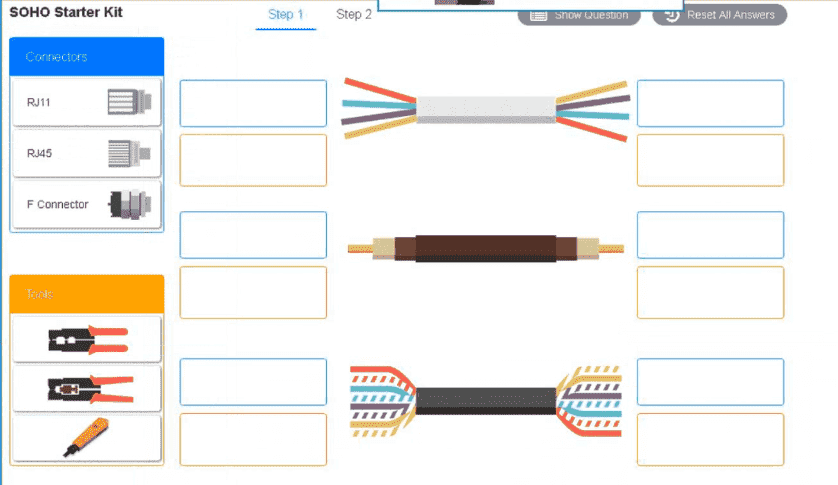
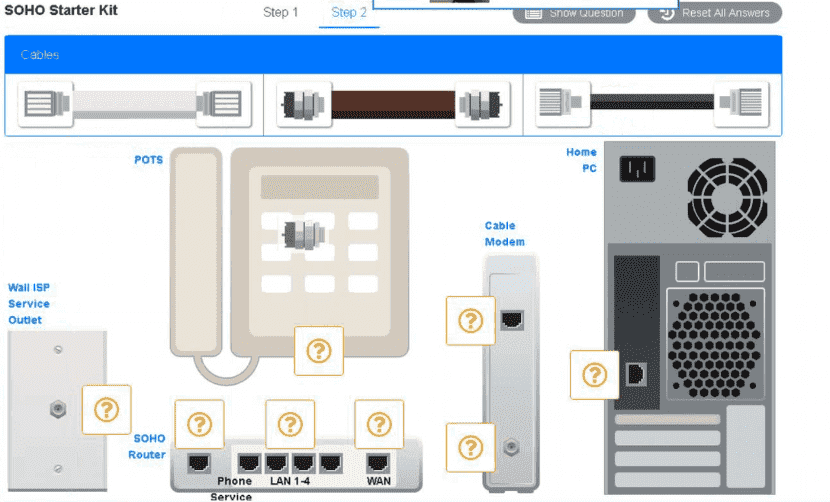
A small ISP has hired a new technician Joe, the new technician, is being trained to configure customers* home networks The trailing instructor gives me technician a starter kit with cables, cable ends, and other network equipment and asks mm to build a working network.
The computer should be connected to have internet connectivity and the phone should be connected to have a dial tone.
INSTRUCTIONS
Use the appropriate cables. cable ends, tools and equipment to configure the network ana
connect an components accordingly
There are 3 steps and the simulation starts on step 1.
Explanation:
Step 1: Wall ISP Outlet → Cable Modem
Cable: Coaxial cable with F Connector
The F connector screws onto the cable modem's coaxial input, bringing the internet signal from the
ISP into the modem.
Step 2: Cable Modem → Router WAN Port
Cable: Ethernet cable with RJ45 Connector
The modem converts the coaxial signal to digital Ethernet. Connect from modem's Ethernet port to router's WAN/Internet port.
Step 3: Router LAN → Home PC and Phone Service
Home PC: Ethernet cable with RJ45 Connector from router LAN port to PC
Phone Service: Telephone cable with RJ11 Connector from router phone port to POTS
Explanation:
Each connector serves a specific purpose: F Connector for coaxial cable internet, RJ45 for Ethernet networking (larger, 8-pin), and RJ11 for telephone service (smaller, 4-pin/6-pin). Using the wrong connector would prevent connectivity—RJ11 won't fit in RJ45 ports, and vice versa. This configuration provides both internet access to the PC and a dial tone to the phone.
Why other connectors are incorrect:
RJ11 in Ethernet ports: Too small, won't make proper contact
RJ45 in phone ports: Too large, won't fit
F Connector on Ethernet: Incompatible connector types
Reference:
CompTIA A+ Core 1 (220-1201) Objective 3.1: "Given a scenario, connect and configure peripherals and ports... Connector types including RJ11 (phone), RJ45 (Ethernet), and F-type (coaxial)."
Question 12
A technician is installing a wireless access point and is required to run all cabling and make
patch cords if necessary.
INSTRUCTIONS
Part 1
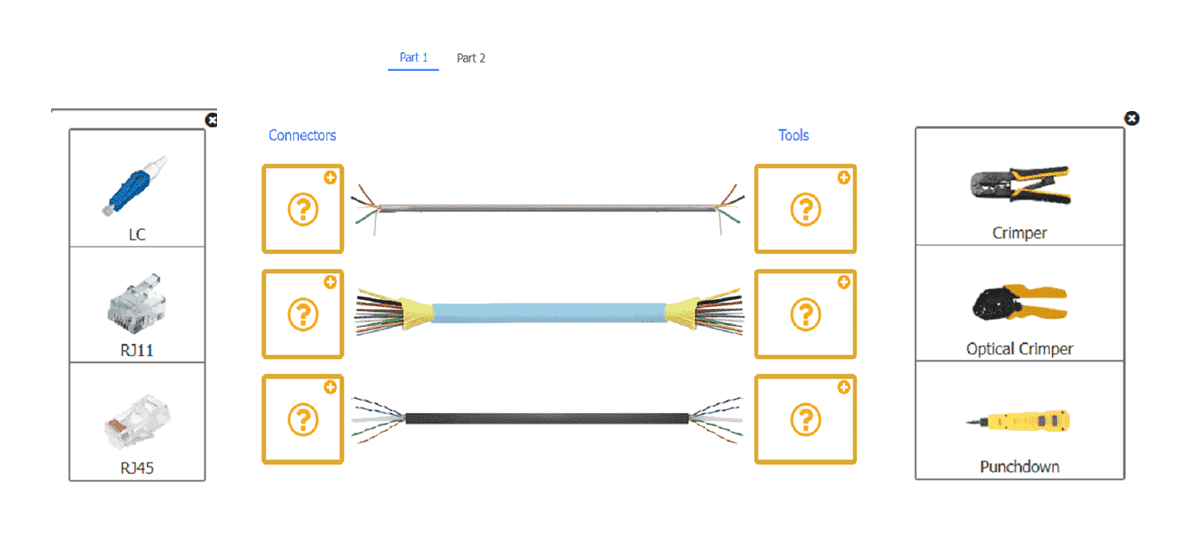
For each cable type, click the (+) to select the appropriate connector and tool.
part 2
An access point was moved and no longer has connectivity. Connect the access point, patch panel, and switch by clicking the (+) to select the appropriate cable end for each corresponding location to create a link.
The link will be visible after making the second selection of each pair.
Cable ends may be used multiple times, and all placeholders will be filled.
Explanation:
LC connector is standard for fiber optic cabling in networking
RJ45 (8-pin) is used for Ethernet connections
RJ11 (4-pin/6-pin) is used for telephone connections
Crimper attaches RJ45 and RJ11 connectors to cable ends
Optical Crimper (fusion splicer) terminates fiber optic connectors
Punchdown tool terminates wires into patch panels and keystone jacks
Why other combinations are incorrect:
Using RJ45 on fiber: incompatible connector types
Using LC on copper: physically impossible
Using punchdown for connectors: punchdown terminates jacks, not plugs
Part 2: Access Point Connectivity
Explanation:
The access point connects to a wall jack using an Ethernet cable with RJ45 connectors. Behind the wall, cabling terminates at a patch panel. A separate patch cable with RJ45 connectors connects the patch panel port to the switch port, completing the link. All connections use RJ45 because this is a standard Ethernet network. Using RJ11 would not provide sufficient bandwidth, and LC is for fiber, not copper Ethernet.
Reference:
CompTIA A+ Core 1 (220-1201) Objective 3.1 and 4.1: "Given a scenario, connect and configure peripherals and ports... Use appropriate networking tools including crimper, punchdown, and fiber connectors."
Question 13Choose 1
An administrator must configure a server that prioritizes data availability. Because the
server will be accessed by many users, the administrator must also consider performance.
Which of the following RAID levels best meets these requirements within a single array?
Correct answer:
D. 10
Explanation:
RAID 10 (RAID 1+0) combines disk mirroring (RAID 1) and disk striping (RAID 0) to provide both high availability and high performance.
High availability
Data is mirrored across drives, so if one drive fails in a mirrored pair, the system continues to operate without data loss.
High performance
Data is striped across mirrored pairs, allowing faster read and write operations compared to RAID 1 or RAID 5.
Best choice for many users
RAID 10 is well suited for servers with heavy workloads and multiple simultaneous users because it delivers excellent read/write performance while maintaining redundancy.
Why the Other Options Are Incorrect
A. RAID 1
Provides excellent fault tolerance through mirroring.
Can survive the failure of one drive in a mirror.
Incorrect because it does not provide the same performance benefits as RAID 10, especially for write-intensive or high-user environments.
B. RAID 0
Provides the highest performance by striping data across drives.
No fault tolerance—if a single drive fails, all data in the array is lost.
Incorrect because it does not meet the availability requirement.
C. RAID 5
Uses striping with distributed parity, providing both performance and fault tolerance.
Can tolerate the failure of one drive.
Incorrect because RAID 5 has slower write performance due to parity calculations and rebuilds, making it less suitable than RAID 10 for servers with many concurrent users.
Key Takeaway
When a question mentions both high availability and high performance within a single array, RAID 10 is almost always the best answer.
Question 14Choose 1
A technician needs to replace the connector on a data cable that uses two pairs of wires.
Which of the following connectors should the technician use?
Correct answer:
A. RJ11
Explanation:
An RJ11 (Registered Jack 11) connector is the standard connector used for telephone lines and DSL connections.
Wire Pairs
A standard RJ11 connector typically features 6 pin positions but is most commonly wired with 4 conductors (two pairs of wires) to support up to two phone lines.
Use Case
When dealing with copper data/telephony cables that specifically utilize a two-pair configuration, the RJ11 is the correct physical connector to terminate the cable.
Why the Other Options Are Incorrect
B. F-type
This is a threaded coaxial connector used for cable television, satellite, and cable modems. It connects a single solid copper core wire surrounded by insulation and shielding, not pairs of wires.
C. ST (Straight Tip)
This is a fiber-optic connector that uses light pulses over glass or plastic fibers to transmit data, rather than copper wire pairs.
D. Molex
This is a legacy internal power connector used to deliver DC power from a computer’s power supply unit (PSU) to older hard drives and optical drives, not a data communication connector.
Reference
CompTIA A+ Core 1 (220-1201) Domain 2.2: Given a scenario, install and configure structured cabling and select the proper connector types.
Question 15Choose 1
A company needs to print several copies of a multipage document with the least
consumption of resources possible. Which of the following settings will best accomplish this
task?
Correct answer:
A. Duplex
Explanation:
Duplex (double-sided printing) is the best setting to minimize resource consumption for multiple copies of a multipage document. It prints on both sides of the paper, which:
Cuts paper usage roughly in half.
Reduces overall toner/ink consumption per document by requiring fewer physical pages to print.
Lowers long-term costs and waste.
This directly addresses the requirement for the least consumption of resources, primarily paper while also indirectly reducing power and printing supplies.
Why the Other Options Are Incorrect or Less Optimal
B. Orientation (Portrait vs. Landscape)
Affects the layout and readability of the document but does not reduce paper, toner, or overall resource consumption.
C. Tray Settings
Controls which paper tray or paper source is used, such as letterhead or different paper sizes. It is useful for workflow management but does not improve resource efficiency.
D. Quality (Draft, Normal, Best, etc.)
Lower quality settings, such as Draft mode, can save some toner or ink, but they do not reduce paper usage for multipage documents. Duplex printing provides a greater overall resource saving when printing many copies.
Question 16Choose 1
Which of the following protocols is used for sending emails?
Correct answer:
D. SMTP
Explanation:
Why D is Correct (SMTP)
SMTP stands for Simple Mail Transfer Protocol. Its primary and definitive job is to send (and relay) outgoing emails from a mail client, such as Outlook or Thunderbird, to a mail server, and also between mail servers across the internet. Think of it as the outgoing or delivery protocol. If you are sending an email, SMTP is the protocol responsible for that transmission.
Why A is Incorrect (POP3)
POP3 stands for Post Office Protocol version 3. This protocol is used for receiving emails. It downloads emails from the mail server to a single local device and typically deletes them from the server afterward. It is an incoming mail protocol, not an outgoing one.
Why B is Incorrect (IMAP)
IMAP stands for Internet Message Access Protocol. Like POP3, it is used for receiving emails. However, unlike POP3, IMAP synchronizes emails across multiple devices by keeping the messages stored on the server. While it manages incoming messages, it does not handle the initial sending of an email from a client to a server. That role belongs to SMTP.
Why C is Incorrect (LDAP)
LDAP stands for Lightweight Directory Access Protocol. It is not used for transferring email messages. Instead, it is used for accessing and querying directory services, such as Microsoft Active Directory. Its most common email-related use is looking up contact information, such as email addresses and phone numbers, in a corporate global address list, but it does not send email messages.
CompTIA Exam Tip
SMTP (Ports 25, 587, or 465)
Sends mail (Outgoing).
IMAP (Ports 143 or 993)
Receives incoming mail and keeps messages on the server, allowing synchronization across multiple devices.
POP3 (Ports 110 or 995)
Receives incoming mail by downloading messages to one device and often removes them from the server afterward.
Question 17Choose 1
Which of the following is primarily used to connect different networks?
Correct answer:
D. Router
Explanation:
A router operates at Layer 3 (Network layer) of the OSI model and is specifically designed to connect different networks together, such as connecting a home or office LAN to the internet or connecting two separate subnets. It uses IP addresses to determine the best path for forwarding data packets between networks and separates broadcast domains.
Why the Other Options Are Incorrect
A. Controller
In networking, this usually refers to a Wireless LAN Controller (WLC), which centrally manages multiple wireless access points (APs) on the same network. It does not connect separate networks together.
B. Bridge
A bridge operates at Layer 2 (Data Link layer). It connects and filters traffic between network segments, usually within the same network, by using MAC addresses. It helps reduce collisions but does not connect distinct networks like a router.
C. Hub
A hub is a basic Layer 1 (Physical layer) device that simply repeats or broadcasts incoming data to all connected ports. It has no intelligence, does not filter traffic, and only extends a single network segment rather than connecting different networks.
Quick Memory Tip
Router
Connects remote or different networks. Operates at Layer 3 and uses IP addresses.
Switch/Bridge
Connects devices within the same network. Operates at Layer 2 and uses MAC addresses.
Hub
A simple repeater that operates at Layer 1 with no addressing or traffic management capabilities.
Question 18Choose 1
A server that is crucial for daily operations is experiencing degraded performance. Upon
investigation, a technician sees that one of the drives in a RAID 5 configuration shows a
failure alert. The system must remain online during business hours, and the controller does
not support hot swapping. Which of the following should the technician do to solve the
issue?
Correct answer:
D. Change the drive during off-peak hours
Explanation:
RAID 5 can tolerate a single drive failure, but performance is degraded until the failed drive is replaced and the array is rebuilt.
Because the controller does not support hot swapping, the technician cannot replace the drive while the system is running.
The correct approach is to use a cold-swappable drive, meaning the system must be powered down before replacing the failed drive. This ensures data integrity and helps prevent hardware damage.
Why the Other Options Are Incorrect
A. Updating Firmware
Updating the firmware will not add hot-swap capability. Whether a controller supports hot swapping is determined by the hardware design, not by a firmware update.
B. Switching to Software RAID
Switching from hardware RAID to software RAID during an active failure is impractical and does not solve the immediate problem of replacing the failed drive.
C. Changing the Drive During Off-Peak Hours
Although replacing the drive during off-peak hours may reduce user impact, it does not address the fact that the controller does not support hot swapping. The correct solution is to use a cold-swappable drive and shut down the system before replacement.
Reference
CompTIA A+ Core 1 (220-1201) Exam Objectives:
Domain 3.0 – Hardware
Configure RAID, including RAID levels and the differences between hot-swappable and cold-swappable drives.
CompTIA Official Study Guide
Core 1, Section on RAID Types and Drive Replacement Procedures.
Question 19Choose 1
A company's directory services server is located on premises. Which of the following best
describes the directory services infrastructure?
Correct answer:
B. Private cloud
Explanation:
Key Concept
Directory services running on-premises, within the company's own building or data center using its own hardware and network, fall under the definition of a private cloud infrastructure because they are dedicated exclusively to a single organization and are not shared with others.
Why Option B is Correct
Private Cloud
A private cloud is infrastructure operated solely for a single organization. It can be hosted on-premises in the company's own facility or by a third-party provider. Since the server in this scenario is located on the company's premises and is used only by that organization, it matches the definition of a private cloud.
Why the Other Options Are Incorrect
A. Hybrid Cloud
A hybrid cloud combines on-premises infrastructure with public cloud services that work together. The question only states that the server is on-premises and does not mention any public cloud services, so this option is incorrect.
C. Public Cloud
A public cloud is infrastructure owned and operated by a cloud service provider and shared among multiple organizations over the internet, such as AWS, Microsoft Azure, or Google Cloud. It is not located on the company's own premises.
D. Community Cloud
A community cloud is shared by multiple organizations that have similar requirements or goals, such as government agencies or healthcare organizations. Since the infrastructure in this scenario is dedicated to a single company, this option is incorrect.
Sub-objective
Compare and contrast cloud computing concepts and deployment models.
Key Concept
Understand the differences between public, private, hybrid, and community cloud deployment models.
CompTIA A+ Core 1 (220-1201) Exam Objectives v15.0, Section 5.2.
Question 20Choose 1
Which of the following virtualization concepts is suitable for a development team that
requires a bare minimum platform to run web applications with the capability to dispose and
redeploy as needed?
Correct answer:
A. Containers
Explanation:
Containers provide a lightweight virtualization method that packages an application and its dependencies while sharing the host operating system's kernel. They are designed to be quickly created, destroyed, and redeployed, making them ideal for development and testing environments.
For a development team that needs:
A minimal platform to run web applications.
Fast deployment and redeployment.
Easy scalability and consistency across environments.
Containers are the best choice.
Common container technologies include Docker and orchestration platforms such as Kubernetes.
Why the Other Options Are Incorrect
A. Containers
Lightweight and efficient.
Start in seconds.
Easy to dispose of and recreate.
Ideal for web application development and DevOps workflows.
Correct answer.
B. IaaS (Infrastructure as a Service)
Provides virtual machines, storage, and networking.
Requires installing and managing an operating system.
More resource-intensive than containers.
Incorrect because the question asks for a bare minimum platform.
C. SaaS (Software as a Service)
Delivers fully managed applications over the internet, such as Microsoft 365 or Google Workspace.
Users consume the software but do not deploy their own web applications.
Incorrect because developers need a platform to run their own applications.
D. Desktop Virtualization
Hosts desktop operating systems remotely for end users.
Used for Virtual Desktop Infrastructure (VDI), not application deployment.
Incorrect because it does not address the need for lightweight application hosting.
Key Takeaway
When a CompTIA question mentions lightweight virtualization, rapid deployment, minimal overhead, or easy redeployment, the correct answer is typically Containers.
Get exam-ready with a timed 220 1201 CompTIA A+ Core 1 mock exam designed to match the official exam's question format, question count, and time limit.