Topic · 49 of 166 questions freeTopic 2: Exam Set B
Question 1Choose 1
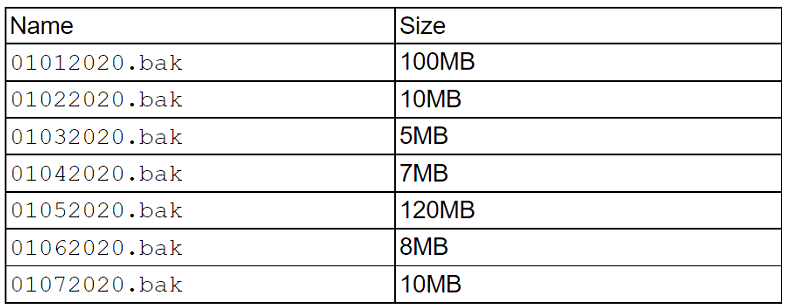
A technician needs to restore data from a backup. The technician has these files in the
backup inventory:
Which of the following backup types is being used if the file 01062020.bak requires another
file to restore data?
Correct answer:
B. Incremental
Explanation
The backup type being used is B. Incremental because it requires another file (specifically, the last full backup and potentially other incremental files) to fully restore the data.
An Incremental backup only captures the data that has changed since the last backup of any type (either a full backup or the previous incremental backup).
Because each incremental file (like 01062020.bak) contains only a small "slice" of the changes, it cannot be used alone to restore the entire system or dataset to the point in time it was taken.
Restoration from an incremental backup set requires the initial full backup (the base) PLUS all subsequent incremental backups applied sequentially, up to the desired restore point. This is why the technician noted that 01062020.bak "requires another file to restore data."
Incorrect Options
A. Full
A Full backup contains a complete copy of all the data at the time it was created. It is the only backup type that can be restored entirely on its own, without requiring any other backup files.
C. Snapshot
A Snapshot is a point-in-time reference (like a freeze-frame) of a virtual machine or a volume's file system, typically storing only the differences from the base image. While a snapshot is dependent on a base image, it is a feature of virtual environments or file systems (like ZFS) and not a traditional file-based backup type that fits the .bak extension and the described dependency chain as closely as an incremental backup does.
D. Differential
A Differential backup is dependent on another file, but only one other file: the last full backup. A differential backup captures all changes since the last full backup.
To restore from a differential set, you only need the most recent full backup and the most recent differential backup. It does not require all previous differential or incremental files, unlike the incremental method.
Question 2Choose 2
An administrator is deploying a new secure web server. The only administration method
that is permitted is to connect via RDP. Which of the following
ports should be allowed? (Select TWO).
Correct answer:
D. 443
F. 3389
Explanation
The question specifies two requirements for the server:
It must be a secure web server.
The only permitted administration method is RDP.
Therefore, the firewall must allow traffic for both the secure web service and the RDP administration access.
D. 443 (Secure Web Server): Port 443 is the standard, well-known port for HTTPS (Hypertext Transfer Protocol Secure). This is the protocol used for a secure web server, typically using TLS/SSL encryption.
F. 3389 (RDP Administration): Port 3389 is the standard, well-known port for the Remote Desktop Protocol (RDP), which is required to fulfill the administrative access requirement.
Why the others are incorrect:
A. 53: Used for DNS (Domain Name System). Essential for network function, but not required specifically for RDP or the secure web service itself.
B. 80: Used for HTTP (non-secure web traffic). This is explicitly not needed for a secure web server, which uses 443.
C. 389: Used for LDAP (Lightweight Directory Access Protocol). Used for directory services, but not required for RDP or the web server function itself.
E. 45: Not a standard, well-known port for common server services.
G. 8080: A common alternative/proxy port for web traffic, but 443 is the standard for a secure server.
Reference
This question relates to the Server Networking and Server Security domains of the CompTIA Server+ (SK0-005) exam, specifically the knowledge of well-known ports and security best practices:
Domain 2.0: Server Security (Configuring firewalls/security groups).
Domain 4.0: Troubleshooting (Diagnosing network connectivity based on ports).
Key Ports: TCP 443 (HTTPS): Secure communication.
TCP 3389 (RDP): Remote Windows server administration.
Question 3Choose 1
Which of the following cloud models is BEST described as running workloads on resources
that are owned by the company and hosted in a company-owned data center, as well as on
rented servers in another company's data center?
Correct answer:
B. Hybrid
Explanation
The scenario explicitly describes two environments:
Company-owned resources in a company-owned data center → private cloud.
Rented servers in another company’s data center → public cloud (e.g., AWS, Azure, GCP).
Running workloads across both = hybrid cloud.
Why the other options are incorrect:
A. Private
Only uses company-owned and company-hosted resources.
Does not include rented external servers.
C. Community
A shared cloud infrastructure for a specific group (e.g., government agencies, universities).
Not defined by ownership or rental — irrelevant here.
D. Public
Only uses third-party rented resources (e.g., AWS EC2).
Does not include on-premises company-owned systems.
B. Hybrid (Correct) Definition: Integration of on-premises (private) and public cloud services, with orchestration between them.
Reference: CompTIA Server+ SK0-005 Official Study Guide
Chapter 7: Cloud Computing
“Hybrid cloud: A combination of private cloud (on-premises) and public cloud services.”
CompTIA Server+ Exam Objectives (SK0-005)
1.4 Compare and contrast cloud computing concepts.
Hybrid: “Uses both on-premises and off-premises (public cloud) resources.”
NIST Special Publication 800-145
“The hybrid cloud infrastructure is a composition of two or more distinct cloud infrastructures (private, community, or public) that remain unique entities but are bound together.”
Question 4Choose 1
A Linux server was recently updated. Now, the server stops during the boot process with a
blank screen and an£s> prompt. When of the following is the MOST likely cause of this
issue?
Correct answer:
B. The UEFI boot was interrupted by a missing Linux boot file
Explanation
The grub> prompt is the minimal command-line interface for the GRUB (Grand Unified Bootloader) 2 bootloader. When you see this prompt, it means GRUB has started but has failed to load its normal menu and proceed with the boot process. This is almost always caused by a corruption or misconfiguration of GRUB's core files.
The key clue in the question is that the server "was recently updated." A system update, especially a kernel update, can sometimes:
Fail to update the GRUB configuration file (grub.cfg).
Corrupt the GRUB core image.
Point to a kernel or initramfs file that no longer exists or is in the wrong location.
Because GRUB cannot find the necessary files to continue the boot process, it drops the user to the rescue prompt (grub>).
Why the other options are incorrect:
A. The system is booting to a USB flash drive: If the system were booting from a non-bootable USB drive, the firmware (BIOS/UEFI) would typically display an error like "No bootable device found" or "Remove disks or other media," not the GRUB prompt. The grub> prompt is specific to the GRUB bootloader, which resides on the server's hard drive.
C. The BIOS could not find a bootable hard disk:This error occurs at an earlier stage, before any bootloader is run. The firmware itself would display an error message, and you would never see a grub> prompt.
D. The BIOS firmware needs to be upgraded: A firmware upgrade is rarely needed and is not typically triggered by a system update. Firmware issues usually manifest as hardware detection failures or an inability to POST, not by loading a specific bootloader's rescue shell.
Reference
This scenario is a common troubleshooting issue covered under CompTIA Server+ Domain 3.0: Server Maintenance, specifically dealing with the implications of OS and application patches. It tests the understanding of the Linux boot process and the critical role of the bootloader. The resolution often involves using the grub> prompt to locate the correct disk, partition, and kernel files to boot the system manually, and then reinstalling or reconfiguring GRUB to fix the issue permanently.
Question 5Choose 1
A technician has moved a data drive from a new Windows server to an orderWindows
server. The hardware recognizes the drive, but the data is not visible to the OS. Which of
the following is the MOST Likely cause of the issue?
Correct answer:
B. Thepartition is formatted with ext4.
Explanation:
If a data drive is physically recognized by Windows but its data is not visible or accessible within the operating system, the most likely cause is that the drive’s file system is not compatible with Windows. The ext4 file system is a Linux-based format that Windows cannot read natively without third-party software or drivers.
When a technician moves a drive from another server, Windows will detect the hardware at the storage level, but if the partition uses ext4, it will not mount or display the data in File Explorer or Disk Management beyond showing the drive as unallocated or unknown.
Why Not the Other Options:
A. The disk uses GPT: Windows supports GPT (GUID Partition Table) on all 64-bit versions and with UEFI firmware. This would not prevent the OS from seeing the data.
C. The partition is formatted with FAT32: FAT32 is fully supported by Windows; the data would be visible, though with some file size and volume limitations.
D. The disk uses MBR: Windows also supports MBR (Master Boot Record); this would not cause invisibility of data.
Reference:
CompTIA Server+ SK0-005 Exam Objectives – Domain 3.2: Install and Configure Server Operating Systems.
This topic covers identifying and resolving file system compatibility issues when migrating or integrating storage devices across different operating systems.
Question 6Choose 1
Which of the following should be configured in pairs on a server to provide network
redundancy?
Correct answer:
E. NIC
Explanation
To provide network redundancy on a server, components should be configured in pairs so that if one fails, the other can immediately take over. The component responsible for physical network connectivity is the Network Interface Card (NIC).
NIC (E): Network Interface Cards are configured in pairs (or more) and often managed via a technique called NIC Teaming (or bonding/aggregation).
NIC Teaming allows multiple physical NICs to be logically grouped. This provides redundancy (if one NIC fails, traffic shifts to the other) and can also offer load balancing (spreading network traffic across the cards).
Why the others are incorrect:
MRU (A): Maximum Receive Unit is a size parameter for network packets, not a component used for hardware redundancy.
SCP (B): Secure Copy Protocol is a network protocol for securely transferring files, not a hardware component.
DLP (C): Data Loss Prevention is a set of policies and software tools, not a hardware component configured for network redundancy.
CPU (D): The Central Processing Unit is the brain of the server. While high-end servers can have multiple CPUs, this configuration provides processing power redundancy/scalability, not specifically network redundancy.
Reference
This question relates to the Server Hardware and Networking domain of the CompTIA Server+ (SK0-005) exam, specifically the methods used to ensure high availability and fault tolerance:
Domain 1.0: Server Administration (Implementing fault tolerance).
Key Concept: Redundancy is achieved by duplicating critical single points of failure. For networking, the NIC is the critical component that is paired for high availability using NIC Teaming/Bonding.
Question 7Choose 1
An administrator receives an alert stating a S.MAR.T. error has been detected. Which of
the following should the administrator run FIRST to determine the issue?
Correct answer:
A. A hard drive test
Explanation
A S.M.A.R.T. (Self-Monitoring, Analysis, and Reporting Technology) error indicates that the storage device itself has detected abnormal operating conditions based on internal monitoring.
These conditions can include:
Increasing bad sectors
Excessive reallocated sectors
Slow read/write response times
High temperature thresholds exceeded
Mechanical issues such as spindle or actuator problems
Imminent drive failure predictions
S.M.A.R.T. is specifically designed to warn ahead of failure to allow the administrator to take action before data loss occurs.
Therefore, the first appropriate step is to run a vendor-recommended comprehensive hard drive diagnostic test such as:
smartctl for Linux
Windows CHKDSK + manufacturer’s diagnostic utilities
RAID controller diagnostic if enterprise storage
This confirms whether the S.M.A.R.T. alert is a false positive or proof of serious degradation. Based on test results, the administrator will typically immediately back up data and replace the failing disk.
Incorrect Options
B. A RAM test
Memory tests like MemTest86 check system RAM for:
Parity/ECC errors
Timing faults
Faulty DIMM modules
RAM errors produce symptoms such as application crashes, BSODs, or data corruption in memory transactions — not S.M.A.R.T. alerts.
S.M.A.R.T. warnings originate only from storage media, so RAM diagnostics would not address the actual alert source.
C. A power supply swap
While unstable power can indirectly cause system failures or corrupted writes, it:
Does not generate S.M.A.R.T. errors
Is not a recommended first troubleshooting action
Replacing a PSU without confirming the reported drive issue could waste time and allow a failing drive to worsen.
D. A firmware update
Updating drive firmware can:
Improve compatibility
Fix performance issues
Address known bugs
However — firmware changes should never be performed on a drive suspected of failing. If the disk is unstable, a firmware flash could:
Completely brick the drive
Trigger immediate data loss
Prevent future recovery attempts
That is why diagnostics must be performed before ANY changes.
Summary
A S.M.A.R.T. alert is an internal failure prediction from the hard drive itself.
The correct action is to:
Run a complete hard drive health diagnostic
Evaluate test results
Back up and replace the drive if failure is confirmed
Choosing another diagnostic first delays necessary recovery action
Question 8Choose 1
Which of the following BEST describes a guarantee of the amount of time it will take to
restore a downed service?
Correct answer:
A. RTO
Explanation:
A Service Level Agreement (SLA) is a formal contract between a service provider and a customer. It defines the specific level of service expected, including performance metrics and remedies for failure. A guarantee of the maximum time allowed to restore a service after an outage, often referred to as the "Recovery Time Objective (RTO)," is a common and critical component of an SLA. The SLA is the document that officially guarantees this time.
Incorrect Options:
A. RTO (Recovery Time Objective):
This is the target time you aim for to restore a service, but it is an internal goal, not the formal guarantee to the customer.
The RTO is often defined within the SLA.
C. MTBF (Mean Time Between Failures): This is a reliability metric that predicts the average time between one system failure and the next.
It describes how often a component fails, not how long it takes to fix it.
D. MTTR (Mean Time To Repair): This is a metric for the average time it takes to repair a failed component and restore it to normal operation.
Like MTBF, it is a historical average used for planning, not a guaranteed maximum time for service restoration.
Reference:
While specific guarantees are detailed in individual contracts, the definition of an SLA as the document containing these guarantees is standard. For authoritative information, you can refer to the official CompTIA Server+ (SK0-005) Exam Objectives under the domain 4.0 "Disaster Recovery," which covers business continuity concepts like SLAs.
Question 9Choose 1
A technician installed a kernel upgrade to a Linux server. The server now crashes
regularly. Which of the following is the most likely cause?
Correct answer:
D. Some modules are not compatible.
Explanation:
The Linux kernel is the core of the operating system. Kernel Modules (like device drivers for network cards, storage controllers, or filesystems) are dynamically loaded into the kernel at runtime.
A kernel upgrade often involves changes to the kernel's internal Application Programming Interface (API).
If the existing modules were not recompiled, updated, or replaced with versions specifically built for the new kernel version, attempting to load or use these incompatible modules will inevitably lead to instability, system hangs, or the most severe failure: a kernel panic (a complete system crash).
Since the crashes started immediately after the kernel upgrade, this direct cause-and-effect relationship makes incompatible modules the most likely technical explanation.
Incorrect Options
A. Necessary dependencies were installed for multiple architectures.
Why it's Incorrect: While installing unnecessary packages (even for different architectures) can consume disk space, it is a package management issue and would not typically cause the running kernel itself to crash repeatedly. If the wrong architecture kernel were installed, the system would likely fail to boot at all, not crash regularly.
There is not enough hard drive space.
Why it's Incorrect: Lack of disk space can prevent processes from starting, logging from functioning, or the installation from completing in the first place. However, if the server successfully booted into the new kernel, lack of hard drive space is very rarely the root cause of frequent, total server crashes (kernel panics), which are generally memory, module, or CPU-related issues.
The server is infected with a virus.
Why it's Incorrect: A virus or rootkit could definitely cause instability, but the question establishes a clear timeline: upgrade $\rightarrow$ crashes. In a troubleshooting scenario, the change that occurred (the upgrade) is the primary suspect. Attributing the issue to a coincidental virus infection, while possible, is less likely than a direct technical fault resulting from the upgrade process itself.
Summary
The most likely cause of a server crashing immediately after a kernel upgrade is incompatible kernel modules (D). This is a classic dependency and compatibility problem: when the central component (the kernel) changes, its dependent components (the modules/drivers) must be updated to match, or system stability will be compromised, leading to crashes or kernel panics. The immediate cause-and-effect relationship points directly to a technical incompatibility introduced by the change.
Question 10Choose 1
An administrator discovers a misconfiguration that impacts all servers but can be easily
corrected. The administrator has a list of affected servers and a script to correct the issue.
Which of the following scripting principles should the administrator use to cycle through the
list of servers to deliver the needed change?
Correct answer:
C. Loop
Explanation
The core of this problem is automation and efficiency. The administrator needs to perform the exact same action (running the correction script) on a large number of items (the list of servers).
Doing this manually for each server would be time-consuming and prone to error.
The correct scripting principle to solve this is a Loop.
Why a Loop is the Best Choice:
A loop is a programming construct designed specifically to repeat a block of code multiple times. In this scenario, the administrator would write a loop that automatically iterates through each entry in the list of servers. For every server name the loop processes, it would execute the correction script. The computer handles the repetition, ensuring the change is delivered consistently and efficiently to every server without any manual intervention after the script is launched.
A Simple Analogy: Imagine you have a class roster with 30 student names and you need to write each name on a certificate. A loop is like handing the roster and a stack of certificates to a robotic assistant. You instruct the robot once: "For each name on this list, write it on a certificate." The robot then cycles through the list automatically, performing the task 30 times. You don't have to point to each name and give the command 30 separate times.
Why the Other Options Are Incorrect
A. Linked List: A linked list is a specific data structure used to store a collection of items. The question is about the action of processing the list (cycling through it), not about how the list itself is built or stored in memory. Whether the list is a linked list, an array, or a simple text file, you still need a loop to go through it.
B. String: A string is a data type that represents text (e.g., a server name like "web-srv-01"). While the individual items within the list are likely strings, the concept of "cycling through the list" is not about the data type of the items. A string doesn't provide the mechanism for repetition.
D. Constant: A constant is a fixed value that does not change while the script is running (e.g., defining MAX_USERS = 100). It is the opposite of what is needed here; a list of servers is a collection of changing items (each server name is different), and a constant cannot represent that. It has no relation to the process of iteration.
In summary, the administrator needs a Loop to automatically and repeatedly apply the script to every server in the list, which is the fundamental purpose of a loop in scripting and automation.
Practice Like It's Exam Day
Get exam-ready with a timed SK0 005 CompTIA Server+ mock exam designed to match the official exam's question format, question count, and time limit.
Build Exam Endurance Stay focused and perform confidently under exam conditions.
Improve Time Management Practice pacing yourself to finish within the time limit.
Fresh Questions Every Attempt Experience randomized questions from our extensive question bank.
Unlimited Practice Attempts Retake mock exams and improve your score at your own pace.
CompTIA Server+ SK0-005 Official Exam Blueprint And Our Practice Questions
CompTIA Server+ SK0-005 Domain
Official Exam Weight
Our Practice Questions
Server Hardware Installation and Management
18%
60
Our Practice Questions Covers Subtopics:
Server hardware installation,
RAID configurations,
Storage technologies,
Power supplies,
Cooling systems,
BIOS and UEFI,
Firmware updates,
Physical server maintenance,
Rack installation,
Cabling standards,
CPU architecture,
Memory installation,
Expansion cards,
Peripheral devices,
Hardware compatibility,
Asset management
Server Administration
30%
147
Our Practice Questions Covers Subtopics:
Server operating systems,
User and group management,
Virtualization,
Cloud computing,
Network configuration,
DNS and DHCP,
Active Directory,
Group policies,
Storage management,
Backup management,
Monitoring tools,
Performance optimization,
Resource allocation,
Patch management,
Service configuration
Security and Disaster Recovery
24%
73
Our Practice Questions Covers Subtopics:
Server security,
Access controls,
Authentication methods,
Encryption,
Firewall configuration,
Physical security,
Disaster recovery planning,
Business continuity,
Backup strategies,
High availability,
Fault tolerance,
Risk management,
Security policies,
Compliance requirements,
Incident response,
Vulnerability mitigation
Troubleshooting
28%
213
Our Practice Questions Covers Subtopics:
Troubleshooting methodology,
Hardware failures,
Boot issues,
Storage failures,
RAID troubleshooting,
Network connectivity issues,
Virtualization troubleshooting,
Performance bottlenecks,
Service failures,
Power issues,
Cooling problems,
Log analysis,
Diagnostic tools,
System recovery,
Security troubleshooting,
Disaster recovery testing,
Backup restoration,
Server performance analysis
Server hardware, storage, security, and disaster recovery—this exam covers it all. This practice test targets the SK0-005 objectives, including server administration, troubleshooting, and virtualization. You will face questions on RAID configurations, power management, network cabling, and server hardening techniques. Each scenario tests your ability to apply concepts to real data center situations. The detailed explanations turn every practice attempt into a learning opportunity. Whether you are weak on storage technologies or failover clustering, this test reveals your gaps. Prepare smarter for certification day and validate your server expertise with confidence.
Our Happy Customers
Server administration requires deep knowledge of hardware, storage, and virtualization. Preptia SK0-005 exam questions covered everything from RAID configurations to server hardening. I felt completely prepared and passed on my first attempt. Highly recommended for server admins!
David Chen, Systems Administrator | Boston, MA
Server management concepts were clearly explained through the Preptia.com Server+ SK0-005 mock exam. The questions covered server hardware, virtualization, and maintenance tasks thoroughly.
Miguel Herrera | Mexico