Topic · 23 of 78 questions freeInformation Gathering and Vulnerability Scanning
Question 1Choose 1
A penetration tester observes the following output from an Nmap command while
attempting to troubleshoot connectivity to a Linux server:
Starting Nmap 7.91 ( https://nmap.org ) at 2024-01-10 12:00 UTC
Nmap scan report for example.com (192.168.1.10)
Host is up (0.001s latency).
Not shown: 9999 closed ports
PORT STATE SERVICE
21/tcp open ftp
80/tcp open http
135/tcp open msrpc
139/tcp open netbios-ssn
443/tcp open https
2222/tcp open ssh
444/tcp open microsoft-ds
Nmap done: 1 IP address (1 host up) scanned in 0.23 seconds
Which of the following is the most likely reason for the connectivity issue?
Correct answer:
A. The SSH service is running on a different port.
Explanation:
The Nmap output shows port 2222/tcp open ssh instead of the default SSH port 22. The tester is likely attempting to connect to port 22 (default SSH) and failing, assuming the service is missing or blocked. However, SSH is actively running on port 2222. The connectivity issue is simply that the tester is using the wrong port.
Why other options are incorrect
B. SSH service blocked by firewall – Nmap shows port 2222 as open, meaning no firewall is blocking it. If blocked, Nmap would show filtered or closed.
C. SSH requires certificate authentication – This affects authentication, not connectivity. The tester would still establish a TCP connection to the correct port.
D. SSH service is not active – Nmap confirms SSH is active and listening on port 2222.
References
CompTIA PenTest+ PT0-003 – Domain 2.2 (Network Scanning): "Interpret Nmap output to identify non-standard service ports."
Nmap documentation – open state means a service is actively listening on that port.
Common misconfiguration – SSH moved from port 22 to another port (e.g., 2222) for obscurity or to avoid automated scans.
Question 2Choose 1
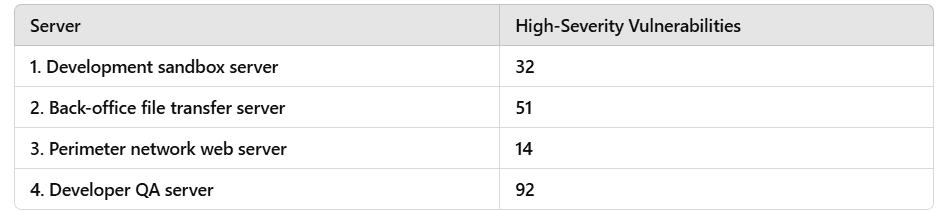
A penetration tester runs a vulnerability scan that identifies several issues across
numerous customer hosts. The executive report outlines the following:
The client is concerned about the availability of its consumer-facing production application.
Which of the following hosts should the penetration tester select for additional manual
testing?
Correct answer:
C. Server 3
Explanation:
The client is concerned about the availability of its consumer-facing production application. The Perimeter network web server is the only host directly exposed to external consumers. A compromise or disruption of this server would directly impact customer availability. Servers 1, 2, and 4 are internal (development, back-office, QA) and do not affect consumer-facing production availability as directly as the perimeter web server.
Why other options are incorrect
A. Development sandbox server – Internal, non-production. Not consumer-facing. Exploitation here does not affect customer availability.
B. Back-office file transfer server – Internal business function. May be important for operations but not directly consumer-facing.
D. Developer QA server – Quality assurance/internal testing. No direct impact on consumer availability.
References
CompTIA PenTest+ PT0-003 – Domain 1.0 (Planning and Scoping): "Prioritize testing based on business impact and asset criticality."
Business impact analysis (BIA) – Consumer-facing production systems are critical for availability.
Question 3Choose 1
A penetration tester runs a vulnerability scan that identifies several issues across numerous customer hosts.
The executive report outlines the following information:
Server High-severity vulnerabilities
1. Development sandbox server 32
2. Back office file transfer server 51
3. Perimeter network web server 14
4. Developer QA server 92
The client is con ble monitoring mode using Aircrack-ng ch of the following hosts should the penetration
tester select for additional manual testing?
Correct answer:
C. Server 3
Explanation:
This question assesses your knowledge regarding vulnerability prioritization and risk management in penetration testing. It tests your ability to evaluate which asset poses the greatest risk and requires manual testing based on its exposure and business impact.
Option A
❌ This option is incorrect because the development sandbox server is primarily used for testing and development rather than being customer-facing, posing a lower immediate risk to production operations.
Option B
❌ This option is incorrect because the back office file transfer server is typically an internal-facing asset, which is less exposed to external threats than the perimeter network.
Option C
✔️ This option is correct because the perimeter network web server (Server 3) is an internet-facing asset, making it highly exposed to external attackers. Even with a lower number of high-severity vulnerabilities, an exploit on this system could provide direct access to the internal network and directly impact customer-facing operations or availability.
Option D
❌ This option is incorrect because the developer QA server is an internal testing environment that does not directly expose the consumer-facing production application to external threats.
Reference
CompTIA PenTest+ Certification confirms the skills related to vulnerability prioritization and risk assessment.
Question 4Choose 1
During the reconnaissance phase, a penetration tester collected the following information
from the DNS records:
A-----> www
A-----> host
TXT --> vpn.comptia.org
SPF---> ip =2.2.2.2
Which of the following DNS records should be in place to avoid phishing attacks using
spoofing domain techniques?
Correct answer:
C. DMARC
Explanation:
DMARC (Domain-based Message Authentication, Reporting & Conformance) is a DNS TXT record that instructs email receivers how to handle messages that fail SPF or DKIM authentication checks. It allows domain owners to set policies such as "reject" or "quarantine" for unauthenticated emails. This directly prevents attackers from spoofing the domain in phishing campaigns, as receiving mail servers will block or flag emails that do not pass verification. Without DMARC, SPF alone is insufficient because it does not define an action for failures.
Why other options are incorrect
A. MX (Mail Exchange) – Specifies which mail servers accept email for the domain. It has no authentication or anti-spoofing capabilities.
B. SOA (Start of Authority) – Contains DNS zone metadata (primary nameserver, admin contact, serial number). Completely unrelated to email security.
D. CNAME (Canonical Name) – Creates domain aliases (e.g., www to @). Does not affect email authentication or spoofing prevention.
References
CompTIA PenTest+ PT0-003 – Domain 2.1: "DMARC to prevent email spoofing and phishing attacks."
NIST SP 800-177 – Email security recommendations include DMARC deployment.
OWASP Phishing Guide – DMARC, SPF, and DKIM are core anti-phishing DNS records.
Question 5Choose 1
A penetration tester cannot find information on the target company's systems using common OSINT methods. The tester's attempts to do reconnaissance against internet-facing resources have been blocked by the company's WAF. Which of the following is the best way to avoid the WAF and gather information about the target company's systems?
Correct answer:
B. Code repository scanning
Explanation
The scenario states that direct reconnaissance against the company's internet-facing resources is being blocked by a WAF. The best way to "avoid the WAF" is to gather intelligence from sources that are not protected by the company's WAF but still contain information about the company's systems.
Code Repository Scanning:
This involves searching public code repositories like GitHub, GitLab, or Bitbucket for code, configuration files, and documentation belonging to the target company. Developers often accidentally (or intentionally) push code containing:
API keys and passwords
Internal server names and IP addresses
Database connection strings
Source code revealing application logic and vulnerabilities
Configuration files (e.g., for cloud services) that map out the infrastructure
This information is gathered directly from the code repository's website, completely bypassing the target's production network and their WAF. It is a highly effective form of passive reconnaissance.
Why the Other Options Are Incorrect
A. HTML scraping:
This involves programmatically extracting data from the target's public websites. Since the website is an "internet-facing resource," it is almost certainly protected by the WAF. Attempting to scrape it would likely be detected and blocked by the same WAF that is preventing other reconnaissance, so it does not avoid the WAF.
C. Directory enumeration:
This is an active attack against the web server (e.g., using a tool like gobuster or dirb to find hidden directories). This direct interaction with the target's web server would be detected and blocked by the WAF.
D. Port scanning:
This is the classic active reconnaissance technique that involves sending probes to the target's IP addresses. The scenario explicitly states that such attempts are blocked, meaning the WAF or other perimeter defenses are configured to drop or reject these packets. Port scanning would not succeed in this situation.
Reference
This technique is a cornerstone of Open-Source Intelligence (OSINT) and is a critical part of modern penetration testing, especially against security-mature organizations with strong perimeter defenses. It aligns with the PenTest+ objective of understanding various information-gathering methods. Searching public code repositories is often the first step when direct scanning fails, as it can yield a treasure trove of information without triggering any alarms.
Question 6Choose 1
A penetration tester needs to launch an Nmap scan to find the state of the port for both TCP and UDP services. Which of the following commands should the tester use?
Correct answer:
C. nmap -sU -sT -p 1-65535 example.com
Explanation:
To determine the state of ports for both TCP and UDP services using Nmap, the penetration tester needs to use scan types that cover both protocols. Let's break down the options and the reasoning:
Nmap Scan Types: -sU: This flag enables a UDP scan, which is used to identify the state of UDP ports (open, closed, or filtered).
-sT: This flag enables a TCP Connect scan, which completes a full TCP handshake to determine the state of TCP ports (open, closed, or filtered). This is the default TCP scan for non-privileged users or when root privileges are not available.
Other options like -sW, -sY, and -sN are either invalid or not suitable:
-sW: This is not a valid Nmap scan type.
-sY: This is not a valid Nmap scan type.
-sN: This is a TCP Null scan, which sends packets with no flags set. It is typically used for stealth scanning but requires root privileges and is not a standard TCP Connect scan.
-p 1-65535: This specifies that Nmap should scan all ports (1 through 65535) for the target, covering the full range of possible ports.
Why Option C is Correct:
The command nmap -sU -sT -p 1-65535 example.com combines a UDP scan (-sU) with a TCP Connect scan (-sT) and scans all ports (-p 1-65535) for the target example.com. This ensures that both TCP and UDP services are checked, fulfilling the requirement to find the state of ports for both protocols.
Why Other Options are Incorrect: A. nmap -sU -sW -p 1-65535 example.com: The -sW flag is invalid, as it does not correspond to any Nmap scan type. This makes the command incorrect.
B. nmap -sU -sY -p 1-65535 example.com: The -sY flag is invalid, as it is not a recognized Nmap scan type. This makes the command incorrect.
D. nmap -sU -sN -p 1-65535 example.com: While -sN is a valid scan type (TCP Null scan), it requires root privileges and is not a standard TCP Connect scan. It is less reliable for general TCP port scanning compared to -sT, especially for non-privileged users, and may not be suitable for a comprehensive TCP/UDP scan.
References: Nmap Official Documentation: The Nmap Reference Guide (man nmap or https://nmap.org/book/man.html) details scan types, including -sU for UDP scans and -sT for TCP Connect scans.
CompTIA PenTest+ PT0-003 Objectives: The exam covers network scanning techniques, including the use of Nmap for port and service enumeration, which aligns with the use of -sU and -sT for TCP and UDP scanning.
Question 7Choose 1
During a penetration test, the tester uses a vulnerability scanner to collect information about any possible vulnerabilities that could be used to compromise the network. The tester receives the results and then executes the following command:snmpwalk -v 2c -c public 192.168.1.23Which of the following is the tester trying to do based on the command they used?
Correct answer:
D. Validate the results and remove false positives.
Explanation:
The command snmpwalk -v 2c -c public 192.168.1.23 is used to query a device via the Simple Network Management Protocol (SNMP) to gather detailed information about its configuration, services, or system details. Let’s break down the command and evaluate the options to determine the tester’s intent:
Command Breakdown:
snmpwalk: A tool used to retrieve a tree of information from a device’s Management Information Base (MIB) via SNMP.
-v 2c: Specifies SNMP version 2c, a common version for querying devices.
-c public: Uses the SNMP community string “public,” which is a default and often insecure credential for read-only access to SNMP data.
192.168.1.23: The target IP address of the device being queried.
This command attempts to extract detailed system information (e.g., network interfaces, running services, or hardware details) from the target device if SNMP is enabled and accessible.
Context in Penetration Testing:
A vulnerability scanner may flag potential issues, such as open SNMP services with default community strings like “public,” which could expose sensitive information.
The tester’s use of snmpwalk suggests they are following up on the scanner’s results to verify whether the SNMP service is indeed accessible and what information it exposes.
Evaluation of Options:
A. Bypass defensive systems to collect more information:
Why Incorrect:
The snmpwalk command does not inherently bypass defensive systems like firewalls or intrusion detection systems. It simply queries an SNMP service. If the service is accessible with the “public” community string, no bypassing is required, as it’s a misconfiguration. This option overstates the command’s purpose.
B. Use an automation tool to perform the attacks: Why Incorrect:
The snmpwalk command is not an attack tool, nor is it automated in the context of launching exploits. It is a manual enumeration tool used to gather information, not to perform attacks.
C. Script exploits to gain access to the systems and host: Why Incorrect:
The snmpwalk command does not involve scripting or executing exploits. It is used for information gathering, not for gaining unauthorized access. While the information collected could be used to craft exploits later, the command itself is not performing that function.
D. Validate the results and remove false positives: Why Correct:
The vulnerability scanner likely identified an open SNMP service or a potential vulnerability (e.g., use of the default “public” community string). By running snmpwalk, the tester is manually verifying whether the SNMP service is accessible and what data it exposes. This helps confirm the scanner’s findings (e.g., is SNMP actually open? Is “public” accepted?) and filters out false positives (e.g., if the scanner incorrectly flagged SNMP as vulnerable). This is a standard step in penetration testing to ensure the accuracy of scan results before reporting.
Why Validating Results is the Best Fit: Penetration Testing Workflow:
After a vulnerability scanner identifies potential issues, testers manually validate findings to confirm their accuracy and eliminate false positives. Using snmpwalk to query an SNMP service aligns with this process, as it verifies whether the service is accessible and misconfigured as reported.
SNMP Enumeration:
The command specifically aims to collect detailed information from the target device, which helps the tester assess the severity of the vulnerability (e.g., what sensitive data is exposed via SNMP). This is part of validating the scanner’s output.
CompTIA PenTest+ Context:
The PT0-003 exam emphasizes the importance of validating scan results to ensure accurate reporting, which includes manual verification of vulnerabilities like exposed SNMP services.
References:
CompTIA PenTest+ PT0-003 Objectives:
The exam covers vulnerability scanning and validation, including manual techniques to confirm scanner findings and eliminate false positives.
Nmap and SNMP Documentation:
Tools like snmpwalk are commonly used in penetration testing to enumerate SNMP services (https://nmap.org/nsedoc/scripts/snmp-brute.html or general SNMP tool documentation).
Penetration Testing Execution Standard (PTES):
The PTES recommends validating automated scan results with manual testing to ensure accuracy.
Question 8Choose 1
A penetration tester is conducting a vulnerability scan. The tester wants to see any vulnerabilities that may be visible from outside of the organization. Which of the following scans should the penetration tester perform?
Correct answer:
C. Unauthenticated
Explanation:
To see any vulnerabilities that may be visible from outside of the organization, the penetration tester should perform an unauthenticated scan.
Unauthenticated Scan:
Definition: An unauthenticated scan is conducted without providing any credentials to the scanning tool. It simulates the perspective of an external attacker who does not have any prior access to the system.
Purpose: Identifies vulnerabilities that are exposed to the public and can be exploited without authentication. This includes open ports, outdated software, and misconfigurations visible to the outside world.
Comparison with Other Scans:
SAST (Static Application Security Testing): Analyzes source code for vulnerabilities, typically used during the development phase and not suitable for external vulnerability scanning.
Sidecar: This term is generally associated with microservices architecture and is not relevant to the context of vulnerability scanning.
Host-based: Involves scanning from within the network and often requires authenticated access to the host to identify vulnerabilities. It is not suitable for determining external vulnerabilities.
Pentest References:
External Vulnerability Assessment: Conducting unauthenticated scans helps identify the attack surface exposed to external threats and prioritizes vulnerabilities that are accessible from the internet.
Tools: Common tools for unauthenticated scanning include Nessus, OpenVAS, and Nmap.
By performing an unauthenticated scan, the penetration tester can identify vulnerabilities that an external attacker could exploit without needing any credentials or internal access.
Question 9Choose 1
A tester runs an Nmap scan against a Windows server and receives the following results:
Nmap scan report for win_dns.local (10.0.0.5)
Host is up (0.014s latency)
Port State Service
53/tcp open domain
161/tcp open snmp
445/tcp open smb-ds
3389/tcp open rdp
Which of the following TCP ports should be prioritized for using hash-based relays?
Correct answer:
C. 445
Explanation:
This question asks specifically about hash-based relays. In Windows networking, this refers to attacks like SMB Relay or NTLM Relay, where an attacker captures or forwards NTLM authentication attempts to another system to authenticate without knowing the password.
Understanding the attack:
Hash-based relay attacks (such as SMB Relay or Pass-the-Hash) rely on protocols that use NTLM authentication and can forward those authentication attempts to other systems. The most common protocol for this is SMB (Server Message Block), which runs on port 445.
Analysis of the ports:
A. 53 (TCP)
This is DNS (Domain Name System). DNS does not use NTLM authentication and cannot be used for hash-based relaying. Incorrect.
B. 161 (TCP)
This is SNMP (Simple Network Management Protocol). SNMP uses community strings for authentication, not NTLM hashes. It is not used for hash relaying. Incorrect.
C. 445 (TCP)
This is SMB (Server Message Block) over TCP, the primary protocol for Windows file sharing and network communication. SMB uses NTLM authentication, making it the perfect target for SMB relay attacks, Pass-the-Hash, and other hash-based relay techniques. Correct.
D. 3389 (TCP)
This is RDP (Remote Desktop Protocol). While RDP can use NTLM authentication, modern versions of Windows have protections (like Restricted Admin mode) and it is generally not the primary target for hash relaying attacks. SMB (port 445) is the classic and most effective protocol for these attacks. Incorrect.
Conclusion:
Port 445 (SMB) is the standard port used for hash-based relay attacks in Windows environments.
Correct Answer:
C. 445
Question 10Choose 1
A penetration tester is getting ready to conduct a vulnerability scan as part of the testing process. The tester will evaluate an environment that consists of a container orchestration cluster. Which of the following tools should the tester use to evaluate the cluster?
Correct answer:
D. Kube-hunter
Explanation:
The environment consists of a container orchestration cluster (most commonly Kubernetes, as it's the dominant orchestration platform). The tester needs a tool to evaluate the cluster itself — meaning assessing the security posture of the Kubernetes control plane, nodes, RBAC, exposed APIs, misconfigurations, and cluster-specific attack paths.
Kube-hunter (by Aqua Security) is a specialized penetration testing tool built exactly for this purpose:
It actively hunts for security issues in running Kubernetes clusters.
It simulates attacker behavior from remote, pod, or active (inside-cluster) perspectives.
It detects vulnerabilities like exposed API servers, insecure Kubelet, weak RBAC, open etcd, dashboard exposures, dangerous pod capabilities, and many other Kubernetes-specific misconfigurations/weaknesses.
It is explicitly designed for cluster-level evaluation, not just individual container images.
This aligns perfectly with PT0-003's coverage of container/orchestration security tools in vulnerability scanning.
Why not the other options?
A. Trivy
Trivy (also by Aqua Security) is excellent for scanning container images, filesystems, Git repos, IaC (like Kubernetes manifests/yaml), SBOMs, and some Kubernetes resources for vulnerabilities, misconfigs, and secrets. However, it is not primarily a tool for actively evaluating or pentesting a live running cluster (e.g., no remote hunting for exposed endpoints or exploitable cluster paths). Trivy is more static/artifact-focused.
B. Nessus
Nessus is a general-purpose vulnerability scanner great for hosts, networks, web apps, etc. It can detect some Kubernetes-related issues if plugins are updated, but it is not specialized for container orchestration clusters. It lacks deep Kubernetes-specific checks (e.g., RBAC analysis, pod escape paths) compared to dedicated tools.
C. Grype
Grype (by Anchore) is a vulnerability scanner focused on container images and filesystems (often using Syft-generated SBOMs). Like Trivy, it excels at finding CVEs in container packages but does not evaluate the orchestration cluster itself (no cluster-wide scanning, no misconfig hunting in live environments).
Learning Point
CompTIA PenTest+ PT0-003 objectives (Domain 2.0 – Vulnerability Scanning and Analysis): Covers container and orchestration security tools, explicitly including kube-hunter for Kubernetes cluster assessments (often contrasted with image scanners like Trivy/Grype).
MITRE ATT&CK for Containers: Many techniques (e.g., T1610 – Deploy Container, T1619 – Discover Cloud Infrastructure via exposed etcd) are directly testable with kube-hunter.
Bottom line:
For vulnerability scanning/evaluation of a container orchestration cluster (Kubernetes), use the dedicated cluster hunter: Kube-hunter.
Practice Like It's Exam Day
Get exam-ready with a timed PT0 003 CompTIA PenTest+ mock exam designed to match the official exam's question format, question count, and time limit.
Subtopics: Persistence mechanisms, Lateral movement,
Credential harvesting, Privilege escalation,
Pivoting and tunneling, Data exfiltration,
Covering tracks, Cleanup procedures,
Command and control (C2), Session hijacking,
Attack path documentation, Post-exploitation analysis
Master Penetration Testing with PenTest+ PT0-003
CompTIA PenTest+ PT0-003 certification validates your hands-on penetration testing and vulnerability assessment skills. Our realistic practice tests prepare you for the latest exam version, helping you develop the offensive security mindset needed for todays cybersecurity challenges.
Exam Code: PT0-003
Exam Name: CompTIA Pentest+ Exam
Certification Name: Pentest+
Certification Provider: CompTIA
Exam Questions: 85
Type of Questions: MCQs and performance-based
Exam Time: 165 minutes
Passing Score: 700
What Does the PT0-003 Exam Cover?
PT0-003 exam validates hands-on skills and knowledge in key areas such as:
Planning and Scoping — Defining test boundaries, compliance considerations, and client communication
Information Gathering and Vulnerability Scanning — Reconnaissance techniques, vulnerability identification, and analysis
Attacks and Exploits — Performing exploits against various platforms, evasion techniques, and post-exploitation activities
Reporting and Communication — Writing clear reports, recommending remediation, and presenting findings to stakeholders
Tools and Code Analysis — Using tools for scripting, automation, and analyzing scripts and code for vulnerabilities
Penetration testers seeking formal validation
Security consultants expanding service offerings
Red team members demonstrating skills
Ethical hackers pursuing career advancement
Cybersecurity analysts transitioning to offensive roles
Recommended Experience:
3-4 years of hands-on security experience
Network+ and Security+ knowledge (recommended)
Familiarity with scripting (Python, Bash, PowerShell)
These practice questions were the missing piece in my study plan!
As an aspiring penetration tester, I knew the PT0-003 exam would be challenging—but I did not realize how much hands-on, scenario-based thinking it required until I started studying. Textbook knowledge alone was not enough. That is when I discovered these PT0-003 practice questions, and they completely changed my approach. The questions mirrored real-world penetration testing workflows, from reconnaissance and vulnerability scanning to exploitation and reporting. Each scenario forced me to think like an attacker, not just memorize terms.
What stood out most were the detailed explanations, which broke down not only the correct answers but also the reasoning behind common pitfalls. I especially appreciated the focus on tools like Nmap, Metasploit, and Burp Suite, as well as the emphasis on compliance and legal considerations—topics that are critical in real engagements. By the time exam day arrived, I felt prepared to tackle even the most situational questions. This practice test didnt just help me pass—they made me a better pen tester. If you want to truly understand the material, not just scrape by, this is the resource you need.
Jordan L., Cybersecurity Consultant
The updated PenTest+ exam requires hands-on thinking about vulnerability assessment and penetration testing. Preptia.com delivered PT0-003 practice exam that challenged me on attack vectors, tool usage, and reporting. The questions were so accurate that the real exam felt familiar. Passed easily!
Daniel Foster, Cybersecurity Analyst | Chicago, IL
Hands-on penetration testing concepts became clearer through the Preptia.com mock exams for CompTIA PenTest+ (PT0-003). The scenario-based exam questions covered vulnerability assessment and ethical hacking techniques thoroughly.
Arman Qureshi | Saudi Arabia