Topic · 21 of 70 questions freeNetwork Troubleshooting
Question 11Choose 1
A network administrator needs to connect a multimode fiber cable from the MDF to the
server room. The administrator connects the cable to Switch 2, but there is no link light.
The administrator tests the fiber and finds it does not have any issues. Swapping the
connection to Switch 1 in a working port is successful, but the swapped connection does
not work on Switch 2. Which of the following should the administrator verify next?
Correct answer:
B. Transceiver model
Explanation:
1. Understand the Scenario:
A multimode fiber (MMF) cable is connected from the MDF (Main Distribution Frame) to the server room.
There is no link light on Switch 2 when the cable is connected.
The fiber cable itself is tested and has no issues.
When the same cable is connected to a working port on Switch 1, it works (link light comes on).
However, when that same working port from Switch 1 is swapped to Switch 2, it does not work on Switch 2.
2. Key Observations:
The fiber cable is good (tested)
The port on Switch 1 is good (works with the same cable).
The issue is specific to Switch 2 (even when using a known-good port and cable).
3. What is the Most Likely Cause?
Since the problem is isolated to Switch 2, the issue likely lies with the transceiver (SFP module) in Switch 2.
Transceivers must be compatible with the switch model and fiber type (e.g., multimode vs. single-mode).
Common issues:
Wrong transceiver model (e.g., single-mode transceiver used with multimode fiber).
Faulty or dirty transceiver.
Transceiver not supported by the switch.
4. Why Verify the Transceiver Model?
If Switch 2 has a single-mode transceiver installed, but the cable is multimode, the link will fail.
Multimode fiber (MMF) uses a larger core and typically shorter wavelengths (e.g., 850 nm), while single-mode (SMF) uses a smaller core and longer wavelengths (e.g., 1310 nm).
Transceivers are designed for specific fiber types. Mismatching them causes no link.
5. Why Not the Other Options?
A) Fiber length:
The cable works on Switch 1, so length is not an issue (unless it exceeds the transceiver's maximum, but that is unlikely given it works on Switch 1).
C) Connector type:
The same cable and connectors work on Switch 1, so connectors (e.g., LC, SC) are not the problem.
D) Port speed:
Port speed (e.g., 1Gbps vs. 10Gbps) might cause issues, but it typically results in a link at a lower speed (auto-negotiation) rather than no link at all. Also, the same port works on Switch 1.
6. Next Step:
The administrator should:
Check the transceiver model in Switch 2 to ensure it is compatible with multimode fiber (e.g., SFP-1G-SX for MMF).
If needed, replace it with a compatible multimode transceiver.
Reference:
CompTIA Network+ Objective 2.1 (Fiber Optic Technologies and Transceivers)
Best Practice: Always use transceivers matched to the fiber type (MMF vs. SMF) and switch compatibility.
Summary:
The issue is likely an incompatible transceiver in Switch 2 (e.g., a single-mode transceiver installed for a multimode fiber link). Verify and replace the transceiver model to resolve the no-link condition.
Question 12Choose 1
Users are experiencing significant lag while connecting to a cloud-based application during
peak hours. An examination of the network reveals that the bandwidth is being heavily
utilized. Further analysis shows that only a few users are using the application at any given
time. Which of the following is the most cost-effective solution for this issue?
Correct answer:
C. Implement QoS to prioritize application traffic.
Explanation:
The scenario describes users experiencing significant lag in a cloud-based application during peak hours due to heavy bandwidth utilization, despite only a few users accessing the application at a time. The goal is to find the most cost-effective solution, a key consideration for the CompTIA Network+ (N10-009) exam. Let’s analyze each option:
A. Limit the number of users who can access the application:
Restricting user access could reduce demand on the application, but it doesn’t address the underlying issue of bandwidth contention during peak hours. This approach could disrupt business operations by preventing legitimate users from accessing the application and is not a direct solution to lag caused by network congestion. It’s also not cost-effective, as it doesn’t optimize existing resources.
B. Lease a Direct Connect connection to the cloud service provider:
A Direct Connect (e.g., AWS Direct Connect) provides a dedicated, high-bandwidth, low-latency connection to a cloud provider. While this could alleviate lag by bypassing the public internet, it is an expensive solution requiring significant infrastructure investment and ongoing costs. Given the need for a cost-effective solution and the fact that only a few users are affected, this is not the most practical choice.
C. Implement QoS to prioritize application traffic:
Quality of Service (QoS) allows network administrators to prioritize certain types of traffic, such as the cloud-based application’s traffic, over others during periods of high bandwidth utilization. By configuring QoS policies (e.g., traffic shaping, prioritization, or queuing), the network can ensure that the application’s packets are given higher priority, reducing lag for users without requiring additional hardware or expensive connections. QoS leverages existing infrastructure, making it a highly cost-effective solution and the best answer.
D. Use a CDN to service the application:
A Content Delivery Network (CDN) caches static content (e.g., images, videos) at edge locations to reduce latency for users. However, the scenario describes a cloud-based application, which likely involves dynamic content or real-time interactions (e.g., a SaaS application), not static content suitable for a CDN. Additionally, implementing a CDN involves costs and may not address bandwidth contention within the organization’s network, making it less effective and costlier than QoS.
Why QoS is Correct:
The lag is caused by heavy bandwidth utilization during peak hours, despite low user numbers, indicating that other traffic is likely congesting the network. QoS can prioritize the cloud application’s traffic, ensuring low latency without additional infrastructure costs. This solution is cost-effective, as it uses existing network equipment (e.g., routers or switches) to manage traffic efficiently.
Reference:
CompTIA Network+ (N10-009) Certification Study Guide, Objective 3.2: Explain the purpose of network performance optimization techniques, including QoS.
Cisco QoS Configuration Guide – Explains how QoS can mitigate congestion and improve application performance.
Question 13Choose 1
An employee has a new laptop and reports slow performance when using the wireless
network. Switch firmware was updated the previous night. A network administrator logs in
to the switch and sees the following statistics on the switch interface for that employee:
→ 98469 packets input, 1681937 bytes, 0 no buffer
→ Received 1548 broadcasts (25285 multicasts)
→ 65335 runts, 0 giants, 0 throttles
→ 11546 input errors, 5 CRC, 0 frame, 0 overrun, 0 ignored
→ 0 input packets with dribble condition detected
→ 22781 packets output, 858040 bytes, 0 underruns
→ 0 output errors, 89920 collisions, 0 interface resets
→ 0 babbles, 0 late collision, 0 deferred
→ 0 lost carrier, 0 no carrier
→ 0 output buffer failures, 0 output buffers swapped out
Which of the following is most likely the cause of the issue?
Correct answer:
D. The NIC is set to half duplex.
Explanation:
1. Analyze the Switch Interface Statistics:
Key indicators from the output: High number of runts (65,335): Runts are packets smaller than the minimum Ethernet size (64 bytes), often caused by collisions or duplex mismatches.
High input errors (11,546) and CRC errors (5): These suggest physical layer issues (e.g., cabling, duplex mismatch).
Extremely high collisions (89,920): This is a classic sign of a duplex mismatch.
On a full-duplex link, collisions should be zero (since full-duplex allows simultaneous send/receive without collisions).
Half-duplex links use CSMA/CD and can have collisions, but this number is excessively high.
2. Why Duplex Mismatch?
The employee has a new laptop, which likely has a NIC set to auto-negotiate duplex and speed.
The switch firmware was updated the previous night. If the update reset the switchport configuration or caused a glitch, the switchport might be forced to half-duplex while the laptop NIC auto-negotiated to full-duplex (or vice versa).
A duplex mismatch causes:
Late collisions (though here it shows 0 late collisions, the high general collisions and runts are telltale signs).
Performance degradation (slow network speed) due to retransmissions and errors.
3. Why Not the Other Options?
A) Faulty patch cord:
While a bad cable can cause CRC errors, the high collisions and runts are more indicative of a duplex issue. The CRC count here is low (only 5), so it’s not the primary problem.
B) Switchport bandwidth needs increase:
Bandwidth issues cause congestion/throughput problems but not necessarily high collisions or runts. The statistics show errors typical of Layer 1/2 issues, not bandwidth starvation.
C) Multicast not configured correctly:
Multicast issues might cause flooding or performance hits, but they wouldn’t explain the high collisions, runts, or input errors. The multicast count (25,285) is normal and not excessive.
4. How to Fix: Check the switchport configuration: Ensure it is set to auto-negotiate or explicitly match the laptop’s duplex setting (typically full-duplex).
Verify the laptop’s NIC settings: Ensure it is set to auto-negotiate (not forced to half/full duplex).
5. Real-World Context:
Duplex mismatches are common after firmware updates or device replacements. Always verify switchport settings after changes.
Reference:
CompTIA Network+ Objective 5.3 (Troubleshooting Common Network Issues)
Cisco Documentation: Understanding Interface Errors and Duplex Mismatches.
Summary:
The high collisions, runts, and input errors point to a duplex mismatch between the switchport and the laptop’s NIC. The NIC is likely set to half-duplex while the switch expects full-duplex (or vice versa), causing severe performance issues.
Question 14Choose 1
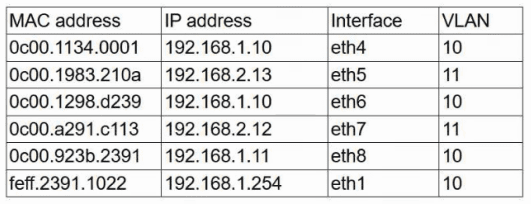
A user reports having intermittent connectivity issues to the company network. The network configuration for the user reveals the following:
IP address: 192.168.1.10
Subnet mask: 255.255.255.0
Default gateway: 192.168.1.254
The network switch shows the following ARP table:
Which of the following is the most likely cause of the user's connection issues?
Correct answer:
C. Another PC with manually configured IP
Explanation:
1. Analyze the ARP Table and User Configuration:
The user has IP address 192.168.1.10 and default gateway 192.168.1.254.
The switch ARP table shows two entries for IP 192.168.1.10:
0c00.1134.0001 on interface eth4 (VLAN 10)
0c00.1298.6239 on interface eth6 (VLAN 10)
This indicates an IP address conflict: two devices are using the same IP address (192.168.1.10).
2. Why This Causes Intermittent Connectivity?
When the network tries to send traffic to 192.168.1.10, it may be delivered to the wrong device (due to ARP flipping between the two MAC addresses).
The user’s device and the conflicting device will both experience packet loss, timeouts, and unstable connections.
The gateway (192.168.1.254) may also become confused about which MAC address to use for 192.168.1.10.
3. Why Not the Other Options?
A) Port with incorrect VLAN assigned:
Both devices are in the same VLAN (VLAN 10), so VLAN misconfiguration is not the issue.
B) Switch with spanning tree conflict:
Spanning Tree Protocol (STP) issues cause loops and broadcast storms, not specific IP conflicts. The symptoms here are tied to a single IP.
D) Router with overlapping route tables:
Overlapping routes might cause routing problems, but the ARP table clearly shows a duplicate IP on the same subnet.
4. How to Resolve:
Identify the device with MAC 0c00.1298.6239 (on eth6) and change its IP address (likely manually set to 192.168.1.10).
Ensure DHCP is properly configured to avoid future conflicts.
Summary:
The duplicate IP address (192.168.1.10) assigned to two devices causes ARP conflicts, leading to intermittent connectivity. The solution is to reassign a unique IP to one of the devices.
Question 15Choose 2
After installing a new wireless access point, an engineer tests the device and sees that it is
not performing at the rated speeds. Which of the following should the engineer do to
troubleshoot the issue? (Select two.)
Correct answer:
A. Ensure a bottleneck is not coming from other devices on the network.
B. Install the latest firmware for the device.
Explanation:
The scenario involves a network engineer troubleshooting a new wireless access point (AP) that is not performing at its rated speeds, a common issue in the CompTIA Network+ (N10-009) exam. The goal is to identify two actions that best address the performance issue. Let’s analyze each option:
A. Ensure a bottleneck is not coming from other devices on the network:
Performance issues with a wireless AP can result from bottlenecks elsewhere in the network, such as congestion on the wired backbone, overloaded switches, or bandwidth limitations at the router or internet connection. For example, if the AP is connected to a switch with a 100 Mbps port instead of a Gigabit port, or if other devices are consuming excessive bandwidth, the AP’s performance could be impacted. Checking for external bottlenecks (e.g., using tools like iperf or monitoring switch port utilization) is a critical troubleshooting step and is one of the best actions.
B. Install the latest firmware for the device:
Outdated firmware can cause performance issues, as it may contain bugs or lack optimizations for the AP’s rated speeds. Manufacturers often release firmware updates to improve wireless performance, fix compatibility issues, or enhance features like channel management. Updating the AP’s firmware to the latest version is a standard troubleshooting step to ensure the device operates at its full potential, making this another best action.
C. Create a new VLAN for the access point:
Creating a VLAN can improve network segmentation and security, but it does not directly address performance issues related to the AP’s rated speeds. VLANs manage traffic separation, not speed or throughput, so this is not relevant to troubleshooting the performance problem.
D. Make sure the SSID is not longer than 16 characters:
While overly long SSIDs could theoretically add minor overhead, there is no standard restriction limiting SSIDs to 16 characters (SSIDs can be up to 32 characters per the 802.11 standard). SSID length is unlikely to cause significant performance degradation, so this is not a relevant troubleshooting step.
E. Configure the AP in autonomous mode:
Autonomous mode allows an AP to operate independently without a wireless LAN controller (WLC). However, the performance issue is related to the AP not achieving rated speeds, not its operational mode (autonomous vs. lightweight). Changing to autonomous mode won’t address speed issues and may complicate management if the network is designed for controller-based APs, so this is not applicable.
F. Install a wireless LAN controller:
A wireless LAN controller (WLC) manages multiple APs in a centralized architecture, optimizing tasks like channel selection and roaming. However, installing a WLC is a significant infrastructure change, not a troubleshooting step for a single AP’s performance. Many APs operate effectively in autonomous mode, and a WLC is not necessary to achieve rated speeds, making this option irrelevant.
Why A and B are Correct:
A. Ensure a bottleneck is not coming from other devices:
Verifying that the network infrastructure (e.g., switch ports, routers, or upstream bandwidth) is not limiting the AP’s performance is critical, as external factors often cause reduced throughput.
B. Install the latest firmware:
Firmware updates can resolve performance issues by fixing bugs, optimizing wireless protocols, or improving compatibility with clients, directly addressing the AP’s failure to reach rated speeds.
Reference:
CompTIA Network+ (N10-009) Certification Study Guide, Objective 5.2: Given a scenario, troubleshoot common network issues, including wireless performance.
Cisco Wireless Troubleshooting Guide – Recommends checking firmware and network bottlenecks for AP performance problems.
Question 16Choose 1
A user called the help desk after business hours to complain that files on a device are
inaccessible and the wallpaper was changed. The network administrator thinks that this
issue is an isolated incident, but the security analyst thinks the issue might be a
ransomware attack. Which of the following troubleshooting steps should be taken first?
Correct answer:
A. Identify the problem
Explanation:
The scenario involves a user reporting inaccessible files and a changed wallpaper on a device after business hours, with the network administrator suspecting an isolated incident and the security analyst suspecting a ransomware attack. This is a troubleshooting scenario relevant to the CompTIA Network+ (N10-009) exam, and the question asks for the first step in the troubleshooting methodology. The CompTIA troubleshooting methodology consists of the following steps:
Identify the problem
Establish a theory of probable cause
Test the theory to determine the cause
Establish a plan of action to resolve the problem and implement the solution
Verify full system functionality and, if applicable, implement preventive measures
Document findings, actions, and outcomes
Let’s analyze each option in the context of this methodology:
A. Identify the problem:
This is the first step in the troubleshooting methodology. It involves gathering information, questioning the user, identifying symptoms, and determining if anything has changed. In this case, the administrator needs to collect details about the issue (e.g., which files are inaccessible, any error messages, whether a ransom note is present, and the scope of the issue—single device or multiple). This step is critical to confirm whether the issue is a ransomware attack, as suspected by the security analyst, or an isolated incident, as the administrator believes. Since this is the initial step, it’s the best answer.
B. Establish a theory:
This is the second step, where possible causes (e.g., ransomware, malware, user error, or configuration issue) are hypothesized based on the information gathered. However, without first identifying the problem through detailed investigation, it’s premature to form a theory, so this is not the first step.
C. Document findings:
Documentation occurs as the final step (step 6) after resolving the issue, recording the problem, actions taken, and outcomes. It’s far too early to document findings before even identifying the problem, so this is incorrect.
D. Create a plan of action:
This is the fourth step, taken after identifying the problem, establishing a theory, and testing it. Creating a plan (e.g., isolating the device, restoring from backups) without understanding the issue’s scope or confirming ransomware would be premature, so this is not the first step.
Why Identify the Problem is Correct:
The first step in troubleshooting is to gather detailed information about the issue to confirm the symptoms and scope. In this case, the administrator must investigate the user’s report (e.g., check for ransom notes, verify if other devices are affected, examine logs) to determine if it’s ransomware or another issue. This step is critical to differentiate between the administrator’s and security analyst’s hypotheses and guide subsequent actions.
Reference:
CompTIA Network+ (N10-009) Certification Study Guide, Objective 5.1: Given a scenario, use the appropriate troubleshooting methodology.
NIST Special Publication 800-83 (Guide to Malware Incident Prevention and Handling) – Emphasizes initial problem identification in ransomware incidents.
Question 17Choose 1
A network administrator is unable to ping a remote server from a newly connected
workstation that has been added to the network. Ping to 127.0.0.1 on the workstation is
failing. Which of the following should the administrator perform to diagnose the problem?
Correct answer:
A. Verify the NIC interface status.
Explanation:
The scenario involves a network administrator troubleshooting a newly connected workstation that cannot ping a remote server, with the additional detail that pinging the loopback address (127.0.0.1) on the workstation also fails. This is a troubleshooting scenario relevant to the CompTIA Network+ (N10-009) exam. Let’s analyze each option to determine the best diagnostic step:
A. Verify the NIC interface status:
Pinging 127.0.0.1 tests the workstation’s TCP/IP stack and network interface card (NIC) functionality. A failure to ping the loopback address indicates a local issue with the workstation’s network configuration, such as a disabled NIC, faulty driver, or corrupted TCP/IP stack. Verifying the NIC interface status (e.g., using ipconfig on Windows or ifconfig/ip addr on Linux to check if the NIC is up, or checking for driver issues) is the most direct step to diagnose why the loopback ping fails, which is likely the root cause of the inability to ping the remote server. This makes it the best answer.
B. Verify the network is not congested:
Network congestion could affect connectivity to a remote server, causing delays or packet loss. However, the failure to ping 127.0.0.1 is a local issue on the workstation, as the loopback address does not involve network traffic. Congestion would not affect loopback pings, so this is not relevant.
C. Verify the router is not dropping packets:
Router issues, such as dropped packets due to ACLs or misconfiguration, could prevent pings to a remote server. However, since the loopback ping (127.0.0.1) fails, the issue is local to the workstation and not related to external routing. This step is premature until the local issue is resolved.
D. Verify that DNS is resolving correctly:
DNS resolution issues could prevent pinging a remote server by name (e.g., ping server.example.com), but the scenario doesn’t specify whether the ping attempt used a hostname or IP address. More critically, the failure to ping 127.0.0.1 (a fixed IP address) indicates a local TCP/IP stack or NIC issue, not a DNS problem, as loopback pings do not rely on DNS. This makes DNS verification irrelevant at this stage.
Why Verify the NIC Interface Status is Correct:
The failure to ping 127.0.0.1 points to a fundamental issue with the workstation’s network interface or TCP/IP stack. Checking the NIC status (e.g., ensuring it’s enabled, drivers are installed, or the TCP/IP stack is functioning) is the first step to diagnose this local issue, which must be resolved before troubleshooting external connectivity to the remote server.
Reference:
CompTIA Network+ (N10-009) Certification Study Guide, Objective 5.2: Given a scenario, troubleshoot common network issues, including local connectivity problems.
Microsoft Documentation, “Troubleshooting TCP/IP” – Recommends checking NIC status for loopback ping failures.
Question 18Choose 1
A network administrator recently configured an autonomous wireless AP and performed a
throughput test via comptiaspeedtester.com. The result was 75 Mbps. When connected to
other APs, the results reached 500 Mbps. Which of the following is most likely the reason
for this difference?
Correct answer:
A. Channel width configuration
Explanation:
Channel Width: Wi-Fi throughput is heavily influenced by the channel width used by the AP. A wider channel allows for more data to be transmitted simultaneously, leading to higher speeds. Default Settings: Autonomous APs might be configured with a narrower channel width (e.g., 20 MHz) by default, while other APs, especially those that are newer or controller-managed, might be configured to use wider channels (e.g., 40 MHz or 80 MHz). A 20 MHz channel width on common Wi-Fi standards (like Wi-Fi 4/5/6) typically provides around 72-75 Mbps of throughput, which matches the observed result.
Why other options are incorrect B. DNS server issues: DNS issues primarily affect name resolution (translating domain names to IP addresses), causing delays in accessing websites or services, rather than limiting the maximum throughput of the wireless connection itself. C. Authentication failure: Authentication failures prevent a device from connecting to the Wi-Fi network at all, meaning no throughput would be possible, not just a reduced speed. D. Incorrect DHCP settings: Incorrect DHCP settings can lead to IP address conflicts or failure to obtain an IP address, preventing network access or causing instability, but they don't directly limit the maximum possible throughput once a connection is established.
Question 19Choose 1
Which of the following actions should be taken as part of the first step of the
troubleshooting methodology?
Correct answer:
B. Handle multiple problems individually
Explanation:
The first step in the CompTIA troubleshooting methodology is to identify the problem. This includes gathering information, questioning users, identifying symptoms, and determining if multiple issues exist. If multiple problems are present, they should be handled individually to avoid confusion and ensure accurate diagnosis.
Let’s break down the options:
A. Conduct tests to verify ideas: This occurs later in the process — specifically during the step where you test your theory.
B. Handle multiple problems individually ✅: This is part of the first step — identifying the problem. It ensures clarity and prevents overlapping symptoms from misleading the troubleshooting process.
C. Create a theory about the possible root cause: This is the second step in the methodology, after the problem has been identified.
D. Use a top-down approach: This is a technique, not a step. It may be used during testing or isolation but is not part of the first step itself.
🧭 CompTIA Troubleshooting Steps:
Identify the problem
Establish a theory of probable cause
Test the theory
Establish a plan of action
Implement the solution
Verify full system functionality
Document findings
An organization recently connected a new computer to the LAN. The user is unable to ping
the default gateway. The technician examines the configuration and sees a self-assigned
IP address. Which of the following is the most likely cause?
Correct answer:
A. The DHCP server is not available
Explanation:
A "self-assigned IP address" is an Automatic Private IP Addressing (APIPA) address in the range of 169.254.0.1 to 169.254.255.254. A client device (like a computer) assigns itself this address when it is configured to obtain an IP address automatically via DHCP but is unable to locate or communicate with a DHCP server on the network.
A. The DHCP server is not available: This is the direct and most common cause. When the DHCP process fails, the client's operating system self-assigns an APIPA address as a fallback to allow for limited local network communication. The user's inability to ping the default gateway confirms a lack of a valid network configuration, which is a direct consequence of the failed DHCP request.
Why the other options are incorrect:
B. An RFC1918 address is being used: RFC1918 addresses (like 10.0.0.0/8, 172.16.0.0/12, and 192.168.0.0/16) are the standard, private IP addresses used for internal networks. If the computer had successfully received one of these from a DHCP server, it would be able to communicate on the network. The problem is that it has a 169.254.x.x address, not an RFC1918 address.
C. The TCP/IP stack is disabled: If the entire TCP/IP stack for the network adapter was disabled, the adapter would have no IP address at all, not even a self-assigned one. The presence of a 169.254.x.x address proves the TCP/IP stack is active and functioning.
D. A static IP is assigned: If a static IP address was manually configured, the computer would be using that specific static address. It would not resort to self-assigning an APIPA address. The problem describes a self-assigned address, which is the behavior of a dynamic (DHCP) client that has failed.
Reference: This question aligns with Objective 1.4: Given a scenario, configure a subnet and use appropriate IP addressing schemes. It specifically tests knowledge of the DHCP process and the meaning of an APIPA address as a symptom of DHCP failure. It also falls under the troubleshooting methodology in Objective 5.0.
Practice Like It's Exam Day
Get exam-ready with a timed N10 009 CompTIA Network+ mock exam designed to match the official exam's question format, question count, and time limit.