Topic · 43 of 144 questions freeNetwork Infrastructure
Question 31Choose 1
A network administrator deployed wireless networking in the office area. When users visit
the outdoor patio and try to download emails with large attachments or stream training
videos, they notice buffering issues. Which of the following is the most likely cause?
Correct answer:
C. Signal degradation
Explanation:
Signal degradation is the most likely cause because:
Users experience issues only when moving outdoors (patio), indicating weaker signal strength due to:
Symptoms (buffering, slow downloads) align with low SNR (Signal-to-Noise Ratio) or poor signal quality, not total disconnection.
Why Not the Other Options?
A) Network congestion
Incorrect: Congestion affects all users simultaneously, not just those outdoors.
B) Wireless interference
Plausible but less likely: Interference (e.g., microwaves, Bluetooth) would cause consistent issues indoors/outdoors, not just patio-specific problems.
D) Client disassociation
Incorrect: Disassociation would cause complete drops, not just buffering
Reference:
CompTIA Network+ Objective 2.4 (Wireless Signal Strength and Coverage)
Solution: Add outdoor APs or directional antennas to extend coverage.
Question 32Choose 1
Which of the following must be implemented to securely connect a company's
headquarters with a branch location?
Correct answer:
D. Site-to-site VPN
Explanation:
Site-to-site VPN is the correct choice for securely connecting two fixed locations (e.g., HQ and branch office). It:
Creates an encrypted tunnel between the routers/firewalls of both sites.
Allows all devices at both locations to communicate securely over the public internet.
Uses protocols like IPsec or GRE over IPsec for encryption.
Why Not the Other Options?
A) Split-tunnel VPN / C) Full-tunnel VPN
Incorrect: These are remote-access VPNs for individual users, not site-to-site connections.
Split-tunnel: Only routes some traffic through the VPN.
Full-tunnel: Routes all user traffic through the VPN.
B) Clientless VPN
Incorrect: Provides web-based access (e.g., HTTPS portal) for users, not site-to-site connectivity.
Reference:
CompTIA Network+ Objective 3.3 (VPN Technologies)
Question 33Choose 1
Two companies successfully merged. Following the merger, a network administrator
identified a connection bottleneck. The newly formed company plans to acquire a high-end
40GB switch and redesign the network from a three-tier model to a collapsed core. Which
of the following should the administrator do until the new devices are acquired?
Correct answer:
D. Enable link aggregation.
Explanation:
Link aggregation (e.g., LACP, EtherChannel) is the best immediate solution because it:
Combines multiple physical links into a single logical link, increasing bandwidth and reducing bottlenecks.
Provides redundancy (failover if one link fails).
Requires no new hardware (uses existing switches/ports).
This is a temporary fix until the 40Gb switch and collapsed core redesign are implemented.
Why Not the Other Options?
A) Implement FHRP (First Hop Redundancy Protocol)
Incorrect: FHRP (e.g., HSRP, VRRP) ensures gateway redundancy but does not improve bandwidth.
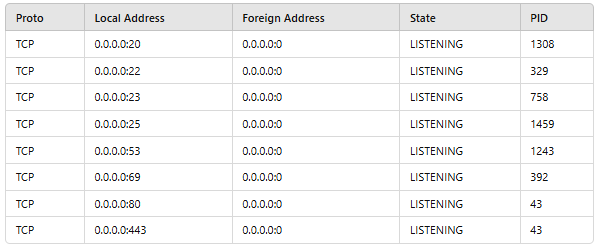
A network administrator is reviewing a production web server and observes the following
output from the netstat command:
Which of the following actions should the network administrator take to harden the
security of the web server?
Correct answer:
A. Disable the unused ports.
Explanation:
The netstat output shows multiple listening TCP ports (20, 22, 23, 25, 53, 69, 80, 443) on the web server, many of which are unnecessary for a typical web server (e.g., FTP port 20, Telnet port 23, SMTP port 25).
Action: Disable unused ports to:
Reduce attack surface (fewer entry points for exploits).
Follow the principle of least functionality (only enable essential services).
Why Not the Other Options?
B) Enforce access control lists (ACLs)
Incorrect: ACLs filter traffic but don’t address the core issue of unnecessary open ports.
C) Perform content filtering
Incorrect: Content filtering blocks malicious web traffic but doesn’t harden the server’s listening services.
D) Set up a screened subnet
Incorrect: A screened subnet (DMZ) isolates public-facing servers but doesn’t fix local port misconfigurations.
Reference:
CompTIA Security+ SY0-601 (Objective 3.3 - Secure Protocols and Hardening)
NIST SP 800-123 (Server Hardening Guidelines)
Question 35Choose 1
A network administrator is configuring a new switch and wants to ensure that only assigned
devices can connect to the switch. Which of the following should the administrator do?
Correct answer:
C. Enable port security.
Explanation:
Port security is the most effective method to ensure only assigned devices can connect to a switch. It works by:
Restricting access based on MAC addresses (statically defined or dynamically learned).
Limiting the number of allowed devices per port.
Taking action (e.g., shutdown, restrict) if unauthorized devices attempt to connect.
Why Not the Other Options?
A) Configure ACLs
Incorrect: ACLs filter traffic by IP/port but do not prevent unauthorized devices from physically connecting.
B) Implement a captive portal
Incorrect: Captive portals are used for web-based authentication (e.g., Wi-Fi hotspots), not switch port access control.
D) Disable unnecessary services
Incorrect: While this hardens the switch, it does not restrict device connections.
Cisco Best Practices: Use port security to prevent MAC flooding attacks and unauthorized access.
Question 36Choose 1
A Chief Executive Officer (CEO) of a company purchases a new phone that will be used
while traveling to different countries. The CEO needs to be able to place outgoing calls and
receive incoming calls on the phone using a SIM card. Which of the following cellular
technologies does the CEO's phone need?
Correct answer:
C. GSM
Explanation:
GSM (Global System for Mobile Communications) is the correct choice because:
It uses SIM cards to authenticate users and store subscriber data, allowing the CEO to swap SIMs when traveling internationally.
GSM is the most widely supported cellular standard globally, ensuring compatibility across countries.
Supports both incoming and outgoing calls seamlessly with local carriers.
Why Not the Other Options?
A) WDMA
Incorrect: WDMA (Wavelength Division Multiple Access) is a fiber-optic technology, unrelated to cellular networks.
B) CDMA
Incorrect: CDMA (Code Division Multiple Access) is SIM-less in older devices (carrier-locked) and less globally compatible.
D) SLA
Incorrect: SLA (Service Level Agreement) is a contract term, not a cellular technology.
GSM vs. CDMA: GSM dominates 90% of the global market (per 3GPP).
Question 37Choose 1
Which of the following can be implemented to add an additional layer of security between
a corporate network and network management interfaces?
Correct answer:
A. Jump box
Explanation:
Jump box (jump server) is the correct choice because it:
Acts as a secure intermediary (bastion host) between the corporate network and sensitive devices (e.g., switches, routers).
Provides controlled access to management interfaces (SSH, RDP, etc.) while isolating direct connections.
Reduces attack surface by limiting exposure of management interfaces to the corporate network.
Why Not the Other Options?
B) Console server
Incorrect: A console server provides out-of-band (OOB) serial access to devices but doesn’t add a security layer for network-based management interfaces.
C) API interface
Incorrect: APIs enable automation but do not inherently secure management interfaces.
D) In-band management
Incorrect: In-band management uses the production network for device access, which is less secure than a jump box.
A company recently converted most of the office laptops to connect wirelessly to the
corporate network. After a high-traffic malware attack, narrowing the event to a specific
user was difficult because of the wireless configuration.
Which of the following actions should the company take?
Correct answer:
C. Migrate from PSK to Enterprise.
Explanation:
The issue described in the question involves difficulty in tracking a specific user responsible for a high-traffic malware attack on a wireless network. This is likely due to the use of a Pre-Shared Key (PSK) authentication method, which is common in simpler wireless configurations like WPA2-Personal. With PSK, all users share the same key, making it challenging to attribute network activity to a specific user. To address this, the company should migrate from PSK to Enterprise (WPA2-Enterprise or WPA3-Enterprise), which provides individual user authentication and better tracking capabilities.
Here’s why the other options are less suitable:
A. Restrict users to the 5GHz frequency:
Restricting users to the 5GHz frequency improves bandwidth and reduces interference compared to 2.4GHz, but it does not address user identification or tracking. It has no direct impact on attributing network activity to specific users during a malware attack
.
B. Upgrade to a mesh network:
A mesh network enhances wireless coverage and reliability by using multiple access points that work together. However, it does not inherently improve user authentication or tracking, so it wouldn’t help narrow down the source of a malware attack.
D. Implement WPA2 encryption:
WPA2 encryption is likely already in use, as it is a standard security protocol for modern wireless networks (especially in corporate environments). The issue isn’t the encryption itself but the authentication method (PSK vs. Enterprise). Implementing WPA2 doesn’t address the lack of user-specific tracking
.
Why Migrate from PSK to Enterprise?
PSK (Pre-Shared Key):
In WPA2-Personal (or WPA3-Personal), all devices use a single shared key for authentication. This makes it difficult to track individual users because there’s no unique identifier for each user’s session. If a malware attack occurs, logs may show activity from the shared key but not from a specific user.
Enterprise (WPA2-Enterprise or WPA3-Enterprise):
This mode uses a RADIUS server for authentication, requiring each user to log in with unique credentials (e.g., username and password) via protocols like EAP (Extensible Authentication Protocol). This creates individual user sessions, making it easier to track network activity to a specific user in logs. For example, during a malware investigation, the RADIUS server logs can identify which user’s credentials were associated with malicious traffic.
Benefits for Malware Investigation:
Enterprise mode enables better auditing and accountability, which is critical for identifying the source of a malware attack. It also integrates with directory services (e.g., Active Directory) for centralized user management, enhancing security in corporate environments.
Implementation Steps for WPA2-Enterprise:
Set up a RADIUS server (e.g., FreeRADIUS or Microsoft NPS) to handle authentication.
Configure the wireless access points to use WPA2-Enterprise with EAP (e.g., EAP-TLS or PEAP).
Create unique user accounts or certificates for each employee.
Update client devices to connect using Enterprise credentials.
Monitor logs on the RADIUS server and wireless controller to track user activity.
Reference:
CompTIA Network+ (N10-009) Exam Objectives:
Section 3.3 – "Given a scenario, implement secure network configurations." This includes configuring secure wireless networks and authentication methods like WPA2-Enterprise.
IEEE 802.11i:
Defines WPA2 security standards, including the difference between PSK (Personal) and Enterprise modes.
Cisco Wireless Security Guidelines:
Emphasize WPA2-Enterprise for corporate environments needing user accountability and tracking.
Question 39Choose 1
An IT department asks a newly hired employee to use a personal laptop until the company
can provide one. Which of the following policies is most applicable to this situation?
Correct answer:
B. BYOD
Explanation:
The IT department has asked a newly hired employee to use a personal laptop until a company-provided device is available. This situation falls under the BYOD (Bring Your Own Device) policy, which allows employees to use their personal devices for work purposes.
B. BYOD (Bring Your Own Device):
A BYOD policy governs the use of personal devices (e.g., laptops, smartphones) for accessing company networks, data, or applications. In this case, the employee using a personal laptop aligns with BYOD, and the company would likely need to enforce security measures (e.g., VPNs, device encryption) and usage guidelines to protect sensitive data.
This policy is most applicable as it directly addresses the scenario of using a personal device for work.
Why Not the Other Options?
A. IAM (Identity and Access Management):
IAM focuses on managing user identities and controlling access to systems and resources. While IAM might be involved in securing the employee’s access via the personal laptop (e.g., through authentication), it is a broader security framework and not specific to the use of personal devices.
C. DLP (Data Loss Prevention):
DLP policies are designed to prevent unauthorized access, use, or distribution of sensitive data. While DLP might be applied to the personal laptop to protect company data, it is a security measure rather than the policy governing the use of the device itself.
D. AUP (Acceptable Use Policy):
An AUP defines acceptable behaviors and usage of company IT resources. It could apply once the employee uses the laptop (e.g., outlining what they can or cannot do), but it is a general policy that applies to all users and devices, not specifically to the scenario of using a personal device temporarily.
Why BYOD?
The BYOD policy is tailored to situations where employees bring and use their own devices for work, addressing security, compliance, and support considerations. In this case, the company may need to implement a BYOD policy to ensure the personal laptop meets security standards (e.g., updated OS, antivirus) and to define the employee’s responsibilities until a company device is provided. This is a common practice in organizations facing equipment shortages or onboarding delays.
Reference:
CompTIA Network+ (N10-009) Exam Objectives:
Section 3.3 – "Given a scenario, implement secure network configurations." This includes understanding policies like BYOD for device management.
NIST SP 800-124 (Guidelines for Managing and Securing Mobile Devices):
Discusses BYOD policies for securing personal devices in the workplace.
Corporate IT Policy Frameworks:
Highlight BYOD as a specific policy for managing personal device usage in professional settings.
Question 40Choose 1
A network administrator is planning to implement device monitoring to enhance network
visibility. The security that the solution provides authentication and encryption. Which of the
following meets these requirements?
Correct answer:
D. SNMPv3
Explanation:
The network administrator is planning to implement device monitoring to enhance network visibility, with the requirement that the solution provides authentication and encryption. Let’s evaluate the options to determine the best fit:
D. SNMPv3 (Simple Network Management Protocol version 3):
Device Monitoring and Network Visibility: SNMPv3 is a protocol designed for monitoring and managing devices on a network (e.g., routers, switches, servers), providing detailed visibility into device performance, traffic, and status.
Authentication and Encryption:SNMPv3 introduces security features that previous versions (e.g., SNMPv1, SNMPv2c) lack, including user-based authentication (e.g., via usernames and passwords or MD5/SHA hashing) and encryption of data (e.g., using DES or AES) to protect communication between the management system and devices. This meets the requirement for a secure monitoring solution.
Why it fits: SNMPv3 is widely used for network device monitoring with built-in security, making it an ideal choice for enhancing visibility while ensuring data integrity and confidentiality.
Why Not the Other Options?
A. SIEM (Security Information and Event Management):
SIEM provides centralized logging, analysis, and monitoring of security events across the network, offering visibility and security features like authentication. However, SIEM is not a monitoring protocol itself but a system that aggregates data from other sources (e.g., logs, SNMP). It relies on underlying protocols like SNMPv3 for device monitoring and does not inherently provide encryption or authentication for the monitoring process unless configured with secure data feeds.
B. Syslog:
Syslog is a protocol for sending log messages from devices to a central server, providing visibility into system events. However, it lacks built-in authentication and encryption by default (though secure variants like TLS can be configured). It is more of a logging mechanism than a comprehensive device monitoring solution with security features.
C. NetFlow:
NetFlow (or similar technologies like sFlow) is used to collect and analyze network traffic flow data, offering visibility into traffic patterns. While it can enhance network monitoring, it does not provide authentication or encryption as part of its core functionality. Security would need to be added via external measures (e.g., encrypted transport).
Why SNMPv3?
SNMPv3 is specifically designed to address the security shortcomings of earlier SNMP versions by incorporating authentication (to verify the identity of users or devices) and encryption (to protect data in transit). This makes it suitable for monitoring devices in a secure manner, aligning with the administrator’s requirements for both visibility and security. For example, an SNMPv3 manager can securely poll devices for metrics like CPU usage or interface status, ensuring that the data is protected from unauthorized access or tampering.
Reference:
CompTIA Network+ (N10-009) Exam Objectives:
Section 3.3 – "Given a scenario, implement secure network configurations." This includes understanding secure monitoring protocols like SNMPv3.
RFC 3414 (User-based Security Model for SNMPv3):
Defines authentication and encryption features in SNMPv3.
Cisco Networking Documentation:
Highlights SNMPv3 as a secure version of SNMP for network device monitoring with authentication and privacy options.
Practice Like It's Exam Day
Get exam-ready with a timed N10 009 CompTIA Network+ mock exam designed to match the official exam's question format, question count, and time limit.